Node.js Runtime Environment Guide
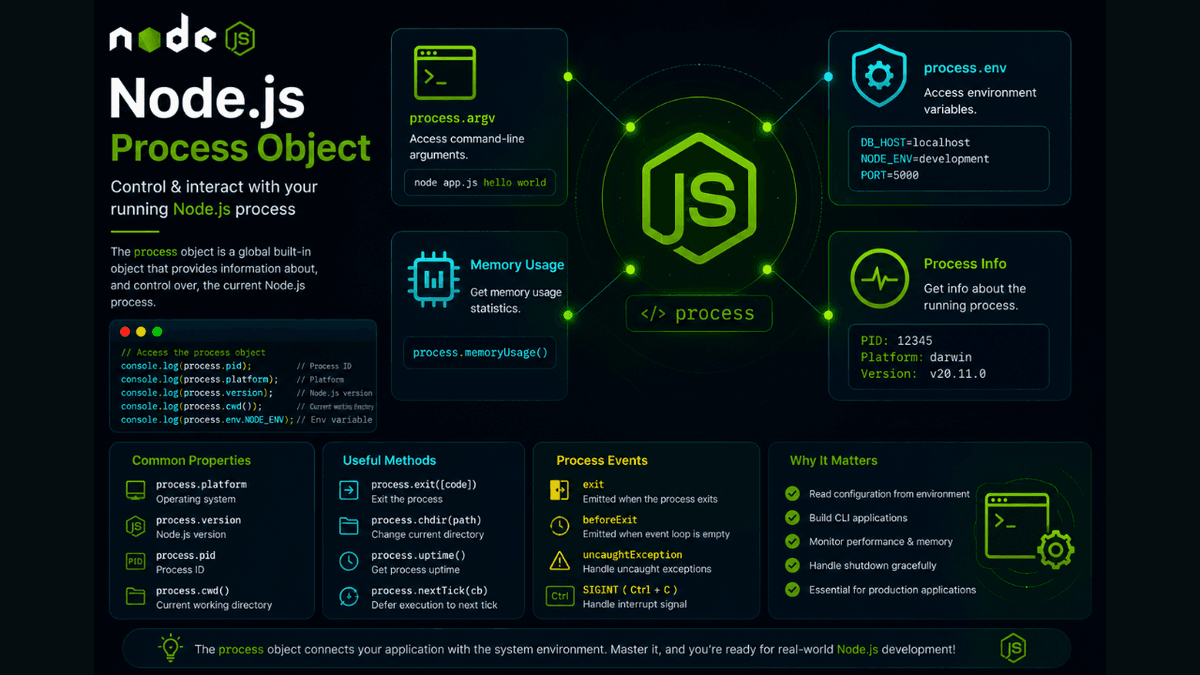
Learn how to use the Node.js process object to access environment variables, command-line arguments, memory usage, process events, and runtime information with practical examples.
Node.js Process Object Explained: Master the Global process Object
Every Node.js application runs inside a process managed by the operating system.
Node.js provides a built-in global process object that gives your application access to important runtime information, such as command-line arguments, environment variables, the current working directory, memory usage, and process events.
Understanding the process object is essential for building production-ready backend applications.
In this guide, you'll learn what the process object is, why it's important, and how to use its most useful properties and methods with practical examples.
Prerequisites
Before reading this guide, you should understand:
What Is the Process Object?
The process object is a global object that provides information about and control over the currently running Node.js process.
Unlike other modules, you do not need to import it .
Simply use:
console.log(process);
Why Use the Process Object?
The process object helps you:
- Read environment variables
- Access command-line arguments
- Get the current working directory
- Check memory usage
- Read process information
- Exit the application
- Listen for process events
These features are commonly used in backend applications, CLI tools, and deployment environments.
Access Command-Line Arguments
Node.js stores command-line arguments inside process.argv .
console.log(process.argv);
Run:
node app.js hello world
Output:
  [
  'node',
  'app.js',
  'hello',
  'world'
]
This is useful when building command-line applications.
Read Environment Variables
Environment variables are available through process.env .
console.log(process.env.NODE_ENV);
Example:
development
This is widely used for API keys, database URLs, and configuration.
Get the Current Working Directory
console.log(process.cwd());
Example output:
/Users/sachin/projects/node-app
Get the Current Process ID
console.log(process.pid);
Every running process has a unique ID assigned by the operating system.
Check Memory Usage
console.log(process.memoryUsage());
Output:
  {
  rss: ...,
  heapTotal: ...,
  heapUsed: ...,
  external: ...
}
This information is useful for performance monitoring.
Exit the Application
  console.log("Application shutting down...");

process.exit();
You can also specify an exit code:
process.exit(1);
-
0→ Success - Non-zero → Error
Listen for Process Events
  process.on("exit", (code) => {
  console.log(`Process exited with code ${code}`);
});
This allows you to perform cleanup before the application exits.
Common Process Properties
| Property | Purpose |
|---|---|
process.argv | Command-line arguments |
process.env | Environment variables |
process.cwd() | Current working directory |
process.pid | Process ID |
process.platform | Operating system |
process.version | Node.js version |
process.memoryUsage() | Memory statistics |
These are the properties you'll use most often.
Real-World Use Cases
The process object is commonly used for:
- Reading
.envvariables - CLI applications
- Logging system information
- Performance monitoring
- Graceful application shutdown
- Deployment configuration
- Debugging production servers
Almost every Node.js backend uses the process object.
Common Beginner Mistakes
Trying to Import process
Incorrect:
const process = require("process");
The process object is already available globally.
Hardcoding Configuration
Avoid storing API keys directly in your code.
Instead, use environment variables:
const apiKey = process.env.API_KEY;
Ignoring Exit Codes
Exit codes help operating systems and deployment tools determine whether your application completed successfully.
Best Practices
- Store sensitive values in environment variables.
- Use
process.envfor configuration. - Avoid exposing system information to clients.
- Monitor memory usage in production.
- Handle shutdown events gracefully.
Practice Exercises
Build these mini-projects:
- CLI Greeting App
- Environment Variable Viewer
- Memory Usage Monitor
- Process Information Dashboard
- Graceful Shutdown Example
These exercises will help you become comfortable working with the Node.js runtime.
Production Tip
The process object is central to modern Node.js applications.
Frameworks like Express.js, NestJS, and Next.js rely heavily on environment variables and process information for configuration, deployment, and production monitoring.
Learning it early will make understanding real-world projects much easier.
Why the Process Object Matters
The process object connects your application to the operating system.
It enables configuration, monitoring, debugging, and lifecycle management, making it one of the most important global objects in Node.js.
Conclusion
The Node.js process object provides valuable information about the running application and its environment.
By mastering its properties and methods, you'll be able to build more configurable, maintainable, and production-ready backend applications.