Learn Binary Data Handling in Node.js
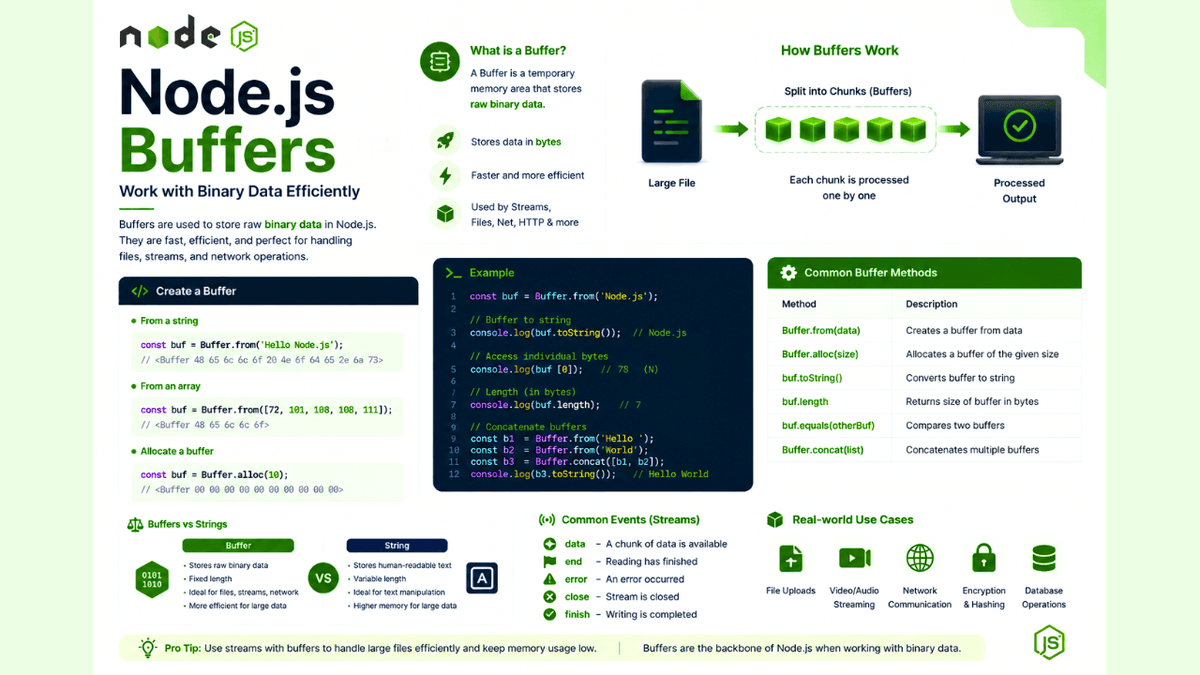
Learn what Node.js Buffers are, how they store binary data, and how to use Buffer.from(), Buffer.alloc(), and other Buffer methods with practical examples.
Node.js Buffers Explained: Understanding Binary Data in Node.js
Whenever you read a file, receive data over the network, stream a video, or upload an image, Node.js doesn't process everything as plain text.
Instead, it works with binary data using Buffers .
Buffers are one of the core building blocks of Node.js and play a crucial role in handling files, streams, networking, and performance-critical applications.
In this guide, you'll learn what Buffers are, why they exist, and how to use them effectively with practical examples.
Prerequisites
Before reading this guide, you should understand:
What Is a Buffer?
A Buffer is a temporary area in memory used to store raw binary data .
Unlike JavaScript strings, Buffers can hold bytes directly, making them ideal for processing files, images, videos, network packets, and other binary content.
Think of a Buffer as a container that temporarily stores data while it is being transferred or processed.
Why Does Node.js Use Buffers?
Node.js uses Buffers because binary data often arrives in small chunks , especially when reading files or receiving data from a network.
Buffers help Node.js:
- Store binary data efficiently
- Process large files
- Handle streams
- Improve performance
- Reduce memory usage
Creating a Buffer
You can create a Buffer in several ways.
Using Buffer.from()
  const buffer = Buffer.from("Hello Node.js");

console.log(buffer);
Output:
<Buffer 48 65 6c 6c 6f 20 4e 6f 64 65 2e 6a 73>
Each value represents a byte.
Converting a Buffer Back to a String
  const buffer = Buffer.from("Hello Node.js");

console.log(buffer.toString());
Output:
Hello Node.js
Allocating a Buffer
Use Buffer.alloc() to create an empty Buffer of a specific size.
  const buffer = Buffer.alloc(10);

console.log(buffer);
This creates a Buffer with 10 bytes initialized to zero.
Checking Buffer Length
  const buffer = Buffer.from("Node.js");

console.log(buffer.length);
The length is measured in bytes.
Accessing Individual Bytes
  const buffer = Buffer.from("ABC");

console.log(buffer[0]);
console.log(buffer[1]);
console.log(buffer[2]);
Output:
  65
66
67
These values are ASCII representations of the characters.
Buffers and Streams
When reading a file using streams, each chunk is received as a Buffer.
  const fs = require("fs");

const stream = fs.createReadStream("example.txt");

stream.on("data", (chunk) => {
  console.log(chunk);
});
Here, chunk is a Buffer.
Convert it into a string when needed:
  stream.on("data", (chunk) => {
  console.log(chunk.toString());
});
Common Buffer Methods
| Method | Purpose |
|---|---|
Buffer.from() | Create a Buffer from data |
Buffer.alloc() | Allocate memory |
toString() | Convert to a string |
length | Get size in bytes |
equals() | Compare Buffers |
concat() | Merge multiple Buffers |
These methods cover most everyday use cases.
Real-World Use Cases
Buffers are widely used for:
- File uploads
- Image processing
- Audio streaming
- Video streaming
- TCP communication
- HTTP requests
- Encryption
- Compression
Many Node.js core modules rely on Buffers internally.
Common Beginner Mistakes
Confusing Strings with Buffers
A string stores text.
A Buffer stores raw bytes.
Convert between them only when necessary.
Using Deprecated APIs
Avoid older methods like new Buffer() .
Prefer:
  Buffer.from();
Buffer.alloc();
Ignoring Buffer Size
Buffers occupy memory.
Allocate only the size you actually need.
Best Practices
- Use
Buffer.from()for existing data. - Use
Buffer.alloc()for new memory. - Convert Buffers to strings only when required.
- Handle large binary data with streams.
- Avoid unnecessary Buffer copies.
Practice Exercises
Build these mini-projects:
- Text Encoder
- File Reader with Buffers
- Image Buffer Inspector
- Buffer Comparison Tool
- Buffer Concatenation Utility
These exercises will strengthen your understanding of binary data handling.
Production Tip
You rarely manipulate Buffers directly in everyday backend development, but they work behind the scenes in streams, file uploads, HTTP requests, image processing, encryption, and networking.
Understanding Buffers helps you write more efficient and memory-conscious Node.js applications.
Why Buffers Matter
Buffers are the foundation of binary data processing in Node.js.
Without them, handling files, media, network communication, and streaming efficiently would not be possible.
Learning Buffers also makes it easier to understand how Streams, HTTP, and file operations work internally.
Conclusion
Node.js Buffers provide a fast and efficient way to work with binary data.
By understanding how Buffers are created, manipulated, and used alongside Streams, you'll gain a deeper understanding of how Node.js handles data behind the scenes and build more performant backend applications.