Process Large Files with Node.js Streams
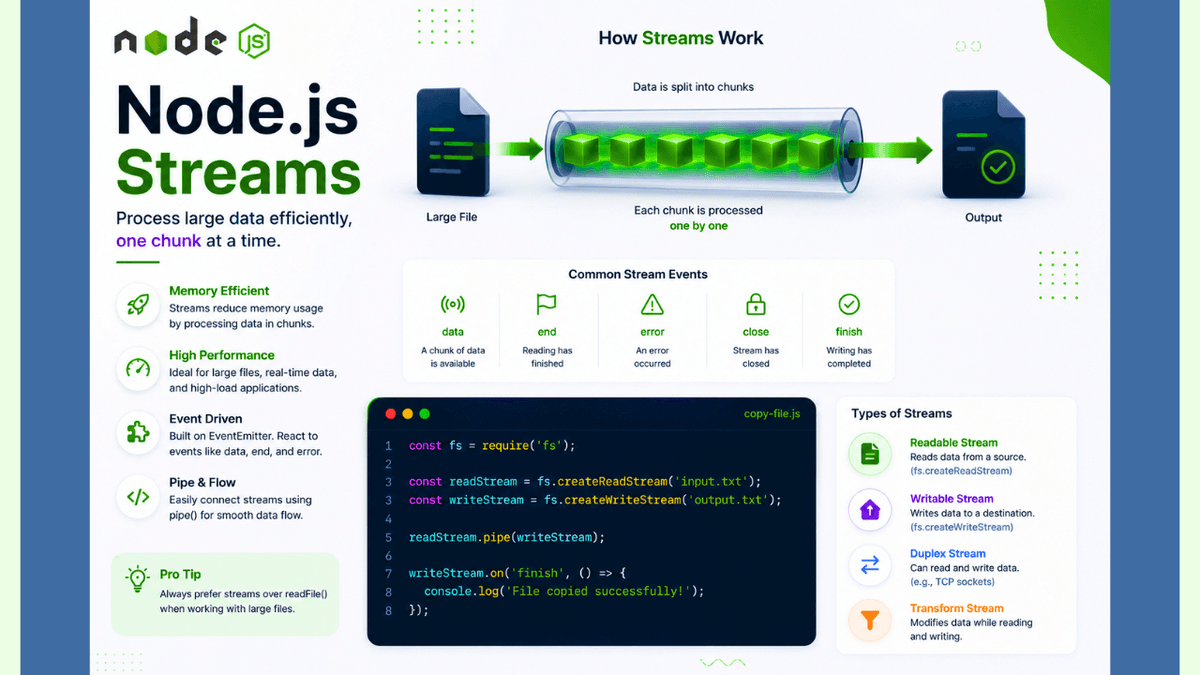
Learn how Node.js Streams work, explore readable, writable, duplex, and transform streams, and discover how to process large files efficiently with practical examples.
Node.js Streams Explained: Process Large Files Efficiently
When working with large files, videos, or network data, loading everything into memory at once can slow down your application and consume a lot of RAM.
Node.js solves this problem with Streams .
Instead of loading an entire file into memory, streams process data piece by piece , making applications faster and more memory-efficient.
In this guide, you'll learn what Node.js Streams are, how they work, the different types of streams, and how to use them in real-world applications.
Prerequisites
Before reading this guide, you should understand:
What Are Streams?
A Stream is an object that lets you read or write data gradually instead of loading it all at once.
Imagine drinking water through a straw.
You don't drink the entire bottle at once—you sip it continuously.
Streams work in the same way by processing data in small chunks .
Why Use Streams?
Streams help you:
- Process large files efficiently
- Reduce memory usage
- Improve application performance
- Handle real-time data
- Stream videos and audio
- Build scalable applications
Streams are essential when dealing with large amounts of data.
How Streams Work
The basic workflow looks like this:
  Large File

↓

Split into Chunks

↓

Process One Chunk at a Time

↓

Send Output
Instead of loading a 2 GB file into memory, Node.js processes it chunk by chunk.
Types of Streams
Node.js provides four main types of streams.
1. Readable Stream
Used to read data.
Example:
  const fs = require("fs");

const readStream = fs.createReadStream("large-file.txt");

readStream.on("data", (chunk) => {
  console.log(chunk.toString());
});
The data event is emitted whenever a new chunk is available.
2. Writable Stream
Used to write data.
  const fs = require("fs");

const writeStream = fs.createWriteStream("output.txt");

writeStream.write("Hello, Streams!");
writeStream.end();
This writes data without loading the entire file into memory.
3. Duplex Stream
A Duplex stream can both read and write data.
Examples include:
- TCP sockets
- Network connections
These streams support two-way communication.
4. Transform Stream
A Transform stream reads data, modifies it, and writes the transformed output.
Examples include:
- File compression
- Encryption
- Image processing
- Data formatting
Common Stream Events
Streams are built on top of the Events module.
Common events include:
| Event | Description |
|---|---|
data | A chunk of data is available |
end | Reading has finished |
error | An error occurred |
close | Stream has closed |
finish | Writing has completed |
Understanding these events is essential for working with streams.
Piping Streams
One of the most powerful features of streams is pipe() .
Instead of manually reading and writing chunks, you can connect streams together.
  const fs = require("fs");

const readStream = fs.createReadStream("input.txt");
const writeStream = fs.createWriteStream("output.txt");

readStream.pipe(writeStream);
This efficiently copies the file from one location to another.
Streams vs readFile()
| Streams | readFile() |
|---|---|
| Reads data in chunks | Reads the entire file |
| Low memory usage | High memory usage for large files |
| Better for large files | Suitable for small files |
| Scalable | Less efficient for big files |
For large files, streams are generally the better choice.
Real-World Use Cases
Streams are commonly used for:
- Video streaming
- Audio streaming
- File downloads
- File uploads
- Large log processing
- Data migration
- Compression
- Network communication
Many popular platforms rely on streams to deliver content efficiently.
Common Beginner Mistakes
Using readFile() for Huge Files
For very large files, readFile() can consume significant memory.
Use streams instead.
Forgetting Error Handling
Always listen for the error event.
  readStream.on("error", (err) => {
  console.error(err);
});
Not Closing Writable Streams
Call end() after writing data.
writeStream.end();
Best Practices
- Use streams for large files.
- Prefer
pipe()when connecting streams. - Handle stream errors gracefully.
- Avoid loading unnecessary data into memory.
- Use Transform streams for data processing.
Practice Exercises
Build these mini-projects:
- File Copier Using Streams
- Log File Reader
- Video Streaming Server
- Text File Transformer
- File Compression Utility
These projects will strengthen your understanding of stream-based programming.
Production Tip
Professional Node.js applications use streams extensively for file uploads, downloads, media streaming, and large data processing.
Whenever you're handling large amounts of data, streams are usually the preferred solution because they minimize memory usage and improve performance.
Why Streams Matter
Streams are one of the most powerful features of Node.js.
They enable applications to process data efficiently, making it possible to build scalable servers, media platforms, and high-performance backend systems.
Understanding streams is a key milestone for becoming a proficient Node.js developer.
Conclusion
Node.js Streams allow you to process data in small chunks instead of loading everything into memory.
By mastering readable, writable, duplex, and transform streams, you'll be able to build faster, more scalable, and memory-efficient applications.