Node.js Modules Explained: Complete Beginner Guide
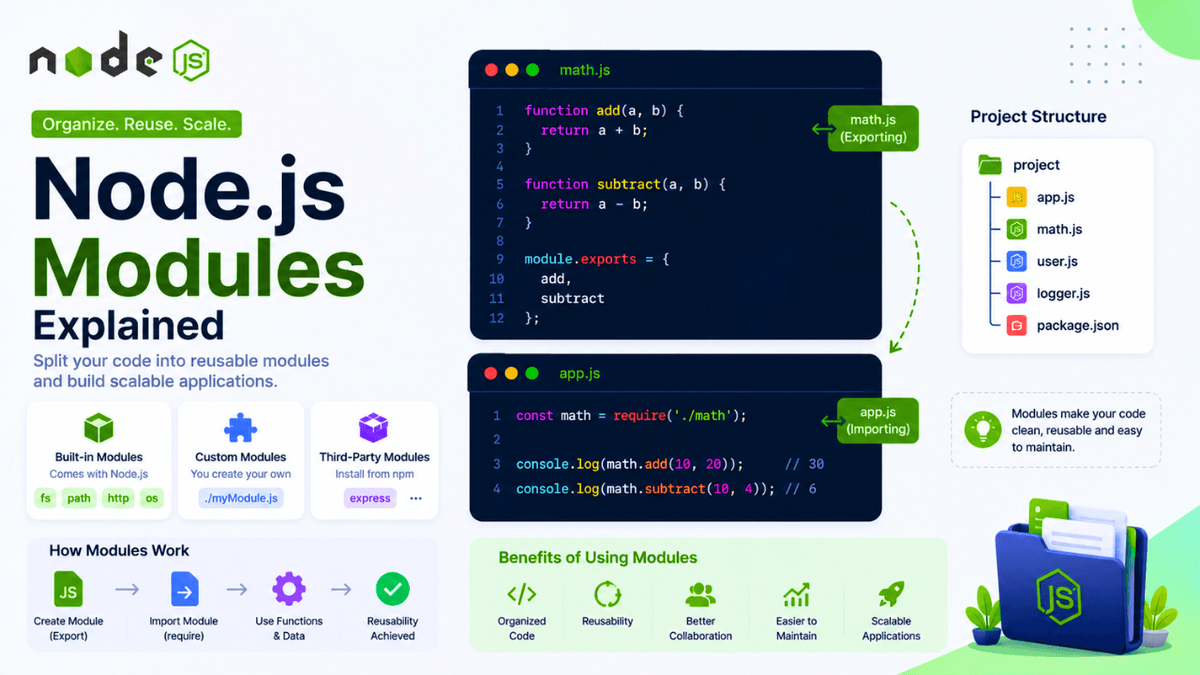
Learn what Node.js modules are, how to create custom modules, use built-in modules, install third-party modules, and understand require() and module.exports in this beginner-friendly guide.
Node.js Modules Explained: Organize and Reuse Your Code
As your Node.js applications grow, writing all your code in a single file quickly becomes difficult to manage.
Imagine building a backend with hundreds or even thousands of lines of code in one file—it would be hard to read, maintain, and debug.
This is why Node.js provides Modules .
Modules allow you to split your application into smaller, reusable files, making your code cleaner, easier to maintain, and more scalable.
In this guide, you'll learn what Node.js modules are, why they matter, and how to create and use your own modules.
Prerequisites
Before reading this guide, make sure you've completed:
What Is a Module?
A module is simply a JavaScript file that contains reusable code.
Each file in a Node.js project is treated as its own module.
For example:
  project

├── app.js
├── math.js
├── user.js
└── logger.js
Each file has a specific responsibility.
Why Do We Need Modules?
Without modules:
  app.js

↓

1000+ Lines of Code

↓

Difficult to Manage
With modules:
  app.js

↓

Import Required Modules

↓

Small Reusable Files
Modules improve code organization and readability.
Types of Node.js Modules
Node.js supports three main types of modules:
- Built-in Modules
- Custom Modules
- Third-Party Modules
We'll explore each one.
1. Built-in Modules
Node.js includes many modules that are available without installing anything.
Examples:
-
fs -
path -
http -
os -
events -
url
You simply import and use them.
2. Custom Modules
These are modules you create yourself.
Example:
math.js
  function add(a, b) {
  return a + b;
}

module.exports = add;
Now import it into another file.
  const add = require("./math");

console.log(add(10, 20));
Output:
30
3. Third-Party Modules
These are packages installed from npm.
Example:
npm install express
Import it:
const express = require("express");
Express is a third-party module that simplifies backend development.
Understanding require()
The require() function imports another module into your file.
Example:
const math = require("./math");
Node.js loads the file and makes its exported values available.
Understanding module.exports
To share code with other files, use module.exports .
Example:
  const message =
  "Welcome to Node.js";

module.exports = message;
Import it:
  const message =
  require("./message");

console.log(message);
Output:
Welcome to Node.js
Exporting Multiple Values
You can export multiple functions.
  function add(a, b) {
  return a + b;
}

function subtract(a, b) {
  return a - b;
}

module.exports = {
  add,
  subtract
};
Import them:
  const math =
  require("./math");

console.log(
  math.add(5, 3)
);

console.log(
  math.subtract(5, 3)
);
Project Structure Example
  project

├── app.js
├── math.js
├── logger.js
├── user.js
└── package.json
Keeping related logic in separate files makes projects easier to understand.
Benefits of Modules
Modules help you:
- organize code
- reuse functionality
- reduce duplication
- simplify debugging
- improve maintainability
- scale applications
Every production Node.js application uses modules extensively.
Common Beginner Mistakes
Forgetting module.exports
If you don't export a value, other files can't access it.
Incorrect File Paths
Wrong:
require("math");
Correct:
require("./math");
The ./ tells Node.js to look in the current directory.
Typing Errors
File names and paths must match exactly.
CommonJS vs ES Modules
Node.js supports two module systems:
| CommonJS | ES Modules |
|---|---|
require() | import |
module.exports | export |
| Default in many Node.js projects | Modern JavaScript standard |
Most beginner tutorials start with CommonJS because you'll encounter it in many existing Node.js codebases.
Real-World Uses
Modules are used to separate:
- routes
- controllers
- database logic
- authentication
- middleware
- utilities
- configuration
Large applications may contain hundreds of modules.
Practice Exercises
Build these small examples:
- Calculator Module
- Greeting Module
- User Information Module
- Logger Module
- Temperature Converter Module
These exercises will help you become comfortable with modular programming.
Production Tip
Professional developers organize applications into modules based on functionality.
Instead of placing everything in one file, they separate concerns into routes, services, controllers, models, and utilities.
This approach keeps projects scalable and easier to maintain.
Why Modules Matter
Modules are one of the most important concepts in Node.js.
They encourage reusable code, improve project organization, and make collaboration easier when working on larger applications.
Understanding modules is essential before learning Express.js or building APIs.
Conclusion
Node.js modules allow you to split your application into smaller, reusable files.
By learning how to create, export, and import modules, you'll write cleaner code and build applications that are easier to maintain and scale.
Mastering modules is a major milestone in becoming a professional Node.js developer.