Parallel Processing in Node.js using Worker
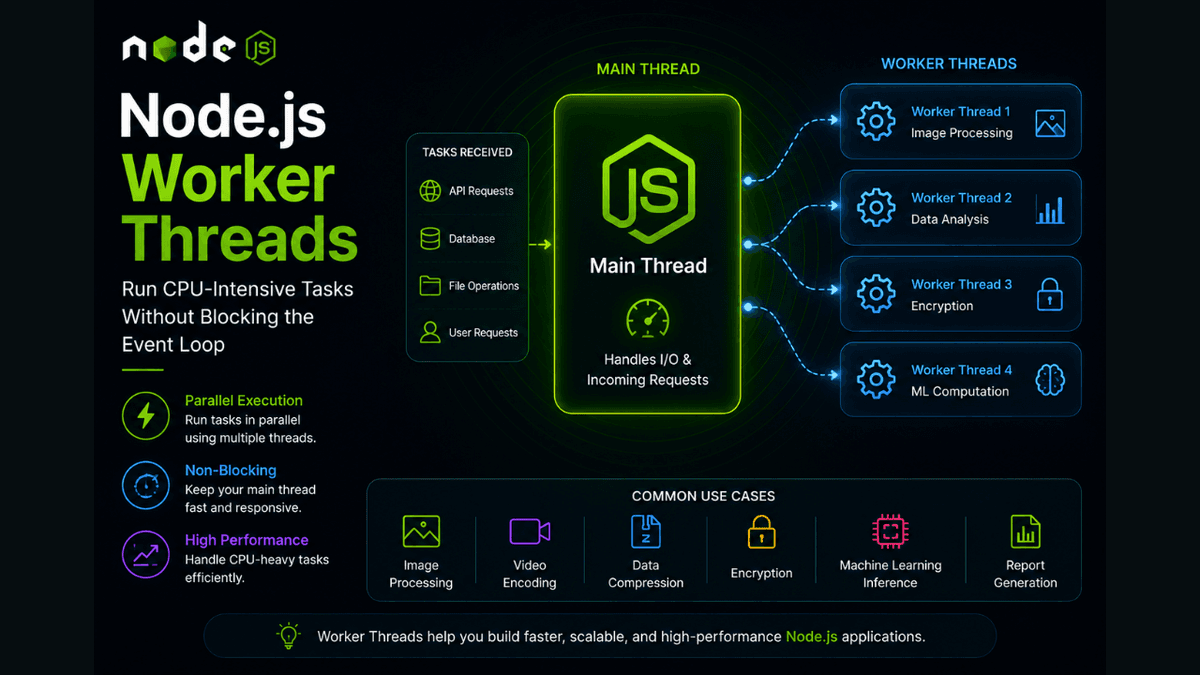
Learn how Node.js Worker Threads work, how they differ from Child Processes, and how to run CPU-intensive JavaScript tasks without blocking the Event Loop.
Node.js Worker Threads Explained: Run CPU-Intensive Tasks Without Blocking the Event Loop
Node.js is incredibly efficient for handling I/O operations such as database queries, API requests, and file operations.
However, CPU-intensive tasks can become a problem.
Examples include:
- Image processing
- Video encoding
- Data compression
- Large calculations
- Machine learning operations
- Report generation
These tasks can block the Event Loop and make your server unresponsive.
To solve this problem, Node.js introduced Worker Threads .
Worker Threads allow JavaScript code to run in parallel using additional threads without blocking the main application thread.
In this guide, you'll learn what Worker Threads are, how they work, and when to use them in production applications.
Prerequisites
Before reading this guide, you should understand:
What Are Worker Threads?
Worker Threads are a built-in Node.js module that allows JavaScript code to execute in separate threads.
Unlike Child Processes, Worker Threads run inside the same process while using separate execution threads.
Import it like this:
const { Worker } = require("worker_threads");
Why Do Worker Threads Exist?
Normally, Node.js executes JavaScript on a single thread.
Consider this example:
  for (let i = 0; i < 10000000000; i++) {
  // heavy calculation
}
During this calculation:
- Incoming requests wait.
- API responses become slow.
- The Event Loop becomes blocked.
Worker Threads move this work to another thread.
How Worker Threads Work
The workflow looks like this:
  Main Thread

↓

Send Task

↓

Worker Thread

↓

Process Task

↓

Return Result

↓

Main Thread Continues
This allows your server to stay responsive.
Creating Your First Worker
Main File
  const { Worker } = require("worker_threads");

const worker = new Worker("./worker.js");

worker.on("message", (result) => {
  console.log(result);
});

worker.postMessage(100);
Worker File
  const {
  parentPort
} = require("worker_threads");

parentPort.on("message", (number) => {
  const result = number * number;

  parentPort.postMessage(result);
});
Output:
10000
Sending Data to Workers
Use:
worker.postMessage(data);
Inside the worker:
  parentPort.on("message", (data) => {
  console.log(data);
});
Returning Data
Workers communicate back using:
parentPort.postMessage(result);
This communication system is known as message passing .
Worker Events
Common events include:
| Event | Description |
|---|---|
message | Worker returned data |
error | Worker failed |
exit | Worker completed |
online | Worker started |
Example:
  worker.on("exit", (code) => {
  console.log(`Worker exited: ${code}`);
});
Worker Threads vs Child Processes
| Feature | Worker Threads | Child Processes |
|---|---|---|
| Memory Usage | Lower | Higher |
| Runs in Same Process | Yes | No |
| Shares Memory | Possible | No |
| Startup Speed | Faster | Slower |
| Best For | CPU Tasks | External Programs |
This comparison is important for production systems.
Shared Memory
Worker Threads can share memory using:
-
SharedArrayBuffer -
Atomics
This enables high-performance parallel computing.
Real-World Use Cases
Worker Threads are commonly used for:
- Image manipulation
- PDF generation
- Video processing
- Machine learning inference
- Data analysis
- Compression
- Encryption
- Financial calculations
These operations would otherwise block the Event Loop.
Common Beginner Mistakes
Using Workers for Database Queries
Database operations are already asynchronous.
Workers should be reserved for CPU-intensive work.
Creating Too Many Workers
Each worker consumes memory.
Creating hundreds of workers can reduce performance.
Forgetting Error Handling
Always handle worker errors.
  worker.on("error", (error) => {
  console.error(error);
});
Best Practices
- Use Worker Threads only for CPU-heavy operations.
- Reuse workers when possible.
- Handle worker failures gracefully.
- Avoid unnecessary thread creation.
- Monitor worker resource usage.
Production Tip
Large applications often use Worker Pools instead of creating new workers for every task.
Libraries such as Piscina help manage worker pools efficiently.
Why Worker Threads Matter
Worker Threads solve one of the biggest limitations of single-threaded JavaScript.
They enable parallel computation while keeping the Event Loop responsive.
This makes Node.js suitable for workloads that previously required other languages or architectures.
Conclusion
Worker Threads allow Node.js applications to execute CPU-intensive tasks in parallel without blocking the main thread.
By understanding when and how to use Worker Threads, you'll be able to build faster, more scalable, and more responsive backend applications.