Child Processes in Node.js for Beginners
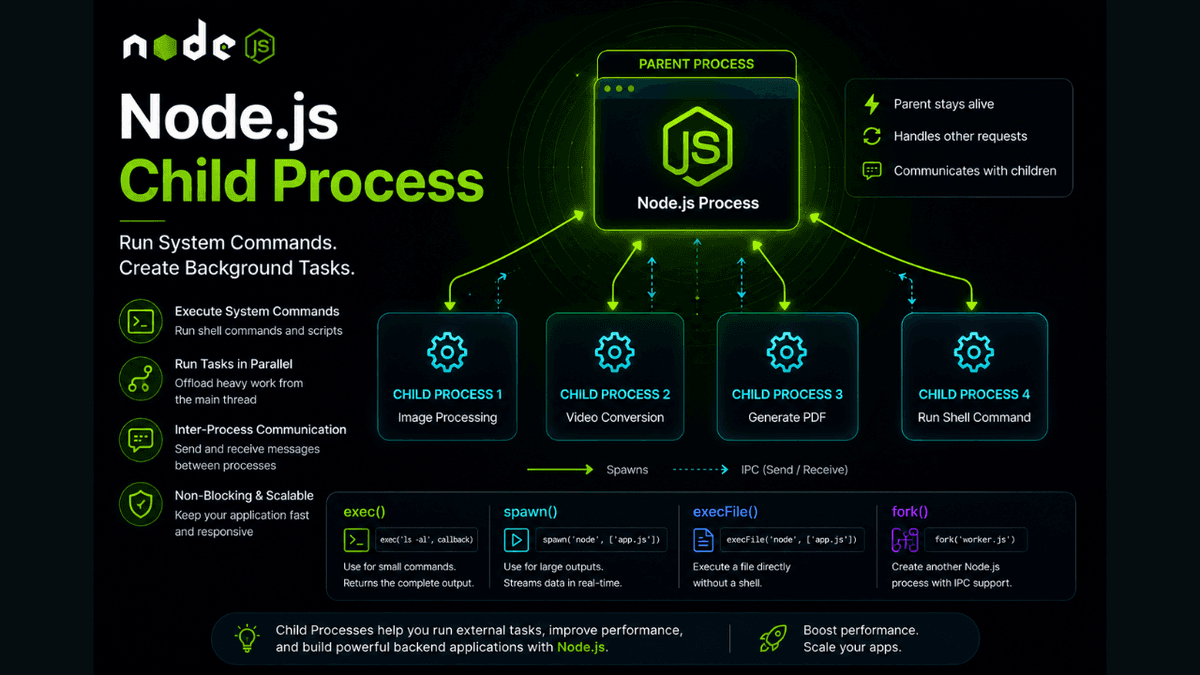
Learn how to use the Node.js Child Process module, including exec(), spawn(), execFile(), and fork(), with practical examples and real-world use cases.
Node.js Child Process Explained: Run System Commands and Background Tasks
Node.js is excellent at handling I/O operations, but some tasks can block the main thread and slow down your application.
Examples include:
- Image processing
- Video encoding
- Running shell commands
- Executing external scripts
- Data conversion
- Heavy computations
To solve this problem, Node.js provides the Child Process module .
It allows your application to create new processes and run tasks independently from the main Node.js process.
In this guide, you'll learn what the Child Process module is, why it's useful, and how to use its most important methods with practical examples.
Prerequisites
Before reading this guide, you should understand:
What Is the Child Process Module?
The Child Process ( child_process ) module is a built-in Node.js module that allows your application to create and manage additional operating system processes.
These child processes run independently from the main Node.js process.
Import it like this:
const childProcess = require("child_process");
Why Use Child Processes?
Child processes help you:
- Run shell commands
- Execute external programs
- Perform CPU-intensive work
- Avoid blocking the Event Loop
- Build automation tools
- Integrate with other languages and scripts
They are commonly used in backend systems and developer tools.
The Main Methods
Node.js provides four primary methods:
| Method | Use Case |
|---|---|
exec() | Run small shell commands |
spawn() | Stream large outputs |
execFile() | Run executable files directly |
fork() | Create another Node.js process |
Each method is designed for different scenarios.
Using exec()
exec() runs a command and returns the complete output.
  const { exec } = require("child_process");

exec("node --version", (error, stdout, stderr) => {
  if (error) {
    console.error(error);
    return;
  }

  console.log(stdout);
});
Example output:
v22.0.0
This is ideal for commands with small output.
Using spawn()
spawn() streams data while the command runs.
  const { spawn } = require("child_process");

const process = spawn("node", ["--version"]);

process.stdout.on("data", (data) => {
  console.log(data.toString());
});
This is better for large outputs because it doesn't store everything in memory.
Using execFile()
execFile() executes a file directly without using a shell.
  const { execFile } = require("child_process");

execFile(
  "node",
  ["--version"],
  (error, stdout) => {
    console.log(stdout);
  }
);
This can be safer and more efficient than exec() .
Using fork()
fork() creates a new Node.js process.
Parent process:
  const { fork } = require("child_process");

const child = fork("./worker.js");

child.send("Hello Child");
Child process:
  process.on("message", (message) => {
  console.log(message);
});
This enables communication between Node.js processes.
Child Process Communication
Using send() and message events:
  child.send({
  task: "generate-report"
});
  process.on("message", (data) => {
  console.log(data.task);
});
This is called Inter-Process Communication (IPC) .
Child Process Events
Common events include:
| Event | Description |
|---|---|
exit | Process finished |
close | Streams closed |
error | Process failed |
message | IPC message received |
Example:
  child.on("exit", (code) => {
  console.log(`Exited with code ${code}`);
});
exec() vs spawn()
| Feature | exec() | spawn() |
|---|---|---|
| Output | Buffered | Streamed |
| Memory Usage | Higher | Lower |
| Best For | Small commands | Large outputs |
Choosing the correct method improves performance.
Real-World Use Cases
Child processes are commonly used for:
- Image resizing
- Video conversion
- PDF generation
- Running Python scripts
- Backup jobs
- Git automation
- CLI tools
Many developer tools rely heavily on child processes.
Common Beginner Mistakes
Using exec() for Huge Output
Large outputs can consume significant memory.
Prefer spawn() instead.
Ignoring Errors
Always handle:
  if (error) {
  console.error(error);
}
Running Untrusted Commands
Never execute user input directly in shell commands.
This creates major security risks.
Best Practices
- Use
spawn()for large outputs. - Use
exec()for simple commands. - Validate command inputs carefully.
- Handle errors and exits properly.
- Avoid blocking the Event Loop.
Production Tip
Child processes are powerful but expensive.
Creating too many processes can consume significant CPU and memory resources.
For CPU-intensive JavaScript work, consider using Worker Threads instead of creating many child processes.
Why Child Processes Matter
Child processes allow Node.js to interact with the operating system and execute tasks outside the main application process.
This makes automation, media processing, and system integration possible.
Conclusion
The Node.js Child Process module allows applications to execute external commands, create background workers, and offload expensive tasks.
By understanding exec() , spawn() , execFile() , and fork() , you'll be able to build more powerful and scalable backend applications.