Node.js Timers : setTimeout(), setInterval(), and setImmediate()
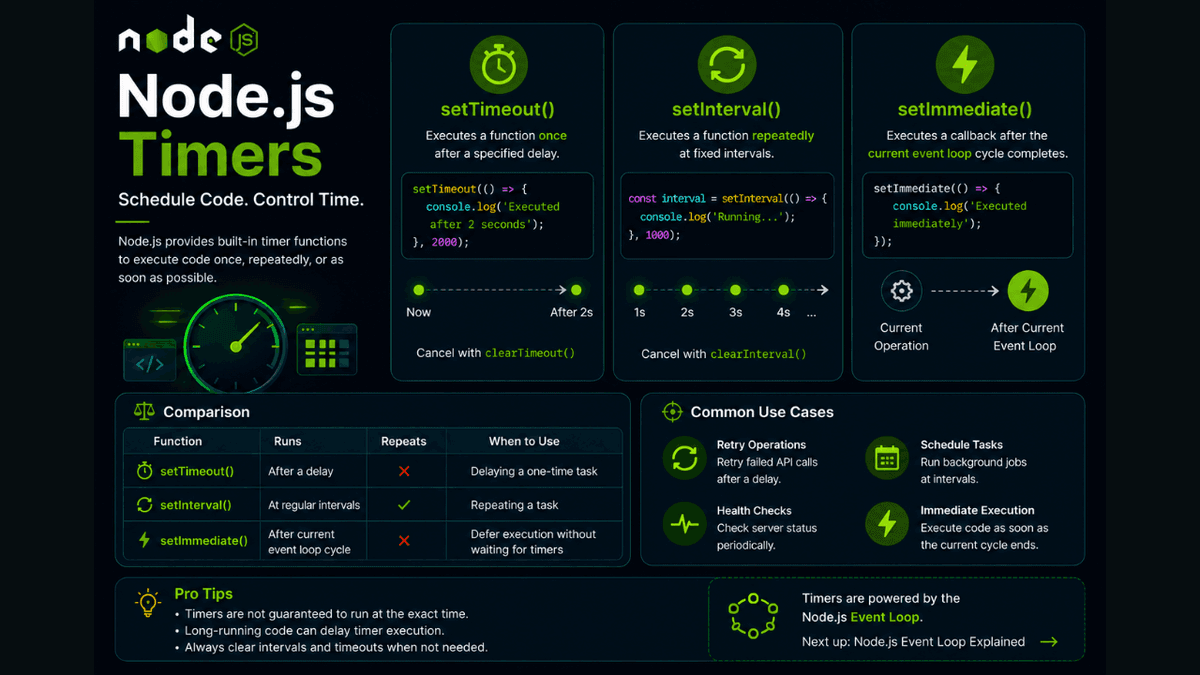
Learn how Node.js timer functions work, including setTimeout(), setInterval(), setImmediate(), and their differences with practical examples and best practices.
Node.js Timers Explained: Master setTimeout() , setInterval() , and setImmediate()
Node.js allows you to schedule code to run later , repeatedly , or as soon as possible after the current operation .
This functionality is provided by the built-in Timer APIs .
Whether you're sending periodic updates, delaying a task, retrying an operation, or scheduling background work, timers are an essential part of backend development.
In this guide, you'll learn how setTimeout() , setInterval() , and setImmediate() work, when to use them, and their differences with practical examples.
Prerequisites
Before reading this guide, you should understand:
What Are Node.js Timers?
Timers are global functions that schedule JavaScript code to execute at a later time.
Unlike browser timers, Node.js timers run within the Node.js runtime and are managed by the Event Loop .
No import is required.
Why Use Timers?
Timers help you:
- Delay execution
- Repeat tasks
- Schedule background jobs
- Retry failed operations
- Poll external services
- Build real-time applications
They're widely used in backend services and automation scripts.
setTimeout()
setTimeout() executes a function once after a specified delay.
  setTimeout(() => {
  console.log("Executed after 2 seconds");
}, 2000);
Output (after 2 seconds):
Executed after 2 seconds
Cancel a Timeout
You can stop a scheduled timeout before it runs.
  const timer = setTimeout(() => {
  console.log("This won't run");
}, 3000);

clearTimeout(timer);
setInterval()
setInterval() repeatedly executes a function at fixed intervals.
  setInterval(() => {
  console.log("Running...");
}, 1000);
Output:
  Running...
Running...
Running...
Stop an Interval
Always stop intervals when they're no longer needed.
  const interval = setInterval(() => {
  console.log("Tick");
}, 1000);

setTimeout(() => {
  clearInterval(interval);
}, 5000);
The interval stops after five seconds.
setImmediate()
setImmediate() schedules a callback to run after the current event loop phase completes , before waiting for additional timers.
  setImmediate(() => {
  console.log("Executed immediately");
});
This is useful when you want to defer execution without introducing a noticeable delay.
Comparing the Timer Functions
| Function | Runs | Repeats |
|---|---|---|
setTimeout() | After a delay | ❌ No |
setInterval() | At regular intervals | ✅ Yes |
setImmediate() | After the current event loop cycle | ❌ No |
Each function serves a different purpose.
Real-World Examples
Retry an API Request
  setTimeout(() => {
  console.log("Retrying request...");
}, 3000);
Periodic Server Health Check
  setInterval(() => {
  console.log("Checking server status...");
}, 10000);
Schedule a Background Task
  setImmediate(() => {
  console.log("Background task started");
});
Common Beginner Mistakes
Forgetting to Clear Intervals
Intervals continue running until stopped.
Always call:
clearInterval(interval);
Expecting Exact Timing
Timers are not guaranteed to execute at the exact millisecond.
They run after the specified delay , depending on the Event Loop and system workload.
Blocking the Event Loop
Long-running synchronous code delays timer execution.
Avoid CPU-intensive tasks on the main thread.
Best Practices
- Use
setTimeout()for one-time delays. - Use
setInterval()only when repeated execution is required. - Always clear unused timers.
- Prefer recursive
setTimeout()oversetInterval()for tasks that depend on previous execution finishing. - Keep timer callbacks lightweight.
Practice Exercises
Build these mini-projects:
- Countdown Timer
- Digital Clock
- Automatic Retry System
- Periodic Logger
- Background Task Scheduler
These projects will help you understand when and how to use different timer functions.
Production Tip
In production applications, avoid creating unnecessary intervals that run forever.
For recurring tasks like cleaning logs or syncing data, consider dedicated job schedulers such as node-cron or queue systems instead of relying solely on setInterval() .
Why Timers Matter
Timers are a fundamental part of asynchronous programming in Node.js.
They allow applications to schedule work efficiently without blocking the main thread.
Understanding timers is also the first step toward mastering the Node.js Event Loop.
Conclusion
Node.js timer functions make it easy to delay execution, repeat tasks, and schedule background work.
By learning setTimeout() , setInterval() , and setImmediate() , you'll gain a solid foundation for building asynchronous and scalable Node.js applications.