Build a Simple REST API in Node.js: Complete Project Without Express
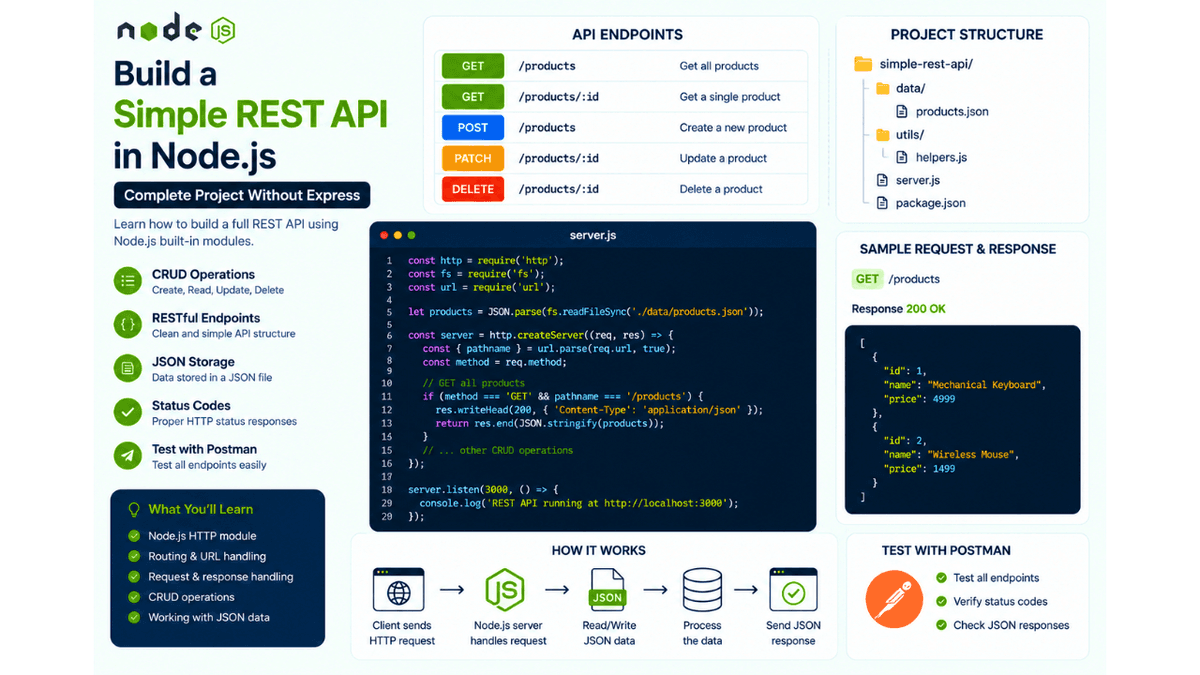
Learn how to build a complete REST API in Node.js without Express. Understand routing, CRUD operations, JSON responses, status codes, and REST API architecture with a practical project.
Build a Simple REST API in Node.js: Complete Project Without Express
By now, you've learned almost everything needed to build a REST API from scratch.
You've explored HTTP methods, CRUD operations, status codes, request and response objects, JSON handling, routing, and API testing with Postman.
Now it's time to combine those concepts into a single project by building a clean and reusable REST API using only Node.js' built-in modules.
Although most production applications use frameworks like Express, understanding how to build an API without one will strengthen your backend fundamentals and help you understand what frameworks are doing behind the scenes.
What We'll Build
We'll create a simple Product API that supports the following operations:
- Get all products
- Get a single product
- Create a product
- Update a product
- Delete a product
This project brings together everything you've learned throughout the REST API section of this series.
Project Structure
  simple-rest-api/
│
├── data/
│   └── products.json
│
├── server.js
├── package.json
└── utils/
    └── helpers.js
As your applications become larger, you'll naturally move toward controllers, services, and route modules. For now, this structure keeps the project simple while still being organized.
Product Data
Example:
  [
  {
    "id": 1,
    "name": "Mechanical Keyboard",
    "price": 4999
  },
  {
    "id": 2,
    "name": "Wireless Mouse",
    "price": 1499
  }
]
We'll store products inside a JSON file for simplicity.
Later, you can replace this with MongoDB without changing the API design.
Creating the HTTP Server
  const http = require("http");

const server = http.createServer((req, res) => {
  res.end("Simple REST API");
});

server.listen(3000, () => {
  console.log("Server running on port 3000");
});
Once the server is running, we can start adding routes.
Building REST Endpoints
Our API will expose the following endpoints:
| Method | Endpoint | Description |
|---|---|---|
| GET | /products | Get all products |
| GET | /products/:id | Get one product |
| POST | /products | Create a product |
| PATCH | /products/:id | Update a product |
| DELETE | /products/:id | Delete a product |
This follows the same REST principles we discussed in our earlier guide on What is a REST API?
GET All Products
  if (req.method === "GET" && req.url === "/products") {
  res.writeHead(200, {
    "Content-Type": "application/json"
  });

  res.end(JSON.stringify(products));
}
Response:
  [
  {
    "id": 1,
    "name": "Mechanical Keyboard",
    "price": 4999
  }
]
This endpoint demonstrates how REST APIs retrieve collections of resources.
GET a Single Product
  const product = products.find(product => product.id === 1);

res.end(JSON.stringify(product));
If the product doesn't exist, return:
  res.writeHead(404);

res.end("Product not found");
Returning meaningful status codes improves both debugging and client-side error handling.
POST a Product
  let body = "";

req.on("data", chunk => {
  body += chunk;
});

req.on("end", () => {
  const product = JSON.parse(body);

  products.push({
    id: Date.now(),
    ...product
  });

  res.writeHead(201);

  res.end("Product created");
});
This uses the same request body handling you learned in POST Requests in Node.js .
PATCH a Product
  products[index] = {
  ...products[index],
  ...updates
};
PATCH updates only the provided fields while preserving the rest of the object.
If you're unsure why PATCH is used instead of PUT, revisit our guide on PUT vs PATCH in Node.js .
DELETE a Product
products = products.filter(product => product.id !== id);
Once deleted, return:
  res.writeHead(200);

res.end("Product deleted");
This completes the CRUD lifecycle.
Returning JSON Responses
Always return structured JSON.
Good:
  {
  "success": true,
  "message": "Product created successfully"
}
Instead of plain text:
Done
Consistent responses make APIs easier to consume.
Handling Errors
Always validate incoming data.
Example:
  if (!product.name) {
  res.writeHead(400);

  return res.end("Product name is required");
}
As you continue learning backend development, input validation becomes one of the most important parts of API design. We'll explore it in detail in the upcoming Input Validation in Node.js article.
Testing with Postman
After building the API, test each endpoint using Postman:
- GET
/products - GET
/products/1 - POST
/products - PATCH
/products/1 - DELETE
/products/1
If you haven't already, our previous guide on API Testing with Postman covers the complete testing workflow.
Improvements You Can Add
Once the basic API is working, try extending it with:
- MongoDB integration
- Authentication
- Pagination
- Search
- Sorting
- Filtering
- File uploads
- Environment variables
- Logging
These features gradually transform a beginner project into a production-ready backend.
Common Beginner Mistakes
Mixing Business Logic with Routing
Keep routing simple.
Move reusable logic into helper functions or separate modules as your project grows.
Returning Inconsistent Responses
Avoid mixing plain text and JSON.
Choose one consistent response format throughout your API.
Ignoring HTTP Status Codes
Use appropriate responses:
-
200 OK -
201 Created -
400 Bad Request -
404 Not Found -
500 Internal Server Error
Clients rely on these codes to understand what happened.
Real-World Applications
The same REST architecture powers:
- E-commerce platforms
- Blog systems
- Social media applications
- Learning management systems
- Banking dashboards
- Inventory management software
- SaaS products
Whether you're building a startup or an enterprise application, the underlying principles remain the same.
What's Next?
You've now built several practical backend projects using only Node.js core modules.
In the next article, we'll build a Command Line Interface (CLI) Tool with Node.js , where you'll learn how to create terminal applications that accept user commands, automate repetitive tasks, and improve developer productivity.
Conclusion
Building a REST API without Express helps you understand how Node.js handles HTTP requests at a fundamental level.
By implementing routing, CRUD operations, status codes, request parsing, and JSON responses yourself, you've gained knowledge that many developers skip when they rely on frameworks from day one.
Once you understand these fundamentals, learning Express, Fastify, NestJS, or other backend frameworks becomes much easier because you'll know exactly what they're abstracting.
More importantly, you've now completed a complete REST API project using only Node.js, giving you a strong foundation for building scalable backend applications.