Node.js Process Management Explained: Processes, PIDs, Signals, and Graceful Shutdown
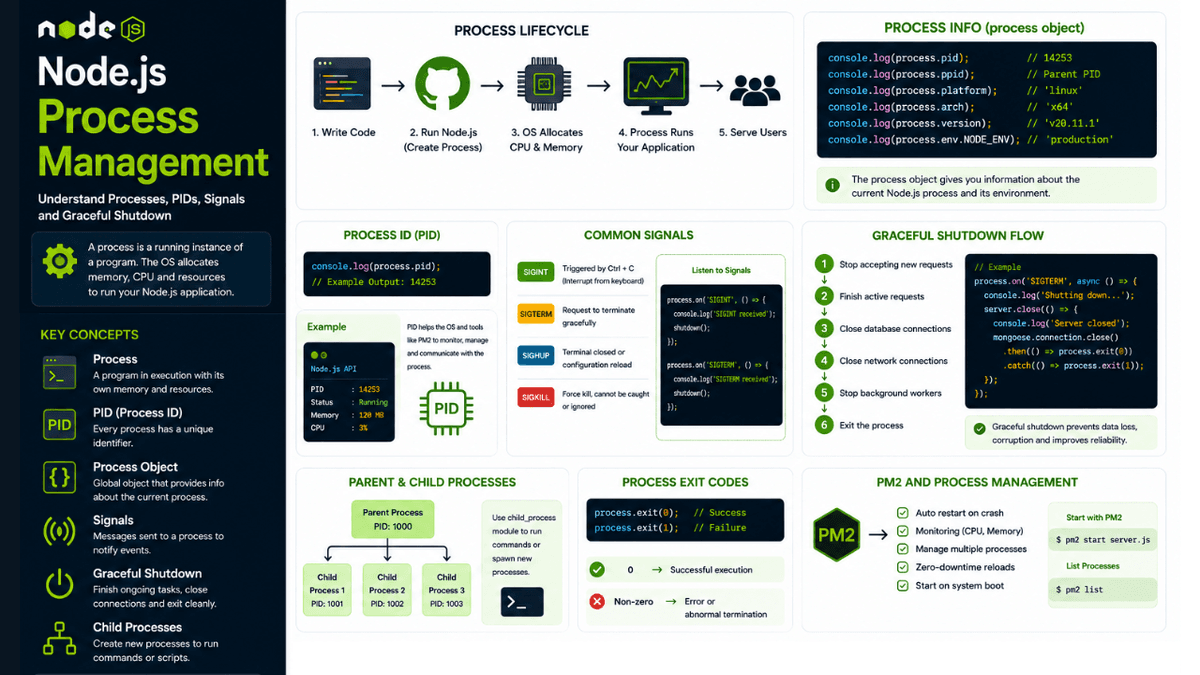
Learn Node.js process management from the ground up. Understand processes, PIDs, signals, graceful shutdown, child processes, PM2, and production process management.
Node.js Process Management Explained: Processes, PIDs, Signals, and Graceful Shutdown
When you deploy a Node.js application, your code doesn't simply "run in the background."
The operating system creates and manages a process that executes your application.
Understanding processes is important because production applications need to handle much more than simply starting a server.
You need to understand:
- How processes work
- How to identify a process
- How processes communicate with the operating system
- How to handle termination signals
- How to shut down gracefully
- How to restart crashed applications
- How to manage multiple processes
This knowledge becomes especially useful when working with tools like PM2 , Docker, Kubernetes, and cloud infrastructure.
In the previous article, we learned how PM2 manages Node.js applications in production. Now we'll go one level deeper and understand the process management concepts behind those tools.
What is a Process?
A process is a running instance of a program.
When you execute:
node server.js
the operating system creates a process to run your Node.js application.
The simplified flow looks like this:
  Your Code
   ↓
Node.js Runtime
   ↓
Operating System Process
   ↓
CPU + Memory
Every running process has its own resources and identity.
Process ID (PID)
Every process running on an operating system receives a unique identifier called a Process ID , or PID.
You can access the current Node.js process ID using:
console.log(process.pid);
Example:
14253
This identifier is useful when debugging production applications or investigating resource usage.
For example, you might see:
  Node.js API
PID: 14253
Status: Running
Memory: 120 MB
CPU: 3%
Process managers such as PM2 use this information to monitor and manage your applications.
The Node.js Process Object
Node.js provides a global process object.
You can access it directly:
console.log(process);
You don't need to import it.
The process object provides information about the current application and the environment in which it is running.
Some useful properties include:
  process.pid
process.ppid
process.platform
process.arch
process.version
process.env
process.argv
These values help your application understand its runtime environment.
If you want a deeper explanation of these properties, revisit our earlier article on the Node.js Process Object .
Parent and Child Processes
A process can create another process.
The original process is called the parent process .
The newly created process is called the child process .
Example:
  Parent Process
      │
      ├── Child Process 1
      ├── Child Process 2
      └── Child Process 3
Node.js provides the child_process module for creating and managing child processes.
This is useful when you need to:
- Run system commands
- Execute external programs
- Perform CPU-intensive tasks
- Separate workloads
- Run scripts independently
We'll explore the Child Process module in detail in the next article.
Process Signals
Operating systems communicate with processes using signals .
Signals can tell a process to:
- Stop
- Terminate
- Reload
- Interrupt
- Continue execution
Common signals include:
  SIGINT
SIGTERM
SIGKILL
SIGHUP
Understanding signals is extremely important for production applications.
SIGINT
SIGINT is commonly sent when you press:
Ctrl + C
For example:
  process.on("SIGINT", () => {
  console.log("Application interrupted.");
});
This allows your application to respond before shutting down.
SIGTERM
SIGTERM requests that a process terminate gracefully.
Production systems often send SIGTERM when an application needs to shut down.
For example:
  process.on("SIGTERM", () => {
  console.log("SIGTERM received.");
});
This is especially important when working with:
- Docker
- Kubernetes
- PM2
- Cloud platforms
SIGKILL
SIGKILL immediately terminates a process.
Unlike SIGTERM , the application cannot handle SIGKILL .
You cannot catch it using:
process.on("SIGKILL", ...)
This is because the operating system terminates the process immediately.
For this reason, graceful shutdown logic should respond to signals like SIGTERM whenever possible.
Graceful Shutdown
Imagine your API is handling a request:
  Client
   ↓
Node.js API
   ↓
Database Query
Suddenly, the server receives a shutdown request.
If the process stops immediately, the request may fail.
A better approach is graceful shutdown .
The application should:
- Stop accepting new requests.
- Finish active requests.
- Close database connections.
- Close network connections.
- Stop background workers.
- Exit the process.
The flow becomes:
  Shutdown Signal
      ↓
Stop New Requests
      ↓
Finish Active Requests
      ↓
Close Database
      ↓
Close Server
      ↓
Exit Process
Implementing Graceful Shutdown
Example:
  const http = require("http");

const server = http.createServer((req, res) => {
  res.end("Hello");
});

server.listen(3000);

process.on("SIGTERM", () => {
  console.log("Shutdown signal received.");

  server.close(() => {
    console.log("Server closed.");

    process.exit(0);
  });
});
This gives the server a chance to finish existing connections before exiting.
Why Graceful Shutdown Matters
Without graceful shutdown, applications can experience:
- Interrupted requests
- Lost data
- Incomplete database operations
- Broken connections
- Inconsistent application state
This becomes especially important when deploying new versions.
For example:
  Version 1
    ↓
Users Connected
    ↓
Deploy Version 2
    ↓
Graceful Shutdown
    ↓
New Version Starts
A well-designed shutdown process reduces downtime and prevents unnecessary errors.
Handling Database Connections
Suppose your application uses MongoDB.
During shutdown, you should close the database connection.
Example:
  process.on("SIGTERM", async () => {
  await mongoose.connection.close();

  server.close(() => {
    process.exit(0);
  });
});
The exact implementation depends on your database driver or ODM.
The important principle is:
Clean up resources before the process exits.
Handling Multiple Shutdown Signals
A production application may handle multiple signals:
  const shutdown = () => {
  console.log("Shutting down...");
};

process.on("SIGTERM", shutdown);
process.on("SIGINT", shutdown);
This keeps shutdown logic centralized.
Process Exit Codes
Processes can exit with a numeric status code.
Success:
process.exit(0);
Failure:
process.exit(1);
Generally:
  0 → Successful execution
Non-zero → Error or abnormal termination
Process managers and operating systems can use these exit codes to determine what happened.
Avoiding process.exit() Too Early
Be careful with:
process.exit(1);
Calling it immediately can terminate your application before asynchronous operations finish.
For example:
  process.on("SIGTERM", () => {
  process.exit(0);
});
This may abruptly terminate active connections.
Whenever possible, perform cleanup first and exit only after resources are safely released.
PM2 and Process Management
Earlier, we used PM2:
pm2 start server.js
PM2 runs your application as a managed process.
It can:
- Restart crashed applications
- Monitor CPU usage
- Monitor memory usage
- Manage multiple instances
- Handle application reloads
- Start processes after reboot
This is why understanding processes makes PM2 easier to understand.
PM2 isn't replacing Node.js.
It's managing the Node.js processes running on your server.
Process Management in Production
A typical production architecture might look like this:
  Users
  ↓
Load Balancer
  ↓
Node.js Processes
  ├── Process 1
  ├── Process 2
  ├── Process 3
  └── Process 4
       ↓
    Database
A process manager or orchestration platform can monitor these processes and restart them when necessary.
For larger applications, this concept expands into containers and orchestration systems such as Kubernetes.
Common Beginner Mistakes
Killing Processes Immediately
Stopping applications without cleanup can cause interrupted requests and lost data.
Prefer graceful shutdown.
Ignoring Signals
Production applications should understand how they respond to termination signals.
Forgetting Database Cleanup
Always close connections when the application shuts down.
Using Too Many Processes
More processes don't automatically mean better performance.
CPU, memory, database connections, and workload characteristics all matter.
When Should You Use Multiple Processes?
Multiple processes can help when:
- Your server has multiple CPU cores.
- Your application receives high traffic.
- You need better fault isolation.
- You want to scale horizontally.
However, scaling processes introduces additional complexity.
You'll need to consider:
- Shared state
- Session storage
- Database connections
- Load balancing
- Logging
This is why production architecture should be designed based on actual requirements rather than simply creating as many processes as possible.
What's Next?
Now that you understand how Node.js applications are managed at the process level, it's time to explore how Node.js can create and communicate with other processes.
In the next article, we'll dive into the Child Process Module and learn how to execute operating system commands, run external programs, and communicate between parent and child processes.
Conclusion
Process management is a fundamental part of production Node.js development.
A Node.js application is not just JavaScript code running on a server. It's a process managed by an operating system, consuming CPU and memory, receiving signals, and interacting with other services.
Understanding PIDs, signals, process lifecycle, and graceful shutdown will help you build applications that behave reliably in production.
Once you understand these concepts, tools like PM2, Docker, and Kubernetes become much easier to reason about because you understand the process lifecycle they are managing.