Node.js Error Handling Best Practices: A Complete Guide to Reliable Error Management
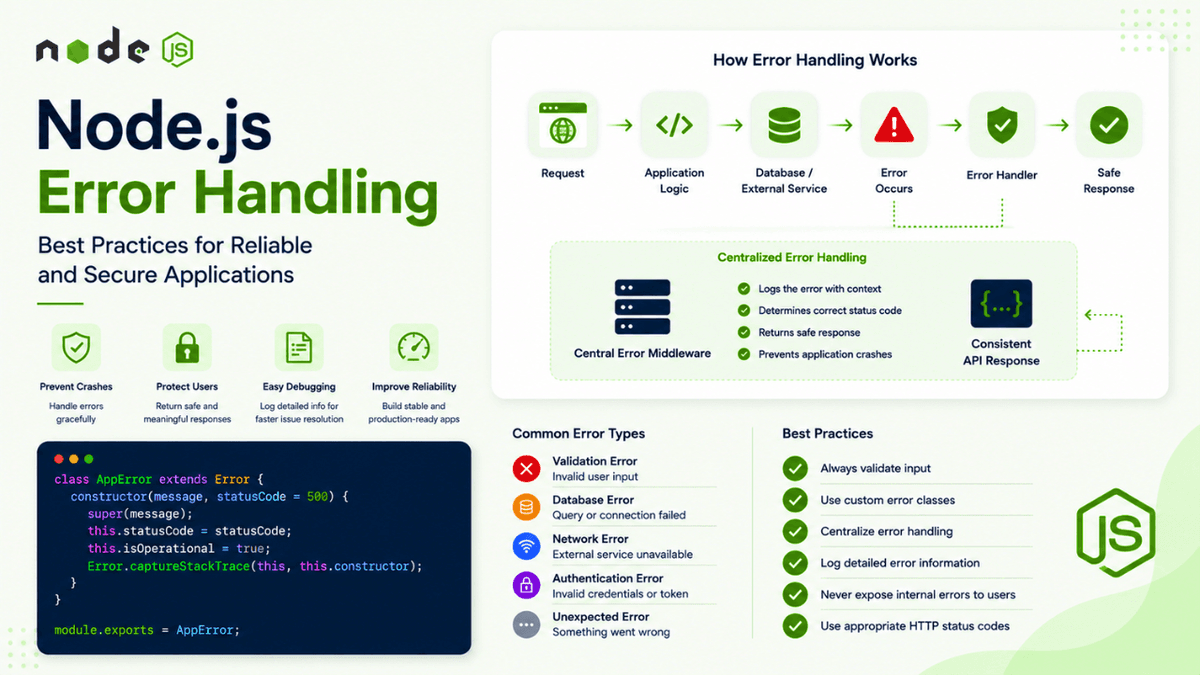
Learn Node.js error handling best practices with practical examples covering try/catch, async errors, custom error classes, Express error middleware, operational errors, validation errors, and production-safe error responses.
Node.js Error Handling Best Practices: A Complete Guide to Reliable Error Management
Errors are an unavoidable part of software development.
Your database connection can fail.
An external API can become unavailable.
A user can send invalid input.
A file may not exist.
A network request can time out.
Your application can also contain bugs that you didn't expect.
The difference between a fragile application and a reliable application is often how it handles these errors .
A poorly designed Node.js application might crash unexpectedly, expose sensitive information, or return confusing responses to users.
A well-designed application can:
- Detect errors
- Handle them consistently
- Log useful information
- Return safe responses
- Recover when possible
- Shut down gracefully when necessary
In the previous article, we explored how to debug Node.js applications using the Inspector, breakpoints, stack traces, and DevTools.
Now we'll learn how to handle errors properly after identifying them.
What Is Error Handling?
Error handling is the process of detecting and responding to problems that occur while an application is running.
For example:
  User Request
     ↓
Application Logic
     ↓
Database Query
     ↓
Database Fails
     ↓
Error Detected
     ↓
Error Handler
     ↓
Safe Response
Without proper error handling:
  Database Fails
     ↓
Unhandled Error
     ↓
Application Crashes
Good error handling prevents unexpected failures from turning into larger problems.
Why Error Handling Matters
Imagine a user sends:
POST /users
with invalid data.
A poorly handled application might return:
500 Internal Server Error
Even though the server itself isn't broken.
A better application might return:
  {
  "success": false,
  "message": "Email is required"
}
This is more useful for the client and easier to understand.
Good error handling also helps developers diagnose problems.
Instead of:
Something went wrong
your logs might contain:
  Database connection failed
Request ID: abc123
Operation: Create User
Error: Connection timeout
The user gets a safe message.
The developer gets useful diagnostic information.
Types of Errors in Node.js
Node.js applications can encounter different types of errors.
Common categories include:
- Syntax errors
- Runtime errors
- Operational errors
- Validation errors
- Network errors
- Database errors
- Authentication errors
- Authorization errors
- Programming errors
Understanding the type of error helps determine how it should be handled.
Syntax Errors
A syntax error occurs when JavaScript code isn't valid.
For example:
  const user = {
  name: "Sachin"
The object is missing a closing brace.
Node.js cannot properly parse the code.
The application may fail before it even starts.
Syntax errors usually need to be fixed during development rather than handled with runtime error-handling logic.
Runtime Errors
Runtime errors happen while your application is running.
For example:
  const user = null;

console.log(user.name);
This causes an error because you're trying to access a property on null .
Runtime errors should be identified and fixed, but appropriate error handling can prevent them from crashing parts of your application.
Operational Errors
Operational errors are failures that can happen during normal application operation.
Examples include:
- Database unavailable
- Network timeout
- File not found
- Invalid user input
- External API failure
- Connection refused
For example:
  Node.js API
    ↓
MongoDB
    ↓
Connection Failed
The application should handle the failure gracefully.
Operational errors are different from programming bugs.
For example:
Database temporarily unavailable
is an operational problem.
While:
undefinedVariable.someProperty
may indicate a programming error.
This distinction becomes important when designing recovery and shutdown strategies.
Synchronous Errors
Some operations execute synchronously.
For example:
  const fs = require("fs");

try {
  const data = fs.readFileSync("missing.txt", "utf8");

  console.log(data);
} catch (error) {
  console.error("Failed to read file:", error.message);
}
The try...catch block catches the synchronous error.
The execution flow is:
  try
 ↓
Operation
 ↓
Error
 ↓
catch
 ↓
Handle Error
Understanding try...catch
The basic structure is:
  try {
  // Code that may fail
} catch (error) {
  // Handle error
}
Example:
  try {
  const result = riskyOperation();

  console.log(result);
} catch (error) {
  console.error(error);
}
The error object contains information about what happened.
The Error Object
A standard JavaScript Error object provides useful properties.
Example:
  try {
  throw new Error("Something went wrong");
} catch (error) {
  console.log(error.name);
  console.log(error.message);
  console.log(error.stack);
}
You might see:
  Error
Something went wrong
Error: Something went wrong
    at ...
The most commonly used properties are:
-
name -
message -
stack
The stack trace is particularly useful when debugging.
You can learn more about using stack traces and debugging workflows in our previous article on Debugging Node.js Applications .
Creating Custom Errors
Instead of throwing generic errors everywhere, you can create custom error classes.
Example:
  class AppError extends Error {
  constructor(message, statusCode) {
    super(message);

    this.statusCode = statusCode;
    this.isOperational = true;

    Error.captureStackTrace(this, this.constructor);
  }
}
Now you can create errors like:
  throw new AppError(
  "User not found",
  404
);
This allows your application to attach additional information to errors.
For example:
  message
statusCode
isOperational
Why Use Custom Error Classes?
Imagine different parts of your application throwing errors:
  throw new AppError(
  "User not found",
  404
);
  throw new AppError(
  "Invalid credentials",
  401
);
  throw new AppError(
  "Database unavailable",
  503
);
A centralized error handler can process them consistently.
This creates a predictable architecture.
  Controller
    ↓
Service
    ↓
Throws AppError
    ↓
Central Error Handler
    ↓
HTTP Response
Async Errors
Modern Node.js applications heavily use asynchronous operations.
For example:
  async function getUser() {
  const user = await User.findById(id);

  return user;
}
If the database operation fails, the Promise may reject.
You need to handle the error.
try...catch with async/await
The simplest approach is:
  async function getUser() {
  try {
    const user = await User.findById(id);

    return user;
  } catch (error) {
    console.error(error);

    throw error;
  }
}
Now asynchronous errors can be handled.
Why await Matters
Consider:
  try {
  const user = await getUser();
} catch (error) {
  console.error(error);
}
The await allows the rejected Promise to be caught by the surrounding try...catch .
Without properly handling asynchronous operations, errors can become unhandled Promise rejections.
Promise Rejections
You can also handle Promise errors with .catch() .
  getUser()
  .then(user => {
    console.log(user);
  })
  .catch(error => {
    console.error(error);
  });
For modern Node.js applications, async/await with try...catch is often easier to read.
However, both patterns are useful to understand.
Handling Errors in Express
If you're building a REST API with Express, errors should usually flow through centralized error-handling middleware.
For example:
  app.use((err, req, res, next) => {
  console.error(err);

  res.status(500).json({
    success: false,
    message: "Internal Server Error"
  });
});
The important part is the four parameters:
(err, req, res, next)
Express recognizes this as error-handling middleware.
Throwing an Error in a Route
For example:
  app.get("/users/:id", async (req, res, next) => {
  try {
    const user = await User.findById(req.params.id);

    if (!user) {
      throw new AppError(
        "User not found",
        404
      );
    }

    res.json({
      success: true,
      user
    });
  } catch (error) {
    next(error);
  }
});
The error is passed to the centralized error handler.
Centralized Error Middleware
A better architecture might look like:
  app.use((err, req, res, next) => {
  console.error(err);

  const statusCode =
    err.statusCode || 500;

  res.status(statusCode).json({
    success: false,
    message:
      statusCode === 500
        ? "Internal Server Error"
        : err.message
  });
});
Now your routes don't need to construct error responses themselves.
They simply pass errors to the central handler.
A Better Error Handler
A production-style error handler might look like:
  app.use((err, req, res, next) => {
  console.error({
    message: err.message,
    stack: err.stack,
    method: req.method,
    url: req.originalUrl
  });

  const statusCode =
    err.statusCode || 500;

  res.status(statusCode).json({
    success: false,
    message:
      statusCode === 500
        ? "Internal Server Error"
        : err.message
  });
});
This provides useful server-side information while returning a safe response to the client.
Never Expose Internal Errors
Avoid sending this directly to users:
  {
  "error": "MongoServerError: E11000 duplicate key error collection..."
}
Internal database errors may expose:
- Database details
- Collection names
- Internal architecture
- Stack traces
- Sensitive implementation details
Instead, return:
  {
  "success": false,
  "message": "A user with this email already exists"
}
The detailed error can remain in your server logs.
Development vs Production Errors
During development, you may want detailed errors:
  {
  "success": false,
  "message": "User not found",
  "stack": "Error: User not found..."
}
In production, avoid exposing stack traces.
Development:
  Detailed Error
      ↓
Developer
Production:
  Safe Error
      ↓
User

Detailed Error
      ↓
Server Logs
You can use an environment variable to control behavior:
  const isDevelopment =
  process.env.NODE_ENV === "development";
Then:
  if (isDevelopment) {
  response.stack = err.stack;
}
Be careful to ensure sensitive information never reaches clients.
HTTP Status Codes
Error handling in APIs should use appropriate HTTP status codes.
For example:
400 Bad Request
The client sent invalid data.
400
401 Unauthorized
The user is not authenticated.
401
403 Forbidden
The user is authenticated but doesn't have permission.
403
404 Not Found
The requested resource doesn't exist.
404
409 Conflict
The request conflicts with existing data.
409
429 Too Many Requests
The client exceeded a rate limit.
429
500 Internal Server Error
An unexpected server-side problem occurred.
500
Using meaningful status codes makes your API easier to consume.
Validation Errors
User input should be validated before processing.
For example:
  if (!email) {
  throw new AppError(
    "Email is required",
    400
  );
}
You can also use validation libraries to handle more complex rules.
The important principle is:
  Request
   ↓
Validate Input
   ↓
Valid?
  ↙   ↘
No     Yes
↓       ↓
400    Continue
Never assume that incoming data is valid.
Input validation is also an important security practice, which we'll explore in more detail later in this series.
Database Errors
Database operations can fail.
For example:
  try {
  const user = await User.create(data);
} catch (error) {
  console.error(error);

  throw new AppError(
    "Unable to create user",
    500
  );
}
However, don't blindly convert every database error into 500 .
Some errors have specific meanings.
For example, a duplicate key error may be better represented as:
409 Conflict
The exact handling depends on your database and application requirements.
External API Errors
Modern applications often depend on external services.
For example:
  Your API
   ↓
Payment Provider
   ↓
Email Service
   ↓
Cloud Storage
Any of these services can fail.
Your application should handle:
- Timeout
- Network failure
- Invalid response
- Rate limits
- Service unavailable
For example:
  try {
  const response = await fetch(
    "https://example.com/api"
  );

  if (!response.ok) {
    throw new AppError(
      "External service failed",
      502
    );
  }
} catch (error) {
  console.error(error);

  throw error;
}
External service failures should not automatically bring down your entire application.
Error Handling in Services
A clean architecture separates responsibilities.
For example:
  Route
  ↓
Controller
  ↓
Service
  ↓
Database
The service can throw an error:
  async function findUser(id) {
  const user = await User.findById(id);

  if (!user) {
    throw new AppError(
      "User not found",
      404
    );
  }

  return user;
}
The controller can pass it to the error middleware:
  async function getUser(req, res, next) {
  try {
    const user = await findUser(
      req.params.id
    );

    res.json({
      success: true,
      user
    });
  } catch (error) {
    next(error);
  }
}
The central error handler generates the response.
This keeps error handling consistent.
Avoid Repeating Error Responses
A common mistake is writing this in every route:
  try {
  // ...
} catch (error) {
  res.status(500).json({
    success: false,
    message: error.message
  });
}
Then repeating it across dozens of files.
This creates inconsistent behavior.
Instead:
  Route
  ↓
Service
  ↓
Throw Error
  ↓
Central Error Middleware
  ↓
Consistent Response
Centralization improves maintainability.
Handling Uncaught Exceptions
An uncaught exception occurs when an error reaches the top of the JavaScript execution stack without being handled.
Node.js provides:
  process.on(
  "uncaughtException",
  (error) => {
    console.error(
      "Uncaught Exception:",
      error
    );
  }
);
However, this should not be treated as a normal recovery mechanism.
An uncaught exception can leave the application in an unknown or inconsistent state.
In many production scenarios, the safer approach is:
  Uncaught Exception
       ↓
Log Error
       ↓
Stop Accepting New Requests
       ↓
Graceful Shutdown
       ↓
Process Manager Restarts App
This is where process managers such as PM2 become useful.
Handling Unhandled Promise Rejections
Node.js applications can also encounter unhandled Promise rejections.
You can listen for them:
  process.on(
  "unhandledRejection",
  (reason) => {
    console.error(
      "Unhandled Rejection:",
      reason
    );
  }
);
Again, this should not replace proper Promise error handling.
Instead, treat unhandled rejections as serious application issues that should be investigated and fixed.
Graceful Shutdown
When an application encounters a fatal error, it may need to shut down gracefully.
A graceful shutdown might:
- Stop accepting new requests.
- Finish existing requests.
- Close database connections.
- Close external connections.
- Exit the process.
Conceptually:
  Fatal Error
    ↓
Stop New Requests
    ↓
Finish Existing Work
    ↓
Close Connections
    ↓
Exit Process
    ↓
Process Manager Restarts
This is particularly important for production applications.
Logging Errors
Logging is an essential part of error handling.
A useful log might include:
  console.error({
  message: error.message,
  stack: error.stack,
  method: req.method,
  url: req.originalUrl
});
In production, use structured logging tools rather than relying entirely on console.log() .
Later in this series, we'll explore Logging in Node.js in detail.
Good logs should help answer:
- What happened?
- When did it happen?
- Where did it happen?
- Which request caused it?
- Which user or operation was involved?
- What was the error?
Request IDs
For APIs, request IDs can make debugging much easier.
Imagine:
Request ID: req_123
Your logs might contain:
  req_123 → Request received
req_123 → Database query started
req_123 → Database timeout
req_123 → Response 503
Now you can trace one request through the system.
This becomes increasingly valuable as your application grows.
Error Handling Architecture
A production-style Node.js application might use:
  Incoming Request
      ↓
Validation
      ↓
Controller
      ↓
Service
      ↓
Database / External API
      ↓
Error?
  ↙       ↘
Yes       No
 ↓         ↓
Throw     Response
 ↓
Central Error Handler
 ↓
Log Error
 ↓
Safe Response
This architecture keeps error handling predictable.
A Practical Error Class
Here's a reusable example:
  class AppError extends Error {
  constructor(
    message,
    statusCode = 500
  ) {
    super(message);

    this.statusCode = statusCode;
    this.isOperational = true;

    Error.captureStackTrace(
      this,
      this.constructor
    );
  }
}

module.exports = AppError;
Usage:
  throw new AppError(
  "User not found",
  404
);
Central middleware:
  app.use(
  (err, req, res, next) => {
    console.error({
      message: err.message,
      stack: err.stack
    });

    const statusCode =
      err.statusCode || 500;

    res.status(statusCode).json({
      success: false,
      message:
        statusCode === 500
          ? "Internal Server Error"
          : err.message
    });
  }
);
This provides a simple foundation for centralized error management.
Common Error Handling Mistakes
Catching Errors and Ignoring Them
Bad:
  try {
  await saveUser();
} catch (error) {
}
The error disappears.
At minimum, log or propagate it.
Returning 500 for Everything
Not every error is a server error.
Use meaningful status codes.
Exposing Stack Traces
Never expose internal stack traces to users in production.
Duplicating Error Logic
Centralize common error handling.
Using try...catch Everywhere Without Purpose
Don't add error handling that simply catches an error and immediately throws the same error without adding value.
Treating Fatal Errors as Normal
Uncaught exceptions and unhandled Promise rejections may indicate that the process is no longer safe to continue.
Logging Sensitive Data
Never log:
- Passwords
- Authentication tokens
- API secrets
- Credit card information
- Sensitive personal data
Logs must be treated as sensitive operational data.
Recommended Error Handling Strategy
For most Node.js REST APIs, a good starting architecture is:
  1. Validate input
        ↓
2. Execute business logic
        ↓
3. Throw meaningful custom errors
        ↓
4. Pass errors to centralized middleware
        ↓
5. Log detailed information securely
        ↓
6. Return safe client responses
        ↓
7. Monitor unexpected failures
This approach is simple enough for smaller applications and can evolve as your system grows.
What's Next?
Error handling tells us what happened when something goes wrong.
But developers also need to understand what is happening inside the application over time .
How many errors are occurring?
How long do requests take?
How often does the server restart?
Which endpoints are slow?
Which operations consume the most resources?
The next article will focus on Logging in Node.js , where we'll explore structured logs, log levels, request logging, error logging, production logging, and how good logs improve debugging and observability.
Conclusion
Reliable error handling is not about preventing every error.
That's impossible.
The goal is to make sure that when something goes wrong, your application responds in a predictable, secure, and maintainable way.
A strong Node.js error-handling strategy should:
- Validate incoming data.
- Handle synchronous and asynchronous errors.
- Use meaningful HTTP status codes.
- Create custom application errors when useful.
- Centralize error handling.
- Keep detailed errors in server-side logs.
- Avoid exposing sensitive information.
- Handle external service failures gracefully.
- Treat uncaught exceptions and unhandled rejections seriously.
- Support graceful shutdown and process recovery.
The basic architecture is simple:
  Detect
  ↓
Handle
  ↓
Log
  ↓
Respond Safely
  ↓
Recover or Shut Down Gracefully
When you build this mindset into your Node.js applications from the beginning, your systems become easier to debug, safer for users, and more reliable in production.