Node.js Cluster Module Explained: Scale Applications Across Multiple CPU Cores
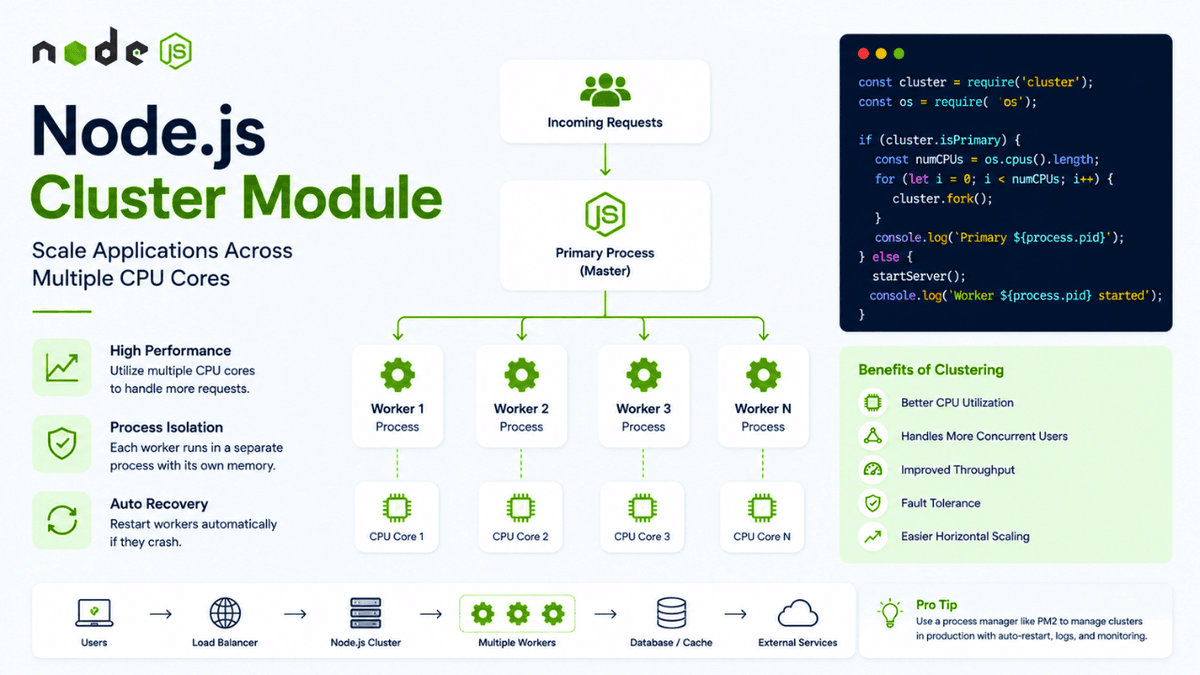
Learn how the Node.js Cluster module works and how to scale Node.js applications across multiple CPU cores. Understand worker processes, load balancing, clustering, and production use cases.
Node.js Cluster Module Explained: Scale Applications Across Multiple CPU Cores
Modern servers often have multiple CPU cores.
But a typical Node.js application runs JavaScript code on a single main thread.
So an important question appears:
How can a Node.js application take advantage of multiple CPU cores?
One solution is the Node.js Cluster module .
The Cluster module allows you to create multiple Node.js processes that can run simultaneously and share the same server port.
Instead of relying on a single Node.js process, you can run multiple worker processes and distribute incoming requests between them.
In the previous articles, we explored Node.js Process Management , Child Processes , and Worker Threads . Now we'll connect those concepts and understand how Node.js applications can scale across multiple CPU cores.
What is the Node.js Cluster Module?
The Node.js Cluster module allows you to create multiple processes called workers .
The architecture looks like this:
                      Incoming Requests
                           │
                           ▼
                    Primary Process
                           │
          ┌────────────────┼────────────────┐
          ▼                ▼                ▼
      Worker 1          Worker 2          Worker 3
          │                │                │
          ▼                ▼                ▼
       CPU Core 1       CPU Core 2       CPU Core 3
Each worker is a separate Node.js process.
This means each worker has its own:
- Event loop
- Memory
- JavaScript execution context
- Process ID
The primary process manages the workers.
Why Use Cluster?
Imagine your server has:
8 CPU Cores
Your application might be running as:
  1 Node.js Process
       ↓
1 Main JavaScript Thread
The other CPU cores may not be fully utilized by your application.
With clustering:
  Node.js Application
       │
       ├── Worker 1 → CPU Core 1
       ├── Worker 2 → CPU Core 2
       ├── Worker 3 → CPU Core 3
       └── Worker 4 → CPU Core 4
Multiple workers can process requests concurrently.
This can improve throughput for applications that need to handle a large number of requests.
Cluster vs Worker Threads
It's important to understand the difference.
Cluster
Creates multiple Node.js processes.
  Primary Process
      │
      ├── Worker Process 1
      ├── Worker Process 2
      └── Worker Process 3
Each process has its own memory.
Worker Threads
Creates multiple threads inside a Node.js process.
  Node.js Process
      │
      ├── Main Thread
      ├── Worker Thread 1
      └── Worker Thread 2
Worker Threads are useful for CPU-intensive JavaScript operations.
Cluster is primarily useful for scaling server applications across multiple processes.
Importing the Cluster Module
The Cluster module is built into Node.js.
  const cluster = require("cluster");
const os = require("os");
You can also use:
  const {
  isPrimary,
  isWorker
} = require("cluster");
The exact API terminology depends on your Node.js version, but modern Node.js versions use primary and worker terminology.
Checking the Primary Process
The primary process is responsible for creating workers.
Example:
  const cluster = require("cluster");

if (cluster.isPrimary) {
  console.log("Running as primary process");
} else {
  console.log("Running as worker process");
}
The primary process and worker processes execute the same application file, but they follow different logic based on their role.
Creating Worker Processes
Example:
  const cluster = require("cluster");
const http = require("http");

if (cluster.isPrimary) {
  cluster.fork();
  cluster.fork();
} else {
  http.createServer((req, res) => {
    res.end(`Handled by ${process.pid}`);
  }).listen(3000);
}
The primary process creates two workers.
Each worker starts an HTTP server.
Both workers can listen on the same port.
Creating Workers Based on CPU Cores
Instead of manually creating workers, you can detect the number of CPU cores.
  const os = require("os");

const cpuCount = os.cpus().length;

console.log(`CPU cores: ${cpuCount}`);
Then create workers:
  for (let i = 0; i < cpuCount; i++) {
  cluster.fork();
}
Now your application can create one worker for each available CPU core.
However, this does not mean you should always create exactly one worker per CPU core.
The ideal number depends on:
- Application workload
- Memory usage
- CPU availability
- Database connections
- Server capacity
Always measure performance instead of assuming more workers are automatically better.
Complete Cluster Example
Let's create a simple HTTP server.
  const cluster = require("cluster");
const http = require("http");
const os = require("os");

const cpuCount = os.cpus().length;

if (cluster.isPrimary) {
  console.log(`Primary process: ${process.pid}`);

  for (let i = 0; i < cpuCount; i++) {
    cluster.fork();
  }
} else {
  const server = http.createServer((req, res) => {
    res.writeHead(200, {
      "Content-Type": "text/plain"
    });

    res.end(
      `Handled by worker ${process.pid}`
    );
  });

  server.listen(3000);

  console.log(
    `Worker started: ${process.pid}`
  );
}
Now several Node.js processes can handle requests.
How Requests Are Distributed
The primary process coordinates worker processes.
A simplified model looks like this:
  Request 1 ──→ Worker 1
Request 2 ──→ Worker 2
Request 3 ──→ Worker 3
Request 4 ──→ Worker 1
Request 5 ──→ Worker 2
The exact scheduling behavior depends on the operating system and Node.js implementation.
The important idea is that multiple worker processes can share incoming traffic.
Checking Worker Processes
You can inspect worker processes:
  Object.values(cluster.workers).forEach(worker => {
  console.log(worker.process.pid);
});
Example:
  Worker 1 → PID 1024
Worker 2 → PID 1025
Worker 3 → PID 1026
Each worker has a unique process ID.
This connects directly to the concepts we covered in our earlier article on Node.js Process Management .
Handling Worker Exit
Workers can crash.
The primary process can detect this:
  cluster.on("exit", (worker) => {
  console.log(
    `Worker ${worker.process.pid} stopped`
  );
});
You can also restart the worker:
  cluster.on("exit", (worker) => {
  console.log(
    `Worker ${worker.process.pid} died`
  );

  cluster.fork();
});
Now the primary process automatically creates a replacement worker.
The flow becomes:
  Worker Crashes
      ↓
Primary Detects Exit
      ↓
New Worker Created
      ↓
Application Continues
This is one reason process management is so important in production.
Graceful Worker Shutdown
When deploying a new version, you may want workers to shut down gracefully.
A worker can listen for termination signals:
  process.on("SIGTERM", () => {
  server.close(() => {
    process.exit(0);
  });
});
This gives existing requests time to finish before the worker exits.
Graceful shutdown becomes particularly important when running multiple workers.
Sharing State Between Workers
This is one of the biggest challenges with clustering.
Each worker is a separate process.
For example:
  let counter = 0;

counter++;
Worker 1 has its own:
counter = 1
Worker 2 has its own:
counter = 1
They do not automatically share memory.
This means in-memory state can cause unexpected behavior.
The Session Problem
Imagine storing user sessions in memory:
const sessions = {};
A user logs in through Worker 1.
Their session exists in:
Worker 1
Later, their next request goes to:
Worker 2
Worker 2 doesn't know about the session.
This can cause authentication problems.
The solution is to store shared state externally.
Common options include:
- Redis
- MongoDB
- PostgreSQL
- Other shared data stores
This is one of the reasons production architectures avoid relying on process-local memory for important application state.
Database Connections
Every worker is a separate process.
This means each worker may create its own database connection pool.
For example:
  4 Workers
×
10 Database Connections
=
40 Connections
If you scale to many workers, database connection usage can increase significantly.
Always configure connection pools carefully.
Cluster and PM2
You don't always need to manually use the Cluster module.
Process managers such as PM2 can manage multiple Node.js instances.
For example:
pm2 start server.js -i max
PM2 can create multiple processes and distribute incoming requests.
This provides many benefits of clustering while simplifying production process management.
We've already explored PM2 in detail in our earlier article on PM2 for Node.js .
Cluster vs PM2
| Feature | Cluster | PM2 |
|---|---|---|
| Built into Node.js | Yes | No |
| Creates multiple processes | Yes | Yes |
| Process monitoring | Basic | Advanced |
| Auto restart | Manual | Built-in |
| Logs | Manual | Built-in |
| Deployment tools | Manual | More convenient |
| Production management | Requires setup | Easier |
If you're learning Node.js internals, understanding Cluster is valuable.
If you're deploying an application, PM2 may provide a simpler operational experience.
Cluster and Load Balancing
Clustering introduces a basic form of request distribution.
But large production systems often use dedicated load balancers.
A typical architecture might look like:
                   Internet
                    │
                    ▼
              Load Balancer
                    │
        ┌───────────┼───────────┐
        ▼           ▼           ▼
     Server 1    Server 2    Server 3
        │           │           │
     Workers     Workers     Workers
This allows applications to scale across multiple machines.
At that point, you're moving beyond a single-server architecture toward distributed systems.
When Should You Use Cluster?
Cluster can be useful when:
- Your application receives high traffic.
- Your server has multiple CPU cores.
- You want multiple Node.js processes.
- You need process-level isolation.
- You want to improve application throughput.
However, clustering isn't always necessary.
For many applications, a single Node.js process combined with efficient asynchronous I/O is perfectly capable of handling significant traffic.
Common Beginner Mistakes
Assuming More Workers Always Means Better Performance
More workers consume more memory and database connections.
Always benchmark your application.
Storing Important State in Memory
Worker processes don't share normal JavaScript memory.
Use external storage for shared state.
Ignoring Database Connection Limits
Every worker may create its own connection pool.
Make sure your database can handle the total number of connections.
Forgetting Graceful Shutdown
Workers should finish active requests before shutting down whenever possible.
Real-World Architecture
A production Node.js application might look like:
  Users
  ↓
CDN
  ↓
Load Balancer
  ↓
Node.js Server
  │
  ├── Worker 1
  ├── Worker 2
  ├── Worker 3
  └── Worker 4
       │
       ├── Redis
       ├── MongoDB
       └── External APIs
At larger scale:
                    Load Balancer
                 /      |      \
                /       |       \
           Server 1  Server 2  Server 3
              │         │         │
           Workers   Workers   Workers
                \       |       /
                  Shared Services
                       │
              ┌────────┴────────┐
              │                 │
           Database           Redis
Understanding the Cluster module helps you understand how Node.js applications can evolve from a single process into more scalable architectures.
What's Next?
We've now completed the core concepts around Node.js processes and concurrency:
- Process management
- Child processes
- Worker Threads
- Cluster
The next part of this series focuses on Developer Experience and Production Reliability .
We'll begin with Nodemon , a development tool that automatically restarts your Node.js application whenever your source code changes.
Conclusion
The Node.js Cluster module provides a way to run multiple Node.js processes and distribute incoming requests across them.
It can help applications take advantage of multi-core servers and increase throughput.
However, clustering also introduces new challenges around:
- Shared state
- Database connections
- Process management
- Graceful shutdown
- Session storage
Understanding these trade-offs is more important than simply knowing how to call cluster.fork() .
For small applications, one Node.js process may be enough.
For larger systems, clustering, PM2, load balancers, containers, and distributed architectures can work together to scale applications effectively.
The goal isn't to use as many processes as possible.
The goal is to build an architecture that uses resources efficiently while remaining reliable, maintainable, and easy to scale.