DELETE Requests in Node.js Explained: Remove Resources Safely
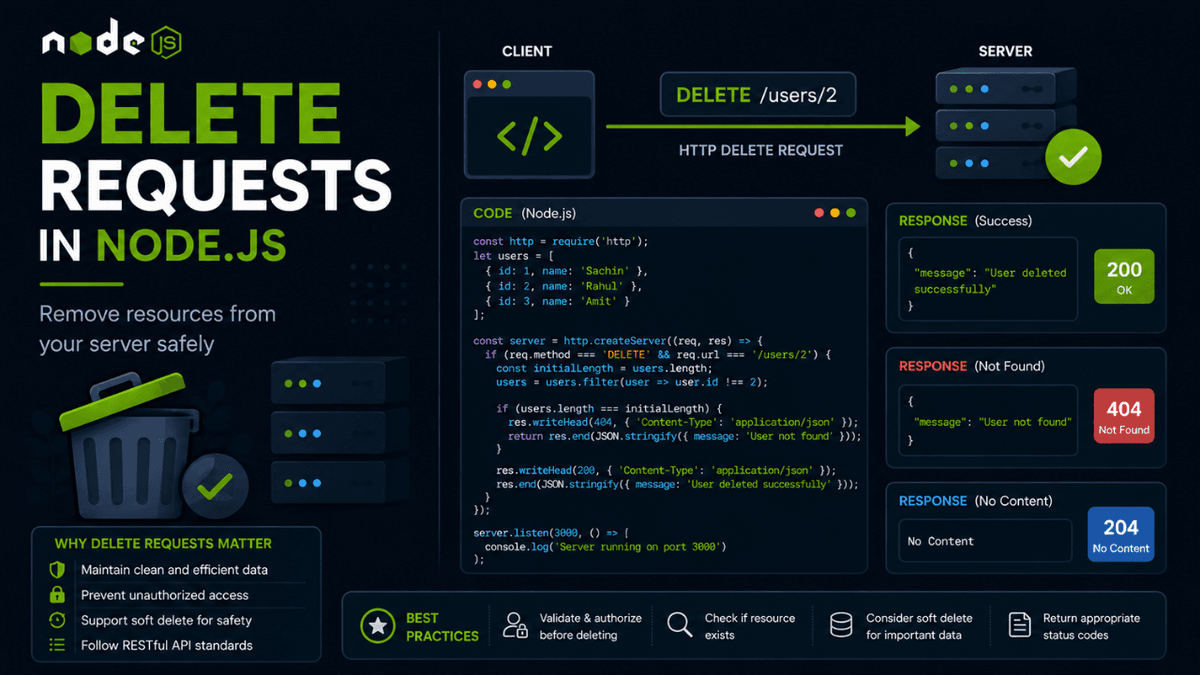
Learn how DELETE requests work in Node.js APIs. Understand HTTP DELETE methods, status codes, best practices, and real-world examples for safely removing resources.
DELETE Requests in Node.js: Removing Resources Safely
We've already learned how to retrieve data using GET requests, create resources with POST requests, and update them using PUT and PATCH.
The final step in the CRUD lifecycle is deleting data.
This is where the DELETE HTTP method comes in.
Whenever a user deletes a blog post, removes a product from an inventory system, cancels an order, or permanently removes an account, a DELETE request is usually responsible for handling that operation.
Understanding DELETE requests is essential because deleting data is often more sensitive than creating or updating it.
What is a DELETE Request?
A DELETE request is used to remove an existing resource from the server.
Example:
DELETE /users/1
This request tells the server:
Remove the user with ID
1.
Unlike POST or PATCH requests, DELETE requests usually do not require a request body because the resource to be deleted is already identified in the URL.
How DELETE Fits Into CRUD
If you remember our article on CRUD Operations in Node.js , the Delete operation maps directly to the DELETE HTTP method.
| CRUD Operation | HTTP Method |
|---|---|
| Create | POST |
| Read | GET |
| Update | PUT / PATCH |
| Delete | DELETE |
DELETE completes the CRUD cycle and allows applications to fully manage resources.
Basic DELETE Route in Node.js
Using Node.js' built-in HTTP module:
  const http = require("http");

const server = http.createServer((req, res) => {
  if (req.method === "DELETE" && req.url === "/users/1") {
    res.end("User deleted successfully");
  }
});

server.listen(3000);
This endpoint accepts DELETE requests sent to:
http://localhost:3000/users/1
Deleting Data from an Array
Let's simulate deleting a user from memory.
  let users = [
  { id: 1, name: "Sachin" },
  { id: 2, name: "Rahul" },
  { id: 3, name: "Amit" }
];

users = users.filter(user => user.id !== 2);

console.log(users);
Output:
  [
  { id: 1, name: "Sachin" },
  { id: 3, name: "Amit" }
]
The filter() method creates a new array without the deleted user.
This same concept is commonly used with databases such as MongoDB and PostgreSQL, although the actual deletion logic differs depending on the database engine.
Complete DELETE Example
  const http = require("http");

let users = [
  { id: 1, name: "Sachin" },
  { id: 2, name: "Rahul" }
];

const server = http.createServer((req, res) => {
  if (req.method === "DELETE" && req.url === "/users/2") {
    users = users.filter(user => user.id !== 2);

    res.writeHead(200, {
      "Content-Type": "application/json"
    });

    res.end(JSON.stringify({
      message: "User deleted successfully"
    }));
  }
});

server.listen(3000);
Response:
  {
  "message": "User deleted successfully"
}
Common Status Codes for DELETE Requests
DELETE requests commonly return the following status codes:
| Status Code | Meaning |
|---|---|
| 200 | Resource deleted successfully |
| 204 | Deleted successfully with no response body |
| 404 | Resource not found |
| 400 | Invalid request |
| 500 | Internal server error |
Many production APIs prefer returning 204 No Content because the operation succeeded and there is nothing else to send back.
If you're not yet familiar with these response codes, our upcoming guide on HTTP Status Codes in Node.js explains when each one should be used.
DELETE Request with 204 Status
Example:
  res.writeHead(204);
res.end();
Response body:
No Content
This is considered the most REST-friendly response for successful delete operations.
Soft Delete vs Hard Delete
Modern applications rarely delete important data permanently.
Instead, many systems use a soft delete strategy.
Hard Delete
The record is permanently removed.
DELETE FROM users WHERE id = 1;
The data cannot be recovered.
Soft Delete
The record remains in the database but is marked as deleted.
Example:
  {
  "id": 1,
  "name": "Sachin",
  "isDeleted": true
}
This approach allows:
- Account recovery
- Audit logs
- Regulatory compliance
- Data restoration
Many SaaS applications, including social media platforms and e-commerce systems, use soft deletes for important business data.
Real World Examples of DELETE Requests
DELETE requests power many common features:
- Delete blog posts
- Remove products
- Delete comments
- Remove uploaded files
- Delete notifications
- Remove users from a team
Without DELETE operations, applications would continue accumulating unused data forever.
Security Concerns with DELETE Requests
Deleting data is dangerous if authorization is not implemented correctly.
For example:
DELETE /users/1
Should not be accessible to every user.
This is where authentication and authorization become critical.
Later in this series, when we cover topics such as Input Validation , Authentication , and Role-Based Access Control , you'll see how production APIs protect destructive actions.
Common Beginner Mistakes
Using GET to Delete Data
Wrong:
GET /delete-user/1
Correct:
DELETE /users/1
HTTP methods should always match the action being performed.
Deleting Without Validation
Always verify:
- The resource exists.
- The user has permission.
- The request is valid.
Skipping these checks can lead to serious security issues.
Forgetting Error Handling
Bad:
  users = users.filter(user => user.id !== userId);

res.end("Deleted");
Better:
  if (!userExists) {
  res.writeHead(404);

  return res.end("User not found");
}
Proper error handling makes APIs easier to debug and maintain.
What Comes Next?
We've now completed the entire CRUD cycle:
- GET retrieves data.
- POST creates resources.
- PUT and PATCH update resources.
- DELETE removes resources.
The next step is learning how developers test these endpoints during development.
In the next article, we'll explore API Testing with Postman , where you'll learn how to send requests, inspect responses, debug APIs, and improve development workflows.
Conclusion
DELETE requests are the final piece of the CRUD puzzle.
Although deleting data appears simple, production applications treat deletion operations carefully because mistakes can be expensive and sometimes irreversible.
Understanding DELETE requests, status codes, authorization, and soft deletes will help you build safer and more reliable APIs.
Master DELETE requests, and you've officially completed the core HTTP methods used in almost every modern backend application.