CORS in Node.js Explained: Origins, Preflight Requests, Credentials, and Secure Configuration
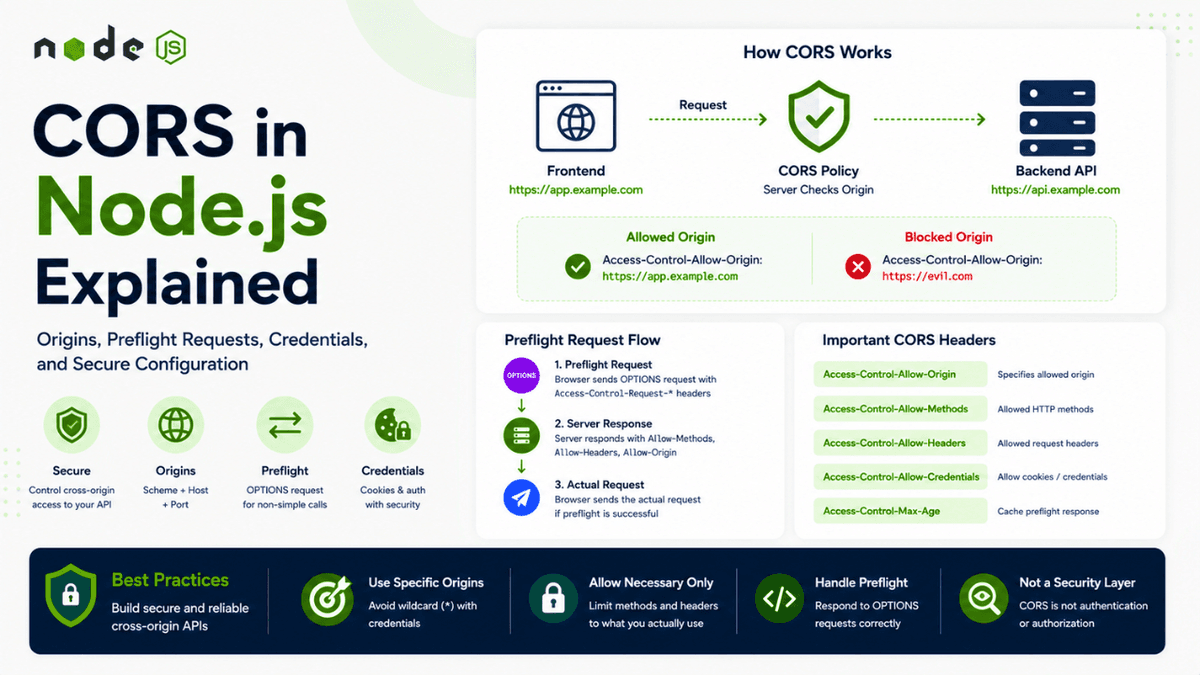
Learn CORS in Node.js from the ground up. Understand same-origin policy, origins, preflight requests, HTTP methods, credentials, CORS headers, common errors, and secure production configuration.
CORS in Node.js Explained: Origins, Preflight Requests, Credentials, and Secure Configuration
You've built a Node.js API.
Your backend works perfectly in Postman.
You can send requests using curl .
The API returns the correct response.
Then you connect your frontend application.
Suddenly, the browser shows an error:
  Access to fetch at 'http://localhost:5000/api/users'
from origin 'http://localhost:3000'
has been blocked by CORS policy
At first, this can feel confusing.
The API is working.
The frontend is working.
So why is the browser blocking the request?
The answer is CORS .
CORS, or Cross-Origin Resource Sharing , is a browser security mechanism that controls whether a web page is allowed to access resources from a different origin.
Understanding CORS is essential when building modern applications with:
- Node.js
- Express.js
- React
- Next.js
- REST APIs
- Authentication systems
- Cookies
- JWT-based applications
- Microservices
In this article, we'll understand CORS from the ground up.
We'll cover:
- What CORS is
- What an origin means
- Same-Origin Policy
- Why browsers enforce CORS
- Simple requests
- Preflight requests
-
OPTIONS - CORS headers
- Credentials and cookies
-
Access-Control-Allow-Origin - Common CORS errors
- CORS with Node.js
- CORS with Express
- Dynamic origins
- Production configuration
- Common security mistakes
- CORS vs authentication
- CORS vs CSRF
Before continuing, it's useful to understand how HTTP requests and responses work. The concepts from our earlier article on HTTP Headers also become especially important here because CORS is largely controlled through HTTP headers.
What Is CORS?
CORS stands for:
Cross-Origin Resource Sharing
It is a mechanism that allows a server to specify which origins are permitted to access its resources from a browser.
For example:
  Frontend
http://localhost:3000

        ↓ Request

Backend
http://localhost:5000
These are different origins.
The browser may restrict the frontend from reading the backend's response unless the backend explicitly allows the frontend's origin.
The server can communicate this using HTTP response headers.
For example:
Access-Control-Allow-Origin: http://localhost:3000
This tells the browser:
The page running from
http://localhost:3000is allowed to access this resource.
What Is an Origin?
To understand CORS, you first need to understand the concept of an origin .
An origin consists of:
Scheme + Host + Port
For example:
https://example.com:443
The three components are:
  Scheme → https
Host   → example.com
Port   → 443
If any of these differ, the origin is considered different.
Same Origin
These URLs have the same origin:
  https://example.com/page1
https://example.com/page2
https://example.com/users
The path is different.
But the:
  Scheme
Host
Port
remain the same.
Therefore, they have the same origin.
Different Origins
Consider:
  https://example.com
https://api.example.com
The hosts are different.
Therefore:
example.com
and:
api.example.com
are different origins.
Another example:
  http://example.com
https://example.com
The scheme is different.
Therefore, these are different origins.
Another:
  http://localhost:3000
http://localhost:5000
The ports are different.
Therefore, these are different origins.
This is why local frontend and backend applications commonly encounter CORS issues.
Same-Origin Policy
CORS exists because browsers implement a security concept called the Same-Origin Policy .
The browser does not allow scripts from one origin to freely access resources from another origin.
For example:
  Frontend
http://localhost:3000

        ↓

API
http://localhost:5000
The frontend JavaScript is running under:
http://localhost:3000
The API is running under:
http://localhost:5000
These are different origins.
The browser therefore applies cross-origin security rules.
Why Does the Browser Do This?
Imagine a malicious website:
https://evil-example.com
You visit it while logged into your banking website.
Without browser security restrictions, the malicious website might try to send requests to:
https://your-bank.com/account
and read sensitive information.
The browser's security model helps prevent arbitrary websites from reading protected cross-origin responses.
CORS allows servers to explicitly declare which origins are trusted.
Conceptually:
  Browser
   ↓
Cross-Origin Request
   ↓
Server
   ↓
CORS Policy
   ↓
Browser Decides Whether JS Can Read Response
This is an important point:
CORS is primarily a browser-enforced access control mechanism.
CORS Is Not an API Security System
One of the most common misconceptions is:
"If I configure CORS correctly, my API is secure."
That's not true.
CORS does not replace:
- Authentication
- Authorization
- Rate limiting
- Input validation
- CSRF protection
- HTTPS
- Secure cookies
For example, a server-to-server request does not rely on browser CORS enforcement.
An attacker can still call your API using:
-
curl - Postman
- Another backend
- Custom scripts
Therefore, you still need proper authentication and authorization.
Think of CORS as one layer in your security architecture.
  Authentication
       +
Authorization
       +
Input Validation
       +
Rate Limiting
       +
CORS
       +
HTTPS
Each solves a different problem.
Simple CORS Request
Not every cross-origin request requires a preflight request.
Some requests are considered "simple" under the Fetch/CORS rules.
For example:
  GET /api/users HTTP/1.1
Host: api.example.com
Origin: https://frontend.example.com
The browser sends the request with an Origin header.
The server might respond:
Access-Control-Allow-Origin: https://frontend.example.com
The browser checks the response.
If the origin is allowed, the browser allows the frontend JavaScript to access the response.
The Origin Header
When a browser makes a cross-origin request, it can include:
  Origin:
https://frontend.example.com
The server can use this information to determine whether the request comes from an allowed origin.
For example:
Origin:
https://frontend.example.com
The server might allow it.
But:
  Origin:
https://unknown-site.com
might not be allowed.
Access-Control-Allow-Origin
The most commonly discussed CORS header is:
Access-Control-Allow-Origin
For example:
Access-Control-Allow-Origin: https://frontend.example.com
This tells the browser that the specified origin can access the response.
You can also see:
Access-Control-Allow-Origin: *
The * means any origin may access the resource under the relevant CORS rules.
However, wildcard configuration requires careful consideration, especially when credentials are involved.
Wildcard Origins
You might configure:
Access-Control-Allow-Origin: *
This can be appropriate for genuinely public APIs.
For example:
  Public API
    ↓
No User-Specific Credentials
    ↓
Public Cross-Origin Access
But it is usually not appropriate to blindly use:
Access-Control-Allow-Origin: *
for authenticated applications.
Especially when your application uses cookies or other credentials.
CORS Preflight Requests
One of the most important concepts in CORS is the preflight request .
A browser may first send an OPTIONS request to ask the server:
"Are you willing to accept this cross-origin request?"
For example:
  Browser
   ↓
OPTIONS /api/users
   ↓
Server
   ↓
CORS Permissions
   ↓
Browser
   ↓
Actual Request
This is called a preflight request.
Why Does Preflight Happen?
Browsers perform preflight requests for certain cross-origin requests that aren't considered simple.
For example, suppose your frontend wants to send:
PUT /api/users/123
with:
  Content-Type: application/json
Authorization: Bearer token
The browser may first send:
OPTIONS /api/users/123
with headers describing the intended request.
For example:
  Origin: https://frontend.example.com
Access-Control-Request-Method: PUT
Access-Control-Request-Headers: authorization, content-type
The server must respond with appropriate CORS permissions.
Preflight Response
The server might return:
  HTTP/1.1 204 No Content
Access-Control-Allow-Origin: https://frontend.example.com
Access-Control-Allow-Methods: GET, POST, PUT, PATCH, DELETE
Access-Control-Allow-Headers: Content-Type, Authorization
The browser checks these headers.
If the request is allowed, the browser proceeds with:
PUT /api/users/123
If the server doesn't provide the expected permissions, the browser blocks the cross-origin request.
The OPTIONS Method
The preflight request typically uses:
OPTIONS
The OPTIONS method is used to discover communication options for a resource.
For CORS, it can be used by browsers to determine whether the intended cross-origin request is permitted.
Your Node.js application therefore needs to handle CORS preflight correctly.
Access-Control-Allow-Methods
This header specifies which HTTP methods are allowed.
For example:
Access-Control-Allow-Methods: GET, POST, PUT, PATCH, DELETE
This means the server allows those methods for the relevant cross-origin request.
You should only allow methods your API actually needs.
For example, if your frontend only performs:
  GET
POST
there may be no reason to advertise:
  DELETE
PATCH
PUT
A smaller policy is generally easier to reason about.
Access-Control-Allow-Headers
This header specifies which request headers can be used.
For example:
Access-Control-Allow-Headers: Content-Type, Authorization
This is common when your frontend sends:
Content-Type: application/json
or:
Authorization: Bearer token
If your application uses custom headers, they may need to be included in the CORS policy.
Access-Control-Allow-Credentials
When cross-origin requests involve credentials, you may need:
Access-Control-Allow-Credentials: true
Credentials can include browser-managed authentication information such as cookies.
For example:
  Frontend
https://app.example.com

        ↓ Cookie

API
https://api.example.com
The frontend may need to explicitly request credentialed behavior.
For fetch , this can look like:
  fetch(
  "https://api.example.com/profile",
  {
    credentials: "include"
  }
);
The server must also allow credentials.
Credentials and Wildcard Origins
A common mistake is combining:
Access-Control-Allow-Origin: *
with:
Access-Control-Allow-Credentials: true
This combination is not valid for credentialed CORS requests.
Instead, the server should return a specific allowed origin.
For example:
  Access-Control-Allow-Origin: https://app.example.com
Access-Control-Allow-Credentials: true
The key idea is:
  Credentials
   ↓
Specific Trusted Origin
not:
  Credentials
   ↓
Wildcard Origin
CORS With Cookies
Suppose your application uses HTTP-only cookies for authentication.
The frontend sends:
  fetch(
  "https://api.example.com/me",
  {
    credentials: "include"
  }
);
The server needs appropriate CORS configuration.
For example:
  Access-Control-Allow-Origin: https://app.example.com
Access-Control-Allow-Credentials: true
Your cookie configuration also matters.
You may need to consider:
-
HttpOnly -
Secure -
SameSite - Domain
- Path
CORS alone does not make cookie authentication secure.
Cookie configuration and CSRF protection also matter.
CORS With Authorization Headers
Suppose your application uses JWT authentication.
The frontend sends:
Authorization: Bearer <token>
The browser may perform a preflight request because of the Authorization header.
Your server may need to allow:
Access-Control-Allow-Headers: Authorization, Content-Type
For example:
  Browser
   ↓
OPTIONS
Authorization requested
   ↓
Server allows Authorization
   ↓
Actual GET/POST request
The CORS policy must match your actual frontend request behavior.
CORS in Node.js Without Express
You can configure CORS manually using Node.js's built-in HTTP module.
For example:
  const http = require("http");

const allowedOrigin =
  "http://localhost:3000";

const server = http.createServer(
  (req, res) => {
    res.setHeader(
      "Access-Control-Allow-Origin",
      allowedOrigin
    );

    res.setHeader(
      "Access-Control-Allow-Methods",
      "GET, POST, PUT, PATCH, DELETE, OPTIONS"
    );

    res.setHeader(
      "Access-Control-Allow-Headers",
      "Content-Type, Authorization"
    );

    if (req.method === "OPTIONS") {
      res.writeHead(204);
      res.end();
      return;
    }

    res.writeHead(200, {
      "Content-Type":
        "application/json"
    });

    res.end(
      JSON.stringify({
        message: "Hello"
      })
    );
  }
);

server.listen(5000);
This demonstrates the basic mechanism.
However, production applications often use a framework or middleware to manage CORS configuration more conveniently.
CORS With Express
If you're using Express, a common approach is the cors middleware.
Conceptually:
  const cors = require("cors");

app.use(
  cors({
    origin:
      "http://localhost:3000"
  })
);
Now requests from the specified frontend origin can be handled according to the middleware's configuration.
For authenticated applications, you may configure:
  app.use(
  cors({
    origin:
      "http://localhost:3000",
    credentials: true
  })
);
The exact configuration depends on how your authentication system works.
Dynamic CORS Origins
Sometimes your application supports multiple frontend origins.
For example:
  http://localhost:3000
https://staging.example.com
https://app.example.com
You can maintain an allowlist:
  const allowedOrigins = [
  "http://localhost:3000",
  "https://staging.example.com",
  "https://app.example.com"
];
Then check the incoming origin.
Conceptually:
  const origin =
  req.headers.origin;

if (
  allowedOrigins.includes(origin)
) {
  res.setHeader(
    "Access-Control-Allow-Origin",
    origin
  );
}
The important idea is to compare against a trusted allowlist.
Don't blindly reflect arbitrary origins.
The Dangerous Origin Reflection Pattern
Avoid:
  res.setHeader(
  "Access-Control-Allow-Origin",
  req.headers.origin
);
without validating the origin first.
This effectively says:
  Whatever Origin You Send
          ↓
Server Allows It
That's not a meaningful access policy.
Instead:
  Incoming Origin
      ↓
Check Allowlist
      ↓
Allowed?
   ↙      ↘
 Yes       No
  ↓         ↓
Allow     Reject
Always validate origins against your application's trusted origins.
Environment-Based CORS Configuration
Your development environment might use:
http://localhost:3000
Production might use:
https://app.example.com
Don't hard-code production configuration throughout your code.
You can use environment variables.
For example:
CLIENT_ORIGIN=https://app.example.com
Then:
  const allowedOrigin =
  process.env.CLIENT_ORIGIN;
This allows different environments to use different configurations.
This connects directly to the configuration-management practices covered earlier in our Node.js series.
Multiple Environment Origins
You might configure:
CLIENT_ORIGINS=http://localhost:3000,https://app.example.com
Then parse them:
  const allowedOrigins =
  process.env.CLIENT_ORIGINS
    .split(",");
You can then validate the request origin.
Always normalize your configuration carefully.
For example, accidental whitespace can cause confusing errors.
Common CORS Error
One common error looks like:
  Access to fetch at ...
from origin ...
has been blocked by CORS policy
This doesn't necessarily mean your Node.js server crashed.
It means the browser's CORS checks failed.
The first things to inspect are:
  Request Origin
        ↓
Server Response Headers
        ↓
Allowed Origin
        ↓
Allowed Methods
        ↓
Allowed Headers
        ↓
Credentials Configuration
"No Access-Control-Allow-Origin Header"
You may see:
  No 'Access-Control-Allow-Origin'
header is present on the requested resource.
This usually means the server response doesn't include an appropriate CORS header.
Check:
- Is CORS middleware running?
- Is it registered before routes?
- Is the request actually reaching the server?
- Is the correct origin configured?
- Is the preflight request handled?
CORS Error on OPTIONS
You may see that:
OPTIONS
requests fail.
This can happen when the server doesn't properly respond to preflight requests.
Check:
  OPTIONS
 ↓
204 / 200
 ↓
Access-Control-Allow-Origin
Access-Control-Allow-Methods
Access-Control-Allow-Headers
If the preflight fails, the browser may never send the actual request.
Why Postman Works but Browser Fails
This is one of the most common questions.
You send:
Postman → API
It works.
Then:
Browser → API
It fails with CORS.
Why?
Because Postman is not a browser.
The browser enforces the Same-Origin Policy and CORS rules.
Postman generally doesn't enforce those browser restrictions.
Therefore:
  Postman Works
      ≠
Browser Will Work
This is a crucial debugging concept.
CORS Is Not the Same as Network Connectivity
Suppose your frontend gets:
CORS error
It doesn't automatically mean the server is unreachable.
The server may have responded successfully, but the browser refused to expose the response to your JavaScript because the CORS policy wasn't satisfied.
You should inspect the browser's Network tab to understand what actually happened.
Debugging CORS in DevTools
Open your browser's Developer Tools.
Go to:
Network
Then inspect the request.
Look for:
  Request Headers
Response Headers
Origin
Access-Control-Allow-Origin
Access-Control-Allow-Methods
Access-Control-Allow-Headers
Access-Control-Allow-Credentials
If a preflight occurred, you'll often see:
OPTIONS
before the actual request.
This is usually much more useful than guessing from the console error alone.
CORS and HTTP Methods
Suppose your frontend sends:
PATCH /api/users/123
But the server only allows:
GET, POST
The browser may block the request because:
PATCH
is not included in:
Access-Control-Allow-Methods
Make sure your CORS configuration reflects the actual API methods.
CORS and Custom Headers
Suppose your frontend sends:
X-Client-Version: 2
The browser may include this in the preflight request:
Access-Control-Request-Headers: x-client-version
Your server must allow the header if appropriate:
Access-Control-Allow-Headers: X-Client-Version
Don't add every possible header blindly.
Only allow the headers your application needs.
CORS and Content-Type
A request with:
Content-Type: application/json
can trigger a preflight in cross-origin scenarios.
The server may need to allow:
Content-Type
For example:
Access-Control-Allow-Headers: Content-Type
This is one reason APIs frequently encounter preflight requests when receiving JSON data.
CORS and DELETE Requests
Consider:
  fetch(
  "https://api.example.com/users/123",
  {
    method: "DELETE"
  }
);
Depending on the request characteristics, the browser may perform a preflight.
Your server should allow:
Access-Control-Allow-Methods: DELETE
if that cross-origin operation is intended.
CORS Security Best Practices
Use an Explicit Allowlist
Prefer:
https://app.example.com
over:
*
for private applications.
Avoid Blind Origin Reflection
Never automatically trust any incoming Origin .
Validate it.
Use HTTPS in Production
Your production frontend and API should generally use HTTPS.
For example:
  https://app.example.com
https://api.example.com
Keep CORS Policies Narrow
Allow only the methods and headers your application actually needs.
Be Careful With Credentials
Credentialed cross-origin requests require deliberate configuration.
Don't Treat CORS as Authentication
Always implement proper authentication separately.
Don't Expose Sensitive APIs Unnecessarily
If an endpoint should only be accessible by trusted clients, don't assume CORS alone protects it.
Review CORS During Deployment
Development and production often use different origins.
Make sure production configuration is correct.
CORS vs Authentication
These solve completely different problems.
CORS
Controls whether browser JavaScript from one origin is allowed to access a cross-origin response.
Authentication
Determines:
Who are you?
For example:
  JWT
Session Cookie
OAuth
Authorization
Determines:
What are you allowed to do?
For example:
  User
Admin
Moderator
You might have:
  Browser
   ↓
CORS
   ↓
Authentication
   ↓
Authorization
   ↓
Business Logic
All of these layers can be necessary.
CORS vs CSRF
CORS and CSRF are also different.
CORS
Controls cross-origin browser access to resources.
CSRF
Deals with unwanted actions performed using a user's authenticated context.
For cookie-based authentication, CSRF protection can be important because browsers may automatically attach cookies to requests depending on cookie and request configuration.
Possible CSRF defenses include:
- SameSite cookies
- CSRF tokens
- Origin checks
- Referer checks where appropriate
CORS should not be treated as a replacement for CSRF protection.
A Secure CORS Architecture
A production application might look like:
  Frontend
https://app.example.com
        ↓
Cross-Origin Request
        ↓
Node.js API
        ↓
Check Trusted Origin
        ↓
CORS Policy
        ↓
Authentication
        ↓
Authorization
        ↓
Input Validation
        ↓
Business Logic
Each layer has a specific responsibility.
Example Production CORS Policy
Imagine:
  Frontend:
https://app.example.com

API:
https://api.example.com
A conceptual policy could be:
  Allowed Origin:
https://app.example.com

Allowed Methods:
GET
POST
PUT
PATCH
DELETE

Allowed Headers:
Content-Type
Authorization

Credentials:
Enabled
This is much more intentional than:
Allow Everything
CORS Middleware Placement
When using middleware-based frameworks, middleware order matters.
For example:
  Request
  ↓
CORS Middleware
  ↓
Body Parser
  ↓
Authentication
  ↓
Routes
  ↓
Error Handler
The exact order depends on your framework and application architecture.
But CORS needs to be configured in a place where the relevant requests—including preflight requests—can be handled correctly.
Don't Fix CORS With mode: "no-cors"
You may find suggestions like:
  fetch(url, {
  mode: "no-cors"
});
This is usually not the solution.
no-cors doesn't magically enable your frontend to read arbitrary cross-origin API responses.
In many cases, it results in an opaque response that your JavaScript cannot meaningfully inspect.
The correct solution is to configure the server's CORS policy correctly.
CORS and Reverse Proxies
In production, your Node.js application may sit behind:
  Browser
   ↓
CDN / Reverse Proxy
   ↓
Load Balancer
   ↓
Node.js
CORS headers may be handled by:
- Node.js
- Reverse proxy
- API gateway
- CDN
Be careful not to configure conflicting CORS policies at multiple layers without understanding how they interact.
A response might contain duplicate or conflicting headers.
Always inspect the final response received by the browser.
CORS and Multiple Services
In a microservice architecture:
  Frontend
   ↓
API Gateway
   ↓
Service A
Service B
Service C
You may want to centralize CORS at the API gateway.
This can simplify external browser access.
However, internal service-to-service communication generally doesn't rely on browser CORS.
Again, CORS is primarily relevant to browser-enforced cross-origin access.
A Practical CORS Checklist
When debugging a CORS issue, ask:
  1. What is the frontend origin?
2. What is the API origin?
3. Are they actually different origins?
4. Does the request trigger preflight?
5. Is OPTIONS handled?
6. Is the correct origin allowed?
7. Is the HTTP method allowed?
8. Are required headers allowed?
9. Are credentials being used?
10. Is wildcard origin being used incorrectly?
11. Is the request reaching the correct server?
12. Are proxies modifying the response headers?
This checklist can solve most common CORS configuration problems.
Example Request Flow
Let's put everything together.
Suppose:
  Frontend:
https://app.example.com

Backend:
https://api.example.com
The frontend sends:
  fetch(
  "https://api.example.com/users",
  {
    method: "POST",
    credentials: "include",
    headers: {
      "Content-Type":
        "application/json"
    },
    body: JSON.stringify({
      name: "Sachin"
    })
  }
);
The browser may first send:
  OPTIONS /users
Origin: https://app.example.com
Access-Control-Request-Method: POST
Access-Control-Request-Headers: content-type
The server responds:
  HTTP/1.1 204 No Content
Access-Control-Allow-Origin: https://app.example.com
Access-Control-Allow-Methods: POST
Access-Control-Allow-Headers: Content-Type
Access-Control-Allow-Credentials: true
The browser then sends:
  POST /users
Origin: https://app.example.com
Content-Type: application/json
Cookie: session=...
The server processes the request.
The response includes:
  Access-Control-Allow-Origin: https://app.example.com
Access-Control-Allow-Credentials: true
The browser allows the frontend JavaScript to access the response.
The complete flow looks like:
  Frontend
   ↓
Preflight OPTIONS
   ↓
CORS Permission
   ↓
Actual Request
   ↓
Authentication
   ↓
Authorization
   ↓
Business Logic
   ↓
Response
   ↓
Browser CORS Check
   ↓
Frontend Receives Response
What's Next?
Now you understand how browsers control cross-origin requests and how Node.js APIs can explicitly define which origins, methods, headers, and credentials are allowed.
But CORS is only one part of securing an API.
Even with a perfectly configured CORS policy, an attacker can still send thousands of requests directly to your API using scripts or other HTTP clients.
That's where rate limiting becomes important.
In the next article, we'll explore Rate Limiting in Node.js .
We'll learn how to protect authentication endpoints and APIs from excessive requests, brute-force attacks, abuse, and traffic spikes.
We'll also explore how rate limiting works in distributed applications and why an in-memory counter may not be enough for production systems.
Conclusion
CORS can seem confusing because the error appears in the frontend even though the problem often exists in the server's response headers.
The core idea is simple:
  Different Origin
      ↓
Browser Applies CORS Rules
      ↓
Server Declares Allowed Access
      ↓
Browser Enforces Policy
The most important concepts to remember are:
- An origin consists of scheme, host, and port.
- Browsers enforce the Same-Origin Policy.
- CORS allows servers to define trusted cross-origin access.
- Some cross-origin requests trigger preflight
OPTIONSrequests. -
Access-Control-Allow-Origindefines allowed origins. -
Access-Control-Allow-Methodsdefines allowed HTTP methods. -
Access-Control-Allow-Headersdefines allowed request headers. -
Access-Control-Allow-Credentialscontrols credentialed cross-origin requests. - Wildcard origins and credentials require special care.
- CORS is not authentication.
- CORS is not authorization.
- CORS is not a replacement for CSRF protection.
- Postman working does not mean browser CORS configuration is correct.
- Production applications should use explicit, intentional CORS policies.
A good CORS configuration should be:
  Specific
    +
Minimal
    +
Environment-Aware
    +
Security-Conscious
Don't think of CORS as something you simply "turn on."
Understand what your frontend needs, identify which origins you trust, allow only the methods and headers you actually use, and configure credentials deliberately.
That approach will make your Node.js APIs easier to debug and safer to operate in production.