Build a Notes API in Node.js: Complete REST API Project for Beginners
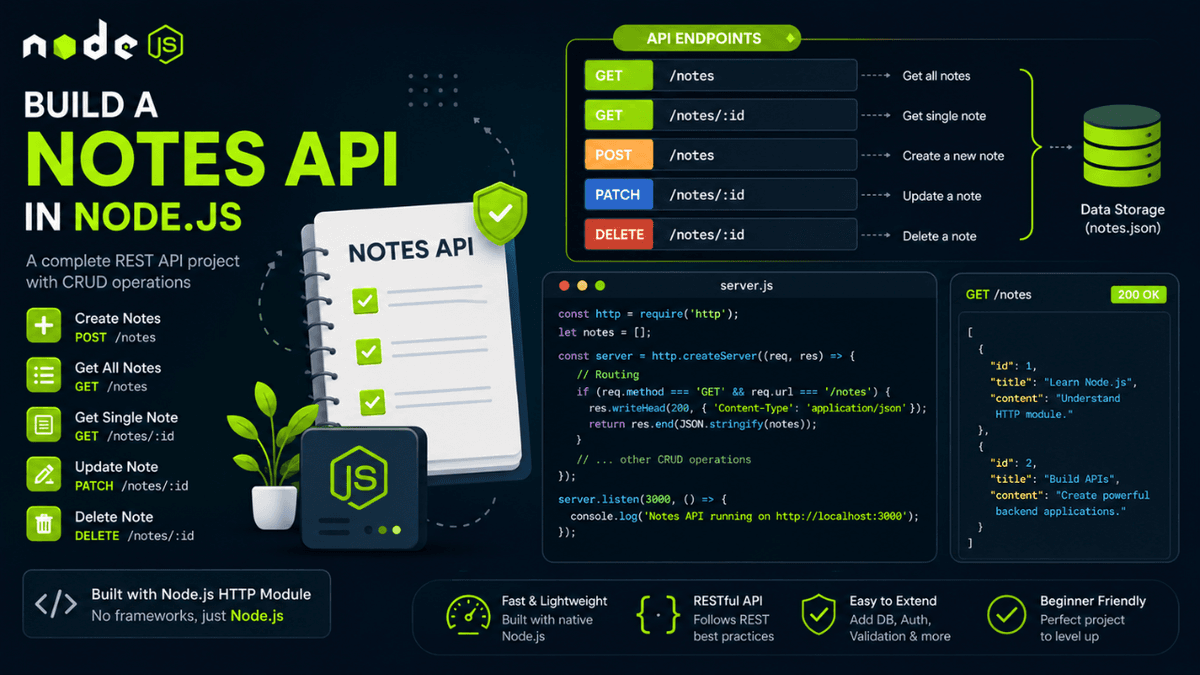
Learn how to build a Notes API in Node.js using the HTTP module. Implement CRUD operations, routing, status codes, and JSON handling with practical examples.
Build a Notes API in Node.js: Your First Real REST API Project
So far in this series, we've learned how REST APIs work, explored CRUD operations, and implemented GET, POST, PUT, PATCH, and DELETE requests.
Now it's time to combine everything into a real project.
We'll build a simple Notes API using Node.js and the built-in http module without using Express.
This project will help you understand how backend applications work behind the scenes before moving to frameworks.
What Are We Building?
Our API will support the following features:
- Create a note
- Get all notes
- Get a single note
- Update a note
- Delete a note
These are the same CRUD operations we explored earlier, but this time we'll implement them in a real application.
Project Structure
  notes-api/
│
├── server.js
├── notes.json
└── package.json
As your applications grow, you'll eventually move toward a production folder structure with controllers, services, and routes, but keeping everything simple initially makes learning easier.
Notes Data Structure
Our notes will look like this:
  [
  {
    "id": 1,
    "title": "Learn Node.js",
    "content": "Understand HTTP module and APIs."
  }
]
Each note contains:
-
id -
title -
content
Creating the Server
  const http = require("http");

const server = http.createServer((req, res) => {
  res.end("Notes API Running");
});

server.listen(3000, () => {
  console.log("Server running on port 3000");
});
Visit:
http://localhost:3000
If everything works, you're ready to build endpoints.
GET All Notes
  if (req.method === "GET" && req.url === "/notes") {
  res.writeHead(200, {
    "Content-Type": "application/json"
  });

  res.end(JSON.stringify(notes));
}
Response:
  [
  {
    "id": 1,
    "title": "Learn Node.js",
    "content": "Understand HTTP module."
  }
]
This endpoint uses the same GET request flow we explored in our article on GET Requests in Node.js .
GET Single Note
  if (req.method === "GET" && req.url === "/notes/1") {
  const note = notes.find(note => note.id === 1);

  res.end(JSON.stringify(note));
}
Response:
  {
  "id": 1,
  "title": "Learn Node.js",
  "content": "Understand HTTP module."
}
Create a Note
  if (req.method === "POST" && req.url === "/notes") {
  let body = "";

  req.on("data", chunk => {
    body += chunk;
  });

  req.on("end", () => {
    const note = JSON.parse(body);

    notes.push({
      id: Date.now(),
      ...note
    });

    res.writeHead(201, {
      "Content-Type": "application/json"
    });

    res.end(JSON.stringify({
      message: "Note created successfully"
    }));
  });
}
This endpoint follows the same request body handling approach we learned while working with POST Requests in Node.js .
Update a Note
  if (req.method === "PATCH" && req.url === "/notes/1") {
  const updates = JSON.parse(body);

  notes[0] = {
    ...notes[0],
    ...updates
  };
}
Since we're updating only specific fields, PATCH is a better choice than PUT here. If you're still unsure about the difference, revisiting PUT vs PATCH in Node.js will make this decision much clearer.
Delete a Note
notes = notes.filter(note => note.id !== 1);
Response:
  {
  "message": "Note deleted successfully"
}
This completes the CRUD lifecycle for our Notes API.
API Endpoints
| Method | Endpoint | Description |
|---|---|---|
| GET | /notes | Get all notes |
| GET | /notes/:id | Get single note |
| POST | /notes | Create note |
| PATCH | /notes/:id | Update note |
| DELETE | /notes/:id | Delete note |
This is the same API structure you'll use in production applications.
Testing the API
You can test the API using:
- Postman
- Thunder Client
- Insomnia
If you're new to API testing, our previous guide on API Testing with Postman walks through the complete workflow for sending requests and debugging responses.
Improvements You Can Add
Once this basic version works, try adding:
- File storage using JSON files
- MongoDB integration
- Input validation
- Authentication
- Search functionality
- Pagination
- Tags and categories
This is exactly how small projects evolve into real-world backend applications.
Common Beginner Mistakes
Forgetting JSON Parsing
const note = JSON.parse(body);
Without parsing, you'll only receive a string.
Not Returning Status Codes
Always return meaningful responses:
res.writeHead(201);
or
res.writeHead(404);
Missing Error Handling
Always check whether a note exists before updating or deleting it.
This prevents unexpected crashes and improves API reliability.
What Comes Next?
Now that you've built your first complete API project, it's time to work with files.
In the next article, we'll build a File Upload Server in Node.js , where you'll learn how applications receive images, PDFs, and other user uploads.
Conclusion
Building a Notes API is an important milestone for every backend developer.
It combines routing, HTTP methods, JSON handling, status codes, and CRUD operations into a single project.
Once you understand this project, you'll have the foundation required to build larger systems such as blog platforms, e-commerce backends, and SaaS applications.
Most importantly, you've now moved from learning individual concepts to building complete backend applications.