Build a URL Shortener in Node.js: Create Tiny URLs Like Bitly
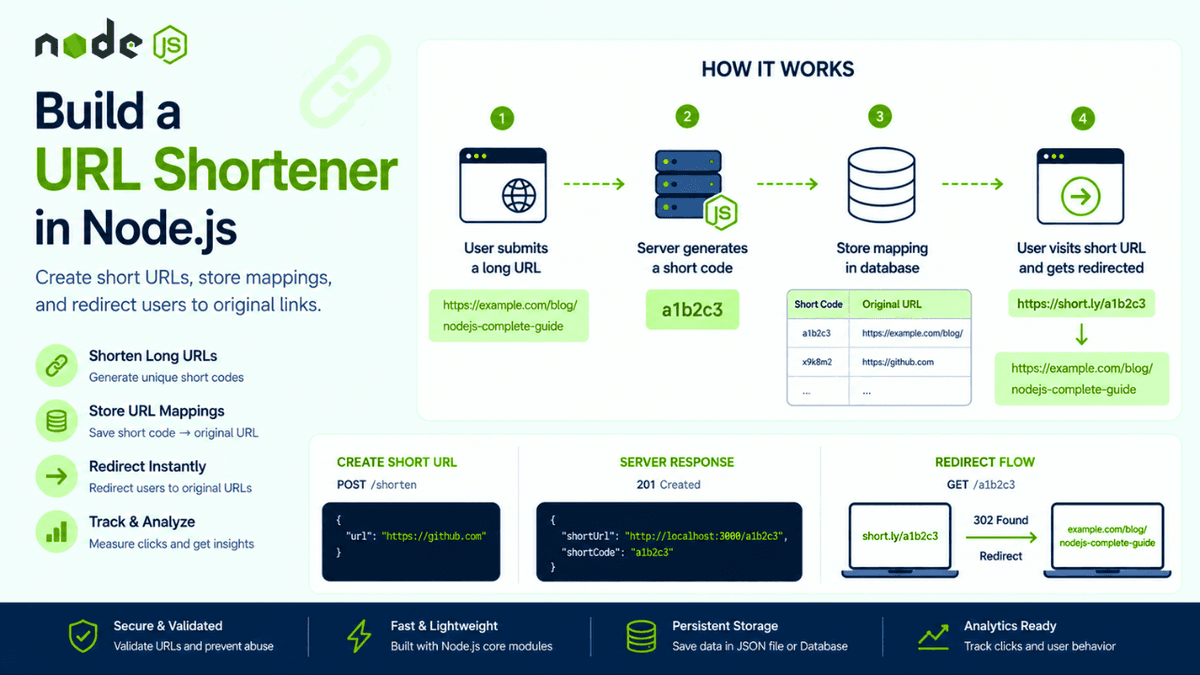
Learn how to build a URL Shortener in Node.js using the HTTP module. Understand redirects, unique IDs, routing, and URL mapping with a real-world backend project.
Build a URL Shortener in Node.js: Create Tiny URLs Like Bitly
If you've ever shared a long URL on social media, in emails, or in documentation, you've probably used a URL shortener.
Services like Bitly and TinyURL convert long links into short, shareable URLs that are easier to remember and distribute.
In this article, we'll build a simple URL shortener in Node.js and explore how one of the internet's most common backend services works behind the scenes.
After building a Static Website Server in the previous article, this project introduces an important backend concept:
Redirecting users from one route to another.
What is a URL Shortener?
A URL shortener converts a long URL into a short identifier.
Example:
Original URL:
https://example.com/blog/nodejs-complete-beginner-guide-to-rest-api-development
Short URL:
https://short.ly/a1b2c3
When a user visits the short URL, the server redirects them to the original destination.
How URL Shorteners Work
The workflow is surprisingly simple:
- User submits a long URL.
- Server generates a unique short code.
- The mapping is stored.
- Users visit the short URL.
- Server redirects them to the original URL.
Example mapping:
| Short Code | Original URL |
|---|---|
| a1b2c3 | https://example.com/blog/nodejs |
| x9k8m2 | https://google.com |
| p7z4d1 | https://github.com |
This simple idea powers billions of redirects every day.
Project Structure
  url-shortener/
│
├── data/
│   └── urls.json
│
├── server.js
├── package.json
└── utils/
    └── generateCode.js
As your application grows, you can move storage to MongoDB or PostgreSQL, but JSON files work perfectly for learning purposes.
Creating the HTTP Server
  const http = require("http");

const server = http.createServer((req, res) => {
  res.end("URL Shortener Running");
});

server.listen(3000, () => {
  console.log("Server running on port 3000");
});
Now let's start creating short URLs.
Generating a Short Code
A short code should be:
- Unique
- Small
- Easy to share
Example:
  function generateShortCode() {
  return Math.random()
    .toString(36)
    .substring(2, 8);
}
Possible output:
k3m9xq
Production applications often use libraries such as NanoID or UUID for better reliability and collision handling.
Storing URL Mappings
Example:
  const urls = {
  "k3m9xq": "https://github.com",
  "a8f4de": "https://nodejs.org"
};
When a request arrives, we simply look up the matching URL.
This concept is very similar to the Notes API we built earlier, where resources were mapped using unique identifiers.
Creating a Short URL Endpoint
  if (req.method === "POST" && req.url === "/shorten") {
  const shortCode = generateShortCode();

  urls[shortCode] = originalUrl;
}
Example request:
  {
  "url": "https://github.com"
}
Example response:
  {
  "shortUrl": "http://localhost:3000/k3m9xq"
}
This endpoint uses the same request body handling we learned while building POST Requests in Node.js .
Redirecting Users
The magic happens here:
  if (req.method === "GET" && urls[shortCode]) {
  res.writeHead(302, {
    Location: urls[shortCode]
  });

  res.end();
}
If a user visits:
http://localhost:3000/k3m9xq
The browser automatically redirects to:
https://github.com
This is the same redirect mechanism browsers use every day across the web.
Understanding HTTP Redirect Status Codes
Common redirect codes include:
| Status Code | Meaning |
|---|---|
| 301 | Permanent Redirect |
| 302 | Temporary Redirect |
| 307 | Temporary Redirect (method preserved) |
| 308 | Permanent Redirect (method preserved) |
For URL shorteners, 301 and 302 are the most common choices.
If you haven't explored response codes yet, our article on HTTP Status Codes in Node.js explains these in much more detail.
Saving URLs to a JSON File
Instead of storing everything in memory:
  const fs = require("fs");

fs.writeFileSync(
  "./data/urls.json",
  JSON.stringify(urls)
);
This ensures URLs survive server restarts.
Since persistence depends heavily on file operations, understanding the File System Module ( fs ) becomes increasingly valuable as projects grow.
Handling Invalid URLs
Never trust user input.
Always validate:
- URL format
- Protocol
- Length
- Domain
Example:
  try {
  new URL(userInput);
} catch {
  console.log("Invalid URL");
}
Validation becomes even more important when we later discuss Input Validation and Security Best Practices .
Adding Analytics
Real URL shorteners track:
- Total clicks
- Geographic location
- Devices
- Browsers
- Referrers
Example:
  {
  "clicks": 1523,
  "country": "India",
  "device": "Mobile"
}
Analytics often become more valuable than the short URL itself.
Common Beginner Mistakes
Using Predictable IDs
Bad:
  1
2
3
4
5
Attackers can easily enumerate your entire database.
Better:
  k3m9xq
x8p2le
z4t7mn
Forgetting Duplicate Detection
If the same URL already exists:
https://github.com
You may want to return the existing short URL instead of creating a new one.
Missing Validation
Invalid URLs should never enter the system.
Always validate before storing data.
Real World Examples
URL shorteners power:
- Marketing campaigns
- QR codes
- Social media sharing
- Email campaigns
- Affiliate tracking
- Analytics platforms
Even large companies often build internal URL shortening services.
Conclusion
A URL shortener may look simple from the outside, but it introduces several important backend concepts:
- Unique identifiers
- Redirects
- Data persistence
- Validation
- Analytics
Understanding these ideas will help you build more advanced backend systems in the future.
More importantly, you've now built another real-world project that demonstrates how Node.js powers applications people use every single day.