Semantic Versioning Explained: Understanding MAJOR, MINOR, and PATCH
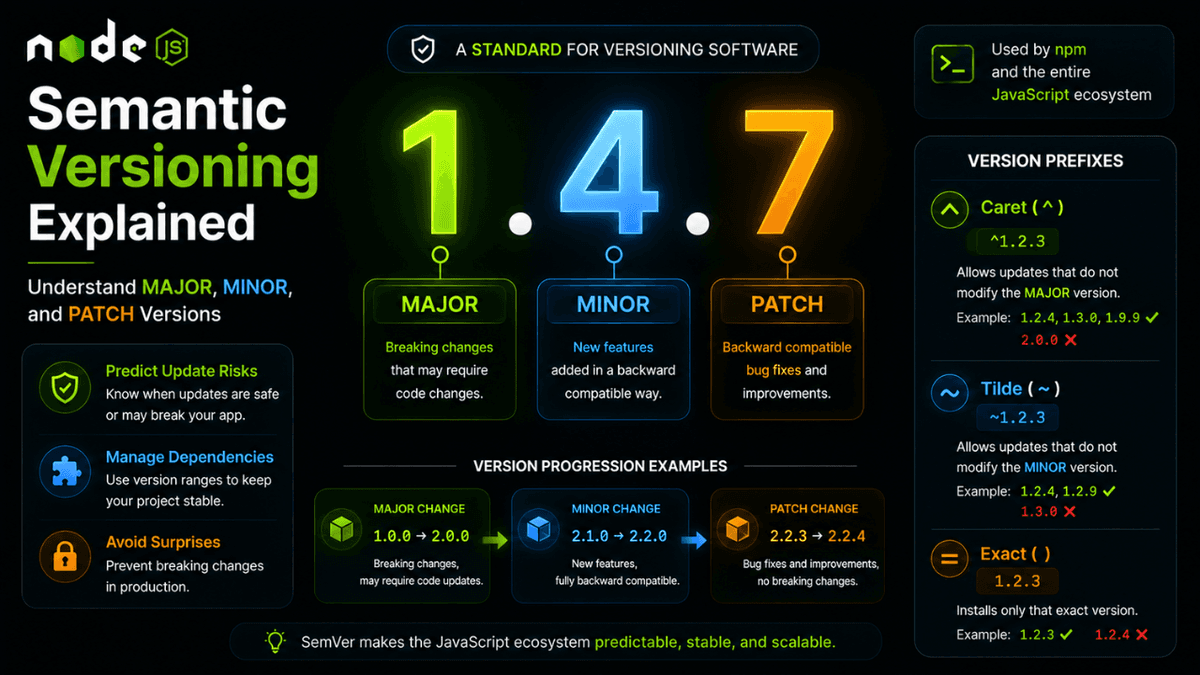
Learn how Semantic Versioning (SemVer) works in Node.js, including MAJOR, MINOR, PATCH versions and npm version prefixes like ^ and ~.
Semantic Versioning (SemVer) Explained: Understanding Package Versions in Node.js
Every Node.js project depends on packages.
Every package has a version.
But what do version numbers like 1.2.3 , 2.0.0 , or ^5.1.0 actually mean?
The answer is Semantic Versioning , commonly called SemVer .
Understanding SemVer helps developers update dependencies safely and avoid unexpected application issues.
What Is Semantic Versioning?
Semantic Versioning is a standard system for versioning software packages.
A version follows this format:
Example:
2.4.7
This version contains three parts:
- MAJOR
- MINOR
- PATCH
MAJOR Version
The first number changes when breaking changes are introduced.
Example:
1.0.0 → 2.0.0
Examples of breaking changes:
- Removed features
- Changed APIs
- Incompatible behavior
Applications often require code changes after major upgrades.
MINOR Version
The second number changes when new features are added without breaking compatibility.
Example:
2.1.0 → 2.2.0
Examples:
- New API endpoints
- New utility functions
- Additional configuration options
Existing code continues working normally.
PATCH Version
The third number changes when bugs are fixed.
Example:
2.2.3 → 2.2.4
Examples:
- Bug fixes
- Security patches
- Performance improvements
No code changes are usually required.
Example Breakdown
Consider:
5.1.7
This means:
| Part | Value | Meaning |
|---|---|---|
| Major | 5 | Breaking changes possible |
| Minor | 1 | New features added |
| Patch | 7 | Bug fixes |
Version Prefixes
Caret ( ^ )
^5.1.0
Allows:
5.x.x
Examples:
-
5.1.1 -
5.2.0 -
5.9.3
But not:
6.0.0
This is npm's default behavior.
Tilde ( ~ )
~5.1.0
Allows:
5.1.x
Examples:
-
5.1.1 -
5.1.8
But not:
-
5.2.0
Exact Version
5.1.0
Only installs:
5.1.0
No updates are allowed.
Why SemVer Matters
SemVer helps developers:
- Predict update risks
- Avoid breaking applications
- Manage dependencies safely
- Build stable production systems
Without SemVer, package management would become chaotic.
Real-World Example
Your package.json :
  {
  "dependencies": {
    "express": "^5.1.0"
  }
}
npm can install:
  5.1.1
5.2.0
5.4.3
but never:
6.0.0
This protects your application from unexpected breaking changes.
Common Beginner Mistakes
Updating Everything Blindly
Running:
npm update
without understanding versions can break applications.
Ignoring Major Upgrades
Major versions often include migration guides that should be reviewed carefully.
Removing Version Prefixes
Version ranges exist for a reason.
Use them intentionally.
Best Practices
- Use
^for most application dependencies. - Test major upgrades carefully.
- Read release notes before upgrading.
- Pin exact versions for critical systems.
- Review breaking changes before deployment.
Production Tip
Many large companies upgrade dependencies gradually using staging environments and automated testing before production deployment.
Why SemVer Matters
Semantic Versioning makes the entire JavaScript ecosystem predictable and maintainable.
It allows millions of packages to evolve without constantly breaking applications.
Conclusion
Understanding Semantic Versioning is essential for every Node.js developer.
Once you understand MAJOR.MINOR.PATCH and version ranges like ^ and ~ , package management becomes much easier and safer.