Nested Routes in React Router Explained
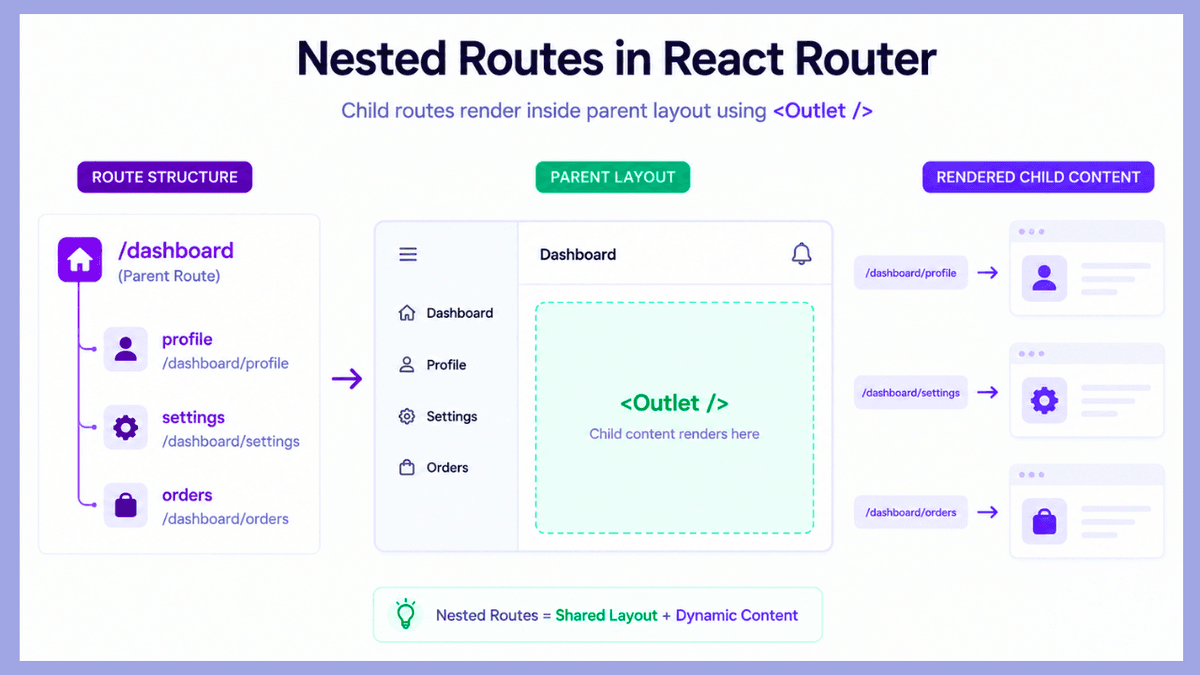
Learn Nested Routes in React Router with practical examples. Understand Outlet, index routes, shared layouts, dashboard routing, and scalable React application architecture.
Nested Routes in React Router: Building Layout-Based Navigation
As React applications grow, managing multiple pages becomes more complex.
Consider a dashboard application:
  /dashboard
/dashboard/profile
/dashboard/settings
/dashboard/orders
All these pages share common elements such as:
- Sidebar
- Header
- Navigation Menu
- Footer
Without Nested Routes, you would need to duplicate these components across multiple pages.
React Router solves this problem using Nested Routes .
Nested Routes allow routes to share layouts while rendering different content inside those layouts.
In this guide, you'll learn what Nested Routes are, how they work, and how to use them in real-world React applications.
Prerequisites
Before learning Nested Routes, make sure you understand:
- React Router Explained
- Static Routing in React Router
- Dynamic Routing in React Router
- Route Parameters in React Router
These concepts will help you understand route hierarchies more effectively.
What Are Nested Routes?
Nested Routes are routes inside other routes.
Example:
  /dashboard
   ├── profile
   ├── settings
   └── orders
Instead of creating completely separate pages, child routes render inside a parent route layout.
Why Do We Need Nested Routes?
Imagine building an admin dashboard.
Without Nested Routes:
  /dashboard/profile
/dashboard/settings
/dashboard/orders
Each page would need:
- Sidebar
- Header
- Navigation
repeated again and again.
This creates:
- duplicated code
- harder maintenance
- poor scalability
Nested Routes solve this problem by sharing layouts.
Understanding Nested Routing
Parent Route:
/dashboard
Child Routes:
  /dashboard/profile

/dashboard/settings

/dashboard/orders
Shared Layout:
  Sidebar

Header

↓

Child Page Content
Only the content section changes.
Creating a Dashboard Layout
Example:
  function DashboardLayout() {

  return (

    <div>

      <Sidebar />

      <Header />

      <Outlet />

    </div>

  );

}
Notice:
<Outlet />
This is where child routes render.
What is Outlet?
Outlet is a React Router component used to display nested route content.
Import:
  import {
  Outlet
} from "react-router-dom";
Example:
  function Layout() {

  return (

    <>
      <Navbar />

      <Outlet />

    </>

  );

}
The matched child route appears inside the Outlet.
Creating Nested Routes
Example:
  import {
  Routes,
  Route
} from "react-router-dom";

<Routes>

  <Route
    path="/dashboard"
    element={<DashboardLayout />}
  >

    <Route
      path="profile"
      element={<Profile />}
    />

    <Route
      path="settings"
      element={<Settings />}
    />

    <Route
      path="orders"
      element={<Orders />}
    />

  </Route>

</Routes>
These routes become:
  /dashboard/profile

/dashboard/settings

/dashboard/orders
Complete Example
Dashboard Layout
  import {
  Outlet
} from "react-router-dom";

function DashboardLayout() {

  return (

    <div>

      <h1>
        Dashboard
      </h1>

      <Outlet />

    </div>

  );

}

export default DashboardLayout;
Route Setup
  <Routes>

  <Route
    path="/dashboard"
    element={
      <DashboardLayout />
    }
  >

    <Route
      path="profile"
      element={<Profile />}
    />

    <Route
      path="settings"
      element={<Settings />}
    />

  </Route>

</Routes>
URLs
  /dashboard/profile

/dashboard/settings
Both pages share the same dashboard layout.
Nested Navigation Example
  import {
  Link
} from "react-router-dom";

function Sidebar() {

  return (

    <nav>

      <Link
        to="/dashboard/profile"
      >
        Profile
      </Link>

      <Link
        to="/dashboard/settings"
      >
        Settings
      </Link>

    </nav>

  );

}
Users can switch pages while keeping the dashboard layout intact.
Index Routes
Sometimes you want a default child route.
Example:
  <Route
  path="/dashboard"
  element={<DashboardLayout />}
>

  <Route
    index
    element={<DashboardHome />}
  />

  <Route
    path="profile"
    element={<Profile />}
  />

</Route>
Visiting:
/dashboard
renders:
DashboardHome
inside the Outlet.
Nested Routes with Route Parameters
Nested routes work with dynamic routes as well.
Example:
  <Route
  path="/products"
  element={<ProductsLayout />}
>

  <Route
    path=":id"
    element={<ProductDetails />}
  />

</Route>
URL:
/products/101
React Router renders:
  ProductsLayout

↓

ProductDetails
inside the Outlet.
Behind the Scenes
When a user visits:
/dashboard/profile
React Router:
  Matches Parent Route

↓

Loads Layout

↓

Finds Child Route

↓

Renders Child Inside Outlet

↓

Updates UI
This is how layout sharing works.
Real Project Usage
Admin Dashboards
Routes:
  /dashboard/profile

/dashboard/settings

/dashboard/users
Shared:
- sidebar
- navbar
- footer
E-commerce Admin Panels
Routes:
  /admin/products

/admin/orders

/admin/customers
Shared dashboard layout.
Learning Platforms
Routes:
  /course/javascript

/course/react

/course/nodejs
Shared course layout.
Common Real-World Use Cases
Nested Routes are commonly used for:
- dashboards
- admin panels
- user profiles
- settings pages
- course platforms
- documentation websites
- SaaS applications
Most large React applications use Nested Routes extensively.
Nested Routes vs Regular Routes
Regular Routes
  /about

/contact

/services
Independent pages.
Nested Routes
  /dashboard/profile

/dashboard/settings

/dashboard/orders
Shared layout structure.
Nested Routes reduce duplication significantly.
Common Beginner Mistakes
Forgetting Outlet
Incorrect:
  function Layout() {

  return (
    <div>
      Dashboard
    </div>
  );
}
Child routes will never render.
Correct:
<Outlet />
Using Absolute Paths
Incorrect:
  <Route
  path="/profile"
/>
inside nested routes.
Correct:
  <Route
  path="profile"
/>
Child routes should usually use relative paths.
Missing Parent Layout
Nested routes require a parent route component.
Forgetting Index Routes
Without an index route:
/dashboard
may display an empty layout.
Nested Routes Interview Questions
- What are Nested Routes?
- Why are Nested Routes useful?
- What is Outlet?
- What is an Index Route?
- How do Nested Routes reduce code duplication?
- Can Nested Routes use Route Parameters?
- What is the difference between Nested Routes and Regular Routes?
Build Something
Practice Nested Routes by creating:
- Admin Dashboard
- Learning Platform
- User Settings Panel
- Documentation Website
- SaaS Dashboard
These projects will help you understand layout-based routing architecture.
Production Tip
Professional React developers usually:
- create reusable layouts
- organize routes by feature
- keep shared UI in parent layouts
- use index routes for defaults
- avoid deeply nested route structures
A clean route hierarchy improves maintainability and scalability.
Why Nested Routes Matter
As applications grow, layouts become more complex.
Nested Routes allow developers to reuse layouts while rendering different content inside them.
This keeps React applications clean, scalable, and easier to maintain.
Conclusion
Nested Routes allow child routes to render inside parent route layouts using the Outlet component.
They reduce duplication, improve scalability, and provide a cleaner routing structure for modern React applications.
Mastering Nested Routes is essential for building dashboards, admin panels, and large-scale React applications.