Build a Notes App in React: Complete Project Guide
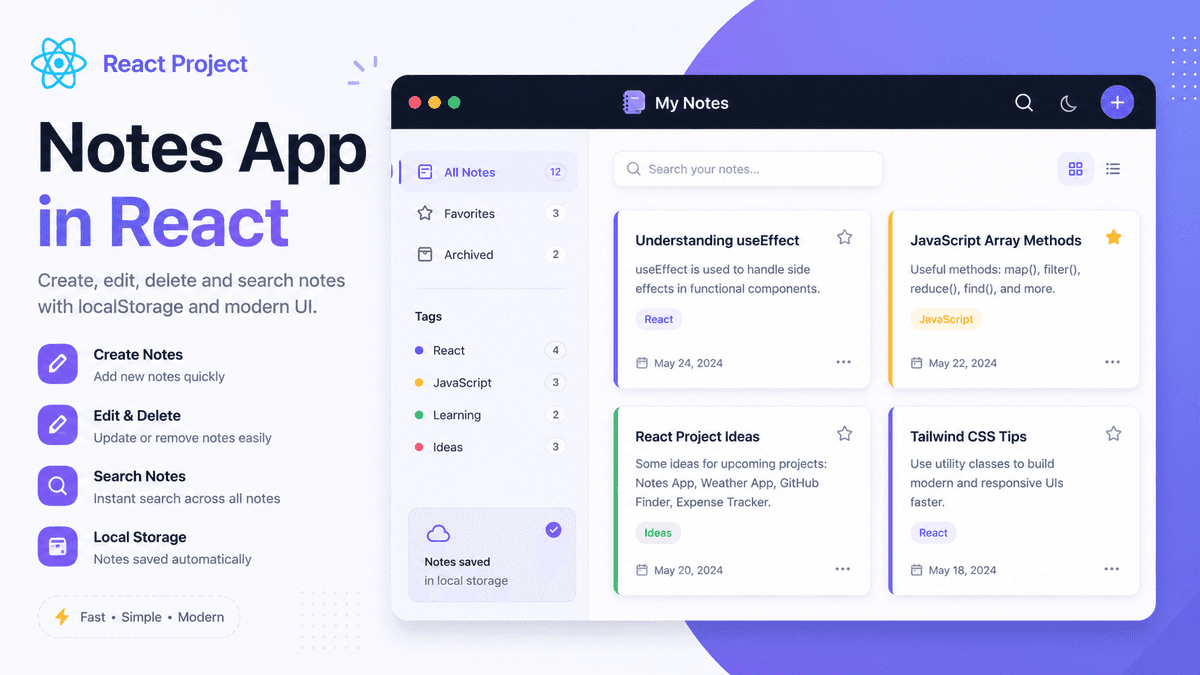
Learn how to build a Notes App in React with CRUD operations, search functionality, localStorage, reusable components, and responsive UI. A perfect beginner React project.
Build a Notes App in React: Complete Beginner Project Guide
A Notes App is one of the most practical React projects because it teaches you how to manage and organize user-generated content.
Unlike a Todo App, where each task is usually just a single line of text, a Notes App allows users to create detailed notes, edit existing ones, delete unwanted notes, and search through their content.
This project combines many important React concepts into one real-world application.
In this guide, you'll build a modern Notes App using React and learn how professional developers structure similar applications.
Prerequisites
Before starting this project, make sure you understand:
- React Components
- React State
- React Hooks
- Controlled Components
- React useEffect Hook
- React Todo List Project
What Will We Build?
Our Notes App will support:
- ✅ Create Notes
- ✅ Edit Notes
- ✅ Delete Notes
- ✅ Search Notes
- ✅ Store Notes in Local Storage
- ✅ Responsive Layout
- ✅ Dark Mode Support (Optional)
Example:
  📒 React Learning Notes

Title:
Understanding useEffect

Description:
Learn dependency arrays,
cleanup functions,
and API calls.
Why Build a Notes App?
A Notes App introduces workflows that are commonly found in real products.
You'll learn:
- managing multiple form fields
- updating complex state
- CRUD operations
- filtering data
- reusable components
- persistent storage
- responsive layouts
These concepts are used in productivity apps like Notion, Google Keep, and Microsoft OneNote.
Project Structure
  src

├── components
│   ├── NoteForm.jsx
│   ├── NoteCard.jsx
│   ├── NoteList.jsx
│   ├── SearchBar.jsx
│   └── EmptyState.jsx

├── hooks
│   └── useLocalStorage.js

├── App.jsx

└── main.jsx
This structure separates UI, logic, and reusable functionality.
Step 1: Create Notes State
  const [notes, setNotes] =
  useState([]);
This state stores every note.
Each note can have the following structure:
  {
  id: Date.now(),
  title: "React Hooks",
  description: "Learn useEffect",
  createdAt: new Date()
}
Step 2: Build the Note Form
Create a form that collects:
- Title
- Description
Users should be able to submit the form to create a new note.
Step 3: Add Notes
Create a function that appends a new note to the existing list.
Each note should receive a unique ID so React can efficiently render the list.
Step 4: Display Notes
Render notes using:
notes.map(...)
Each note should be displayed inside a reusable NoteCard component.
Step 5: Edit Existing Notes
Allow users to update the title or description of any note.
Editing teaches immutable state updates, an essential React concept.
Step 6: Delete Notes
Provide a delete button for each note.
Removing notes should immediately update the UI.
Step 7: Search Notes
Create a search bar that filters notes while the user types.
Searching introduces derived state and dynamic rendering.
Step 8: Save Notes
Store notes using Local Storage.
Without persistence:
  Refresh Page

↓

All Notes Lost
With Local Storage:
  Refresh Page

↓

Restore Notes Automatically
Step 9: Improve the UI
Enhance your application by adding:
- note cards
- rounded corners
- shadows
- responsive grid
- empty state illustration
- hover effects
- smooth transitions
These improvements create a more professional interface.
Complete Application Flow
  Create Note

↓

Save State

↓

Render Card

↓

Edit / Delete

↓

Save to Local Storage

↓

Restore on Refresh
This reflects the lifecycle of many productivity applications.
Real Project Improvements
Once the basic application works, add:
- categories
- tags
- favorite notes
- markdown support
- note colors
- sorting
- pin notes
- rich text editor
These features make the project feel production-ready.
Common Beginner Mistakes
Mutating State Directly
Always create new arrays instead of modifying existing ones.
Forgetting Unique Keys
Every rendered note should have a unique key.
Storing Too Much Logic in One Component
Split forms, cards, and lists into reusable components.
Ignoring Empty States
Display a friendly message when no notes exist.
What Concepts Does This Project Teach?
By completing this project, you'll practice:
- React Components
- Props
- State
- Hooks
- CRUD Operations
- Local Storage
- Forms
- Search
- Conditional Rendering
- Responsive UI
These skills apply directly to many real-world applications.
Build Something More Advanced
After this project, try building:
- Expense Tracker
- Habit Tracker
- Bookmark Manager
- Movie Watchlist
- Recipe Organizer
Each project introduces new challenges while reinforcing the same React fundamentals.
Production Tip
Professional React developers usually:
- separate UI into reusable components
- extract reusable hooks
- organize state logically
- persist user data
- design responsive interfaces
These practices make applications easier to maintain and scale.
Why This Project Matters
A Notes App demonstrates how React can manage more complex data than a simple Todo List.
It introduces patterns that you'll use in content management systems, productivity tools, and business applications.
Conclusion
Building a Notes App is an excellent way to strengthen your React fundamentals while creating a practical application.
By implementing CRUD operations, search functionality, reusable components, and local storage, you'll gain hands-on experience that prepares you for larger React projects.