Build a GitHub User Finder App in React
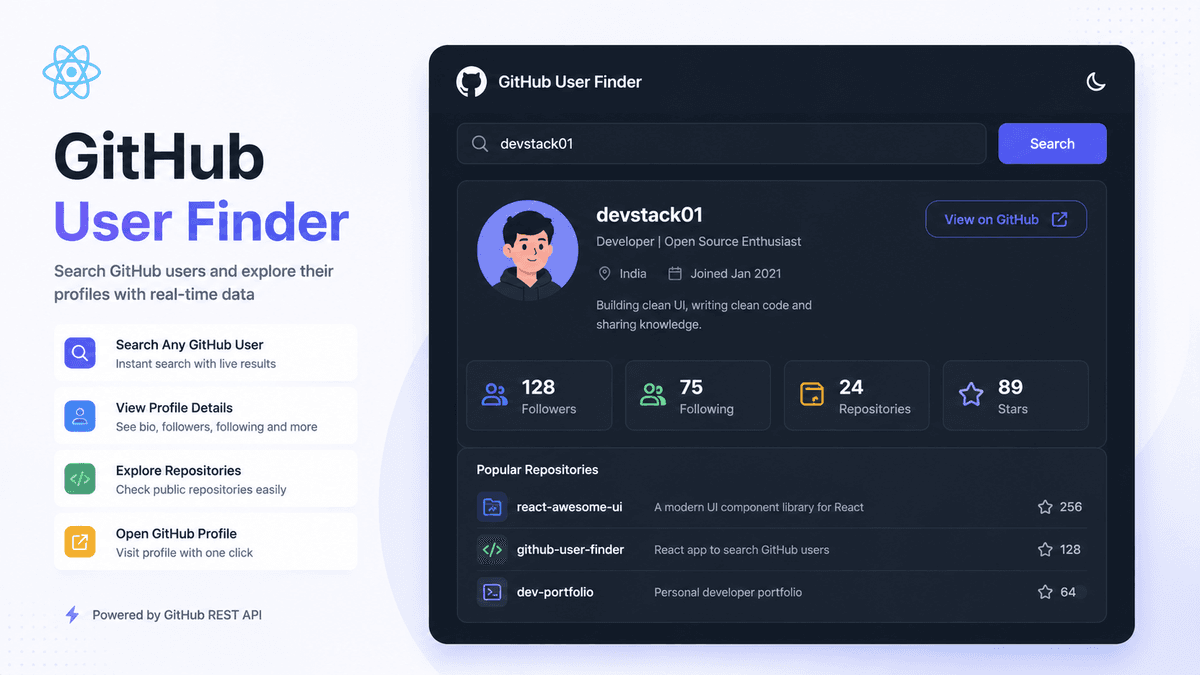
Learn how to build a GitHub User Finder App in React using the GitHub API. Understand API integration, React Hooks, Fetch API, async/await, loading states, and responsive UI.
Build a GitHub User Finder App in React: Complete Beginner Project Guide
Once you've built a Todo App and a Weather App, the next logical step is creating a GitHub User Finder .
This project introduces searching real users through the GitHub API and displaying profile information dynamically.
Unlike previous projects, you'll work with more complex API responses and build a cleaner, card-based user interface.
In this guide, you'll build a GitHub User Finder application using React and the GitHub REST API.
Prerequisites
Before starting this project, make sure you understand:
What Will We Build?
Our application will support:
✅ Search GitHub Users ✅ Display Profile Picture ✅ Show Username ✅ Show Bio ✅ Display Followers & Following ✅ Display Public Repositories ✅ View GitHub Profile
Example:
  👤 torvalds

📍 Creator of Linux

👥 Followers: 250000+

📦 Public Repositories: 8

🔗 View GitHub Profile
Why Build a GitHub User Finder?
This project teaches several practical frontend development skills.
You'll learn:
- API integration
- handling search input
- asynchronous requests
- conditional rendering
- reusable components
- working with nested JSON data
- responsive UI design
These are common tasks in production React applications.
Project Structure
  src

├── components
│   ├── SearchBar.jsx
│   ├── UserCard.jsx
│   ├── Loader.jsx
│   └── ErrorMessage.jsx

├── services
│   └── githubApi.js

├── App.jsx

└── main.jsx
Keeping API logic separate improves maintainability.
Step 1: Create State
  const [username, setUsername] =
  useState("");

const [user, setUser] =
  useState(null);

const [loading, setLoading] =
  useState(false);

const [error, setError] =
  useState("");
These states manage the application.
Step 2: Create Search Input
  <input
  type="text"
  placeholder="Search GitHub User"
  value={username}
  onChange={(e) =>
    setUsername(e.target.value)
  }
/>
Users can now enter any GitHub username.
Step 3: Fetch User Data
  const fetchUser = async () => {

  try {

    setLoading(true);

    const response =
      await fetch(
        `https://api.github.com/users/${username}`
      );

    const data =
      await response.json();

    setUser(data);

  } catch {

    setError(
      "User not found."
    );

  }

  setLoading(false);

};
This retrieves user information from the GitHub API.
Understanding the API Flow
  Enter Username

↓

Click Search

↓

GitHub API

↓

Receive JSON

↓

Update State

↓

Render Profile
This is the standard workflow for API-based applications.
Step 4: Display User Information
  {user && (

  <div>

    <img
      src={user.avatar_url}
      alt={user.login}
    />

    <h2>
      {user.login}
    </h2>

    <p>
      {user.bio}
    </p>

  </div>

)}
The UI updates automatically when data is received.
Display Additional Information
Popular fields include:
- Avatar
- Name
- Username
- Bio
- Followers
- Following
- Public Repositories
- Location
- Company
- Website
- Join Date
These details make the application more useful.
Styling with Tailwind CSS
Example:
  <div
  className="
    max-w-md
    mx-auto
    rounded-xl
    shadow-lg
    p-6
    bg-white
  "
>
  User Profile
</div>
This creates a clean and modern card layout.
Real Project Improvements
After building the basic application, add:
- recent repositories
- pinned repositories
- dark mode
- search history
- loading skeletons
- profile sharing
- responsive animations
These improvements simulate production-ready applications.
Common Beginner Mistakes
Not Checking API Errors
Always verify the response before updating state.
Ignoring Loading State
Provide feedback while data is loading.
Rendering Before Data Exists
Use conditional rendering to avoid runtime errors.
Hardcoding Usernames
Always allow dynamic user searches.
What Concepts Does This Project Teach?
By completing this project, you'll practice:
- React Components
- State Management
- Fetch API
- Async/Await
- API Integration
- Conditional Rendering
- Responsive UI
- Error Handling
- Loading States
These are core skills for every React developer.
Build Something More Advanced
After this project, challenge yourself by building:
- Movie Search App
- News App
- Currency Converter
- Recipe Finder
- E-commerce Product Search
These projects expand your API integration skills.
Production Tip
Professional React developers usually:
- separate API logic into services
- use environment variables
- handle loading and error states
- design reusable components
- optimize API requests
Following these practices makes your applications scalable.
Why This Project Matters
The GitHub User Finder introduces you to real-world API consumption and dynamic UI updates.
The same development patterns are used in dashboards, CRM systems, analytics tools, and SaaS products.
Conclusion
Building a GitHub User Finder is an excellent next step after the Weather App.
It strengthens your understanding of API integration, state management, conditional rendering, and responsive UI development while preparing you for more advanced React projects.