PUT vs PATCH in Node.js: Understanding the Difference with Examples
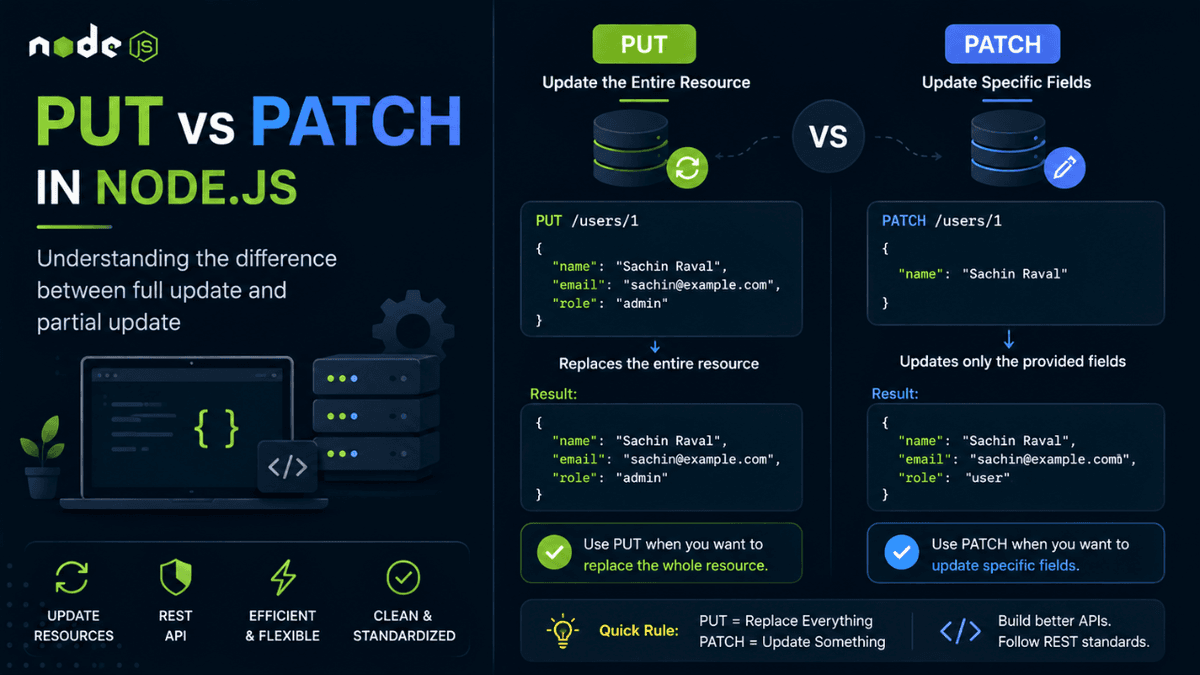
Learn the difference between PUT and PATCH requests in Node.js. Understand full updates vs partial updates with practical REST API examples and best practices.
PUT vs PATCH in Node.js: Understanding the Difference
After learning how GET requests retrieve data and POST requests create new resources, the next step in the CRUD lifecycle is updating existing data.
This is where many developers get confused.
Should you use PUT or PATCH ?
Both update data, but they serve different purposes.
Understanding this difference helps you design cleaner APIs, follow REST standards, and avoid unexpected bugs in production applications.
Why Do We Need Update Operations?
Imagine you're building a blog platform.
A user wants to:
- Change their profile picture
- Update their email address
- Edit a blog post
- Modify a product price
- Change account settings
These actions don't create new resources.
They update existing ones.
In our earlier article on CRUD Operations in Node.js , we learned that the Update operation maps to either PUT or PATCH .
The challenge is knowing which one to choose.
What is a PUT Request?
A PUT request replaces the entire resource.
Example:
Current user:
  {
  "name": "Sachin",
  "email": "sachin@example.com",
  "role": "user"
}
Request:
PUT /users/1
Request body:
  {
  "name": "Sachin Raval",
  "email": "sachinraval@example.com",
  "role": "admin"
}
Result:
  {
  "name": "Sachin Raval",
  "email": "sachinraval@example.com",
  "role": "admin"
}
The old resource is completely replaced by the new one.
Think of PUT as replacing an entire document with a new version.
What Happens if Fields Are Missing?
Suppose the existing user looks like this:
  {
  "name": "Sachin",
  "email": "sachin@example.com",
  "role": "user"
}
You send:
  {
  "name": "Sachin Raval"
}
Using PUT, the result could become:
  {
  "name": "Sachin Raval"
}
The email and role fields may disappear because PUT assumes the new payload is the complete replacement.
This behavior makes PUT useful when the client knows the full state of the resource.
What is a PATCH Request?
A PATCH request updates only specific fields.
Example:
Current user:
  {
  "name": "Sachin",
  "email": "sachin@example.com",
  "role": "user"
}
Request:
PATCH /users/1
Request body:
  {
  "name": "Sachin Raval"
}
Result:
  {
  "name": "Sachin Raval",
  "email": "sachin@example.com",
  "role": "user"
}
Only the name field changes.
Everything else remains untouched.
This makes PATCH ideal for partial updates.
PUT vs PATCH Comparison
| Feature | PUT | PATCH |
|---|---|---|
| Replaces full resource | ✅ | ❌ |
| Updates specific fields | ❌ | ✅ |
| Requires complete object | Usually | No |
| Network payload size | Larger | Smaller |
| Common usage | Full profile update | Edit one field |
Real World Examples
Good use cases for PUT
- Replacing an entire user profile
- Updating complete application settings
- Replacing a document
- Updating all product details at once
Good use cases for PATCH
- Updating profile image
- Changing password
- Updating email address
- Changing product price
- Toggling a feature flag
Most modern APIs use PATCH more frequently because frontend applications usually update only a few fields at a time.
PUT Example in Node.js
  if (req.method === "PUT" && req.url === "/users/1") {
  let body = "";

  req.on("data", chunk => {
    body += chunk;
  });

  req.on("end", () => {
    const updatedUser = JSON.parse(body);

    users[0] = updatedUser;

    res.writeHead(200, {
      "Content-Type": "application/json"
    });

    res.end(JSON.stringify(updatedUser));
  });
}
The existing resource is completely replaced.
PATCH Example in Node.js
  if (req.method === "PATCH" && req.url === "/users/1") {
  let body = "";

  req.on("data", chunk => {
    body += chunk;
  });

  req.on("end", () => {
    const updates = JSON.parse(body);

    users[0] = {
      ...users[0],
      ...updates
    };

    res.writeHead(200, {
      "Content-Type": "application/json"
    });

    res.end(JSON.stringify(users[0]));
  });
}
Notice how we merge the existing object with incoming updates.
This approach preserves existing fields while modifying only the requested properties.
If you haven't explored object spreading yet, understanding it will make API development significantly easier when working with update operations.
Which One Should You Use?
Use PUT when:
- The client sends the entire resource.
- You want to replace the old resource completely.
- Missing fields should be removed.
Use PATCH when:
- Only a few fields need updating.
- You want to preserve existing data.
- Bandwidth efficiency matters.
For most modern web applications, PATCH is the preferred choice.
Status Codes for Update Requests
Common responses include:
| Status Code | Meaning |
|---|---|
| 200 | Update successful |
| 204 | Updated successfully with no response body |
| 400 | Invalid request |
| 404 | Resource not found |
| 500 | Internal server error |
As your APIs grow, returning meaningful status codes becomes increasingly important for debugging and frontend integration.
Common Beginner Mistakes
Using POST for Updates
Wrong:
POST /users/1
Correct:
PATCH /users/1
or
PUT /users/1
Using PUT for Small Changes
Wrong:
  {
  "profileImage": "avatar.png"
}
Using PUT here may accidentally remove existing fields.
PATCH is usually the better choice.
Forgetting Validation
Never trust incoming request data.
Validation prevents invalid data from entering your system.
When we cover Input Validation in Node.js , you'll see why this is one of the most important security practices in backend development.
Real World APIs
Many popular APIs use PATCH for partial updates:
- Updating user profiles
- Editing blog posts
- Changing account preferences
- Updating inventory quantities
- Modifying subscription settings
Meanwhile, PUT is often used for complete replacements or synchronization operations.
Conclusion
Both PUT and PATCH solve the same problem: updating data.
The difference lies in how they update that data.
Use PUT when replacing an entire resource.
Use PATCH when modifying specific fields.
Understanding this distinction makes your APIs more predictable, easier to maintain, and closer to industry standards followed by modern REST APIs.