PM2 for Node.js: Keep Your Applications Running in Production
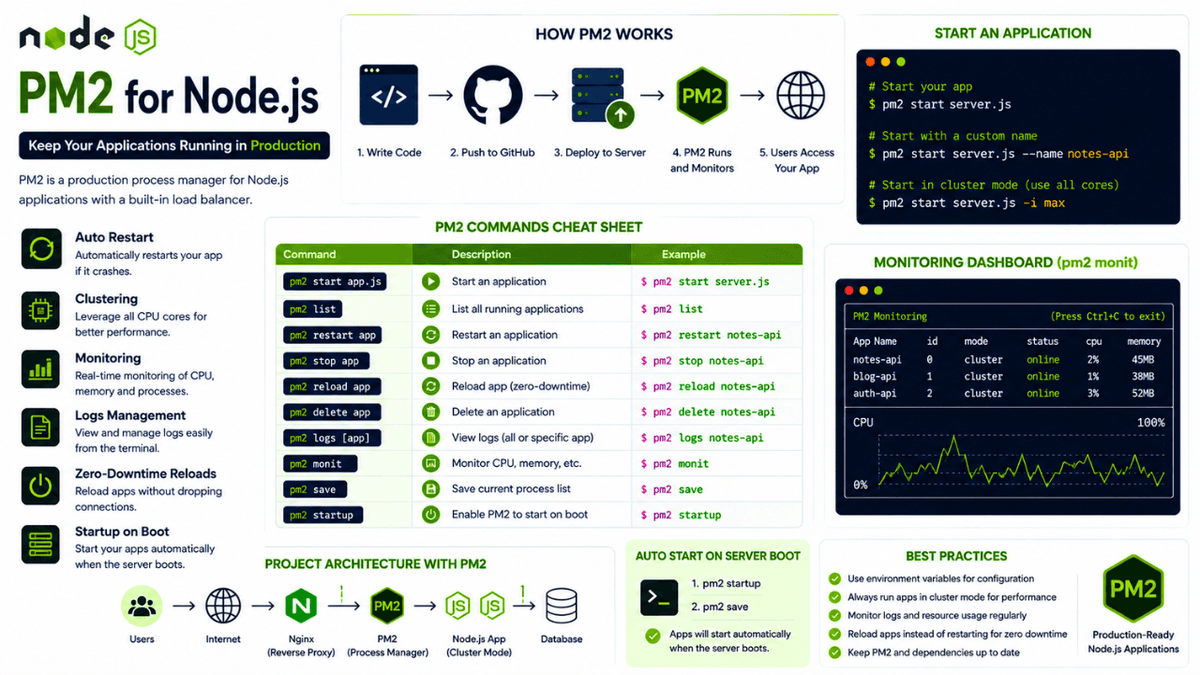
Learn how to use PM2 to manage Node.js applications in production. Understand process management, auto restart, clustering, monitoring, logs, and zero-downtime deployments.
PM2 for Node.js: Keep Your Applications Running in Production
Deploying your Node.js application is a major milestone—but deployment is only the beginning.
What happens if your application crashes?
What if your server restarts?
How do you monitor logs or restart an application without downtime?
Running your application with node server.js works for development, but it's not suitable for production.
This is where PM2 comes in.
PM2 is one of the most popular process managers for Node.js applications. It keeps your applications running, automatically restarts them after crashes, manages multiple processes, and provides monitoring tools for production environments.
If you've completed the previous article on Node.js Deployment Basics , you're ready to learn how to keep your deployed applications running reliably.
What is PM2?
PM2 is a production process manager for Node.js applications.
Instead of running:
node server.js
You run:
pm2 start server.js
PM2 continues running your application even if it crashes unexpectedly.
Why Use PM2?
Imagine you've deployed your backend API.
Suddenly:
- The server runs out of memory.
- An unexpected error crashes the application.
- A deployment accidentally stops the process.
Without PM2:
  Application Crashes
        ↓
Users Cannot Access Website
With PM2:
  Application Crashes
        ↓
PM2 Detects Crash
        ↓
Automatically Restarts App
        ↓
Users Experience Minimal Downtime
This automatic recovery is one of the biggest reasons PM2 is widely used in production.
Installing PM2
Install PM2 globally:
npm install -g pm2
Verify the installation:
pm2 --version
You'll now have access to PM2 commands from anywhere on your system.
Starting an Application
Start your Node.js application:
pm2 start server.js
Example output:
  App Name: server
Status: online
PID: 14253
Unlike running node server.js , PM2 keeps the process under continuous supervision.
Naming Your Application
Instead of using the default filename, assign a meaningful name:
pm2 start server.js --name notes-api
Now PM2 displays:
notes-api
This becomes especially useful when managing multiple applications on the same server.
Viewing Running Processes
Display all managed applications:
pm2 list
Example:
  ┌─────────────┬─────────┬────────┐
│ App Name    │ Status  │ PID    │
├─────────────┼─────────┼────────┤
│ notes-api   │ online  │ 14253  │
│ blog-api    │ online  │ 14310  │
└─────────────┴─────────┴────────┘
PM2 provides a quick overview of your production services.
Restarting an Application
Restart after making changes:
pm2 restart notes-api
Restarting is much cleaner than manually stopping and starting the process.
Stopping an Application
To stop a running application:
pm2 stop notes-api
The application remains registered but is no longer running.
Deleting an Application
Remove an application from PM2 completely:
pm2 delete notes-api
This removes it from PM2's process list.
Monitoring Applications
One of PM2's most useful features is real-time monitoring.
Run:
pm2 monit
You'll see:
- CPU usage
- Memory usage
- Running processes
- Event loop delay
Monitoring helps identify performance issues before users notice them.
Viewing Logs
Production debugging depends heavily on logs.
View logs:
pm2 logs
For a specific application:
pm2 logs notes-api
Unlike console.log() in development, PM2 keeps logs available even after the application restarts.
This builds naturally on the concepts introduced in our earlier article on Logging in Node.js , where we discussed why production logs are essential for debugging.
Auto Start After Server Reboot
Imagine your VPS restarts after a system update.
Without PM2:
  Server Restarts
      ↓
Application Stops
With PM2 startup enabled:
pm2 startup
Then save your current processes:
pm2 save
Now PM2 automatically restores your applications whenever the server boots.
Running Multiple Instances
PM2 supports clustering out of the box.
Example:
pm2 start server.js -i max
max tells PM2 to use all available CPU cores.
Instead of:
1 Process
You may get:
  Core 1 → Process 1
Core 2 → Process 2
Core 3 → Process 3
Core 4 → Process 4
This improves performance and handles more concurrent users.
If you're unfamiliar with clustering, our earlier guide on the Node.js Cluster Module explains how multiple processes improve scalability.
Zero-Downtime Reloads
When deploying updates, restarting the server can briefly interrupt users.
PM2 supports seamless reloads:
pm2 reload notes-api
Instead of stopping all processes simultaneously, PM2 reloads them gradually.
This minimizes downtime during deployments.
Common PM2 Commands
| Command | Description |
|---|---|
pm2 start app.js | Start an application |
pm2 stop app | Stop an application |
pm2 restart app | Restart an application |
pm2 reload app | Reload without downtime |
pm2 delete app | Remove an application |
pm2 list | Show running applications |
pm2 logs | View logs |
pm2 monit | Monitor CPU and memory |
pm2 save | Save current process list |
pm2 startup | Start PM2 on system boot |
These commands cover the majority of day-to-day production management tasks.
Common Beginner Mistakes
Running with node server.js in Production
Using:
node server.js
means the application stops immediately if it crashes.
Use PM2 instead.
Forgetting pm2 save
If you don't save the process list:
pm2 save
your applications won't automatically restart after a server reboot.
Ignoring Logs
Monitoring logs regularly helps detect errors, memory leaks, and unexpected behavior before they become major problems.
Real-World Usage
PM2 is widely used for:
- REST APIs
- E-commerce platforms
- SaaS applications
- Admin dashboards
- Microservices
- Internal business tools
It provides a simple yet powerful way to keep Node.js applications running in production.
Conclusion
PM2 is one of the first tools every Node.js backend developer should learn after deployment.
It transforms a simple Node.js application into a production-ready service by providing automatic restarts, monitoring, logging, clustering, and zero-downtime deployments.
Whether you're hosting a small personal project or a large-scale backend system, PM2 helps keep your applications available, reliable, and easier to manage in production.