Password Hashing with Node.js Crypto: Hashing, Salting, and Secure Password Storage
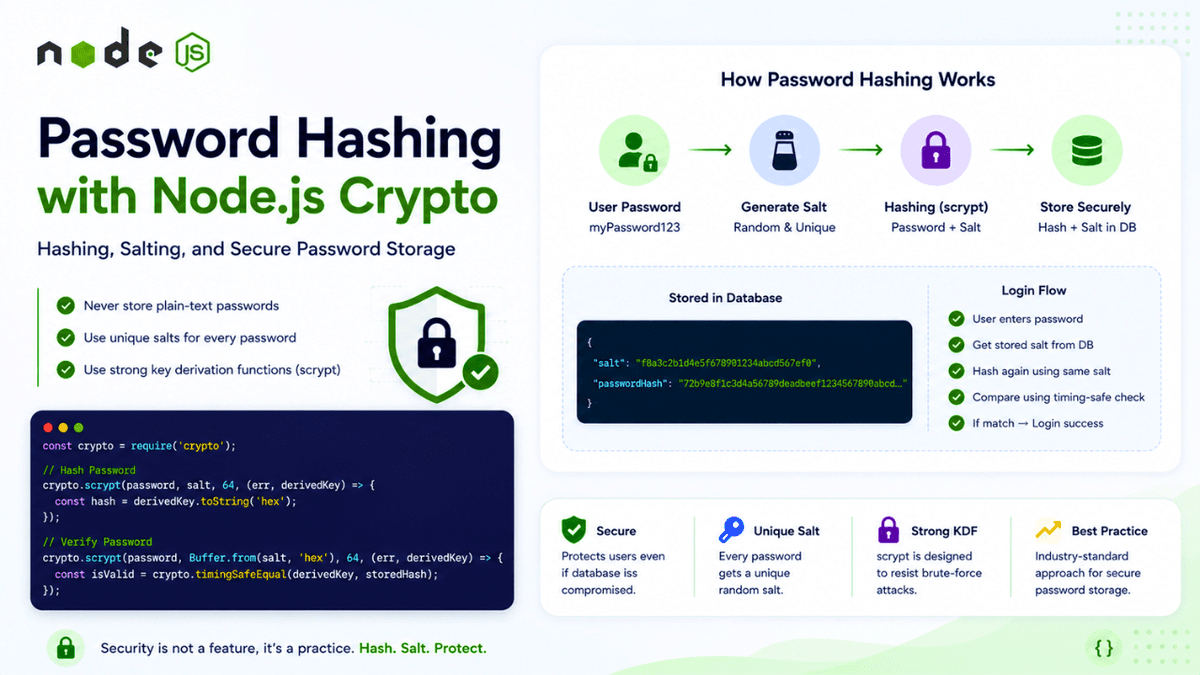
Learn how to securely hash passwords in Node.js using the built-in Crypto module. Understand hashing, salting, password security, scrypt, timing-safe comparison, and production best practices.
Password Hashing with Node.js Crypto: Hashing, Salting, and Secure Password Storage
Passwords are one of the most sensitive pieces of data in any application.
When a user creates an account, your application needs to store something that allows it to verify the user's password later.
The biggest mistake you can make is storing the password itself.
Never do this:
  const user = {
  email: "user@example.com",
  password: "myPassword123"
};
If your database is compromised, every user's password is immediately exposed.
Instead, applications should use password hashing .
The basic idea is:
  User Password
      ↓
Password Hashing Function
      ↓
Salt + Derived Key
      ↓
Store Secure Representation
When the user logs in:
  Entered Password
      ↓
Hashing Function + Stored Salt
      ↓
Derived Key
      ↓
Compare With Stored Value
      ↓
Match?
   ↙     ↘
 Yes      No
  ↓        ↓
Login    Reject
In this article, we'll learn how password hashing works and how to implement password hashing using Node.js's built-in crypto module.
We'll cover:
- What password hashing is
- Hashing vs encryption
- Why plain-text passwords are dangerous
- What a salt is
- Why every password needs a unique salt
- Why fast hashes aren't suitable for passwords
- Using
crypto.scrypt() - Generating secure random salts
- Verifying passwords
- Timing-safe comparisons
- Storing password hashes
- Common security mistakes
- Production best practices
This article builds on the authentication concepts we've explored throughout this Node.js series.
What Is Password Hashing?
Password hashing converts a password into a derived value that should not be practically reversible.
For example:
  Password
   ↓
Hash Function
   ↓
Derived Value
Conceptually:
  "myPassword123"
        ↓
"8d7f...a91c"
The important idea is that you don't store the original password.
You store the result of the password derivation process.
When the user logs in, you perform the same derivation process and compare the result.
  Registration:

Password
   ↓
Hash
   ↓
Store Hash


Login:

Password Entered
   ↓
Hash
   ↓
Compare With Stored Hash
If the values match, the password is considered valid.
Hashing vs Encryption
Hashing and encryption are not the same thing.
Encryption
Encryption is designed to be reversible.
  Plaintext
   ↓
Encryption + Key
   ↓
Encrypted Data
   ↓
Decryption + Key
   ↓
Plaintext
This is useful when your application needs to retrieve the original data.
For example:
- Encrypted files
- Secure communication
- Sensitive configuration data
Hashing
Hashing is designed to be one-way.
  Input
   ↓
Hashing
   ↓
Hash
You don't normally "decrypt" a password hash to retrieve the original password.
This makes hashing suitable for password storage.
The goal is not to recover the password.
The goal is to verify whether a newly entered password matches the original password.
Why You Should Never Store Plain-Text Passwords
Consider this database record:
  {
  "email": "user@example.com",
  "password": "myPassword123"
}
If an attacker gains access to your database, the user's password is immediately visible.
This can have serious consequences.
Users frequently reuse passwords across multiple websites.
So a leaked password could potentially expose:
- Email accounts
- Social media accounts
- Banking accounts
- Developer accounts
- Cloud infrastructure
The database should never contain the original password.
Instead:
  {
  "email": "user@example.com",
  "passwordHash": "..."
}
The exact representation depends on the password hashing algorithm you use.
Password Hashing Is Not Encryption
A common misconception is:
"We should encrypt passwords before storing them."
That's generally not the right approach.
If you encrypt passwords, your application must have a decryption key.
If the key is compromised, attackers may be able to decrypt every password.
Password hashing avoids this architecture.
Your application doesn't need to recover the original password.
It only needs to verify it.
Why Regular Hash Functions Aren't Ideal for Passwords
Node.js provides cryptographic hash functions such as SHA-256.
For example:
  const crypto = require("crypto");

const hash = crypto
  .createHash("sha256")
  .update("myPassword123")
  .digest("hex");

console.log(hash);
This is a valid cryptographic hash.
However, SHA-256 is not designed specifically for password storage .
Why?
Because it's extremely fast.
Attackers can try enormous numbers of guesses quickly using specialized hardware.
Password hashing should intentionally be expensive.
This makes brute-force attacks more difficult.
Password Hashing Functions
Password storage should use a password hashing or password-based key derivation function designed to resist brute-force attacks.
Common choices include:
- Argon2id
- scrypt
- bcrypt
- PBKDF2
Node.js's built-in crypto module provides scrypt() and scryptSync() .
For this article, we'll focus on crypto.scrypt() .
What Is Scrypt?
scrypt is a password-based key derivation function.
It is designed to make brute-force attacks more expensive by requiring computational resources and memory.
Conceptually:
  Password
    +
Salt
    +
Cost Parameters
    ↓
Scrypt
    ↓
Derived Key
Instead of simply calculating:
SHA256(password)
you derive a key using a password-specific algorithm.
This is much more appropriate for password storage.
What Is a Salt?
A salt is a random value generated specifically for a password.
For example:
  Password:
myPassword123

Salt:
8f3a9c...
The salt is combined with the password during hashing.
Conceptually:
  Password + Salt
      ↓
Scrypt
      ↓
Derived Key
The salt doesn't need to be secret.
You can store it alongside the password hash.
For example:
  {
  "passwordHash": "...",
  "salt": "..."
}
The purpose of the salt is to make each password hash unique.
Why Do We Need Salts?
Imagine two users choose the same password.
Without salts:
  User A Password
      ↓
Hash
      ↓
ABC123


User B Password
      ↓
Hash
      ↓
ABC123
An attacker immediately knows both users have the same password.
With unique salts:
  User A:
Password + Salt A
       ↓
Hash A


User B:
Password + Salt B
       ↓
Hash B
Even if both users choose:
myPassword123
their stored derived keys should be different.
This is one of the most important reasons to use a unique salt for every password.
Salts and Rainbow Tables
A rainbow table is a precomputed collection of hashes that attackers can use to speed up password cracking.
Without salts:
  Password
   ↓
Known Hash
   ↓
Lookup
With unique salts:
  Password + Random Salt A
       ↓
Derived Key A

Password + Random Salt B
       ↓
Derived Key B
The attacker can't simply rely on a universal precomputed hash table.
Salts don't make weak passwords magically strong, but they significantly improve password storage security.
Salt Must Be Unique
Every password should have its own random salt.
Bad:
const salt = "global-salt";
This uses the same salt for every user.
Better:
const salt = crypto.randomBytes(16);
Now each password gets a fresh random salt.
Generating a Secure Salt
Node.js provides:
crypto.randomBytes()
Example:
  const crypto = require("crypto");

const salt = crypto.randomBytes(16);

console.log(salt.toString("hex"));
The result is random bytes.
You can represent them as hexadecimal:
  const salt = crypto
  .randomBytes(16)
  .toString("hex");
A 16-byte salt provides 128 bits of randomness.
The salt does not need to be kept secret.
It only needs to be unpredictable and unique.
Hashing a Password with Scrypt
Let's create a reusable function.
  const crypto = require("crypto");

function hashPassword(password) {
  return new Promise((resolve, reject) => {
    const salt = crypto.randomBytes(16);

    crypto.scrypt(
      password,
      salt,
      64,
      (error, derivedKey) => {
        if (error) {
          reject(error);
          return;
        }

        resolve({
          salt: salt.toString("hex"),
          hash: derivedKey.toString("hex")
        });
      }
    );
  });
}
Now we can use it:
  const result = await hashPassword(
  "myPassword123"
);

console.log(result);
Conceptually, the output might look like:
  {
  "salt": "f8a3...",
  "hash": "72b9..."
}
The exact values will be different every time because the salt is random.
Why the Same Password Produces Different Hashes
Run:
  await hashPassword(
  "myPassword123"
);
twice.
You should get different results:
  First:
Salt A
Hash A


Second:
Salt B
Hash B
This is expected.
The password is the same.
The salt is different.
Therefore, the derived key is different.
This is exactly what we want.
Verifying a Password
During login, you need to verify the password.
You already have:
  Stored Salt
Stored Hash
The user enters:
Entered Password
You perform:
  Entered Password
       +
Stored Salt
       ↓
Scrypt
       ↓
New Derived Key
       ↓
Compare With Stored Hash
If they match:
Password Correct
Otherwise:
Password Incorrect
Password Verification Function
Here's an example:
  function verifyPassword(
  password,
  storedSalt,
  storedHash
) {
  return new Promise((resolve, reject) => {
    const salt = Buffer.from(
      storedSalt,
      "hex"
    );

    crypto.scrypt(
      password,
      salt,
      64,
      (error, derivedKey) => {
        if (error) {
          reject(error);
          return;
        }

        const storedHashBuffer =
          Buffer.from(
            storedHash,
            "hex"
          );

        if (
          derivedKey.length !==
          storedHashBuffer.length
        ) {
          resolve(false);
          return;
        }

        resolve(
          crypto.timingSafeEqual(
            derivedKey,
            storedHashBuffer
          )
        );
      }
    );
  });
}
Now:
  const isValid =
  await verifyPassword(
    "myPassword123",
    user.salt,
    user.passwordHash
  );
The result is:
true
if the password is correct.
Otherwise:
false
Why Use timingSafeEqual()?
Password comparisons should be performed carefully.
Node.js provides:
crypto.timingSafeEqual()
This is designed to compare byte sequences in a way that reduces timing side-channel risks.
For example:
  crypto.timingSafeEqual(
  derivedKey,
  storedHashBuffer
);
You should ensure both buffers have the same length before calling it.
That's why the example checks:
  if (
  derivedKey.length !==
  storedHashBuffer.length
) {
  resolve(false);
  return;
}
Using a constant-time comparison is a good security practice when comparing cryptographic values.
A Complete Password Hashing Utility
A more reusable implementation might look like this:
  const crypto = require("crypto");

const KEY_LENGTH = 64;
const SALT_LENGTH = 16;

function hashPassword(password) {
  return new Promise(
    (resolve, reject) => {
      const salt =
        crypto.randomBytes(
          SALT_LENGTH
        );

      crypto.scrypt(
        password,
        salt,
        KEY_LENGTH,
        (error, derivedKey) => {
          if (error) {
            reject(error);
            return;
          }

          resolve({
            salt:
              salt.toString("hex"),

            passwordHash:
              derivedKey.toString(
                "hex"
              )
          });
        }
      );
    }
  );
}

function verifyPassword(
  password,
  saltHex,
  hashHex
) {
  return new Promise(
    (resolve, reject) => {
      const salt =
        Buffer.from(
          saltHex,
          "hex"
        );

      const storedHash =
        Buffer.from(
          hashHex,
          "hex"
        );

      crypto.scrypt(
        password,
        salt,
        KEY_LENGTH,
        (error, derivedKey) => {
          if (error) {
            reject(error);
            return;
          }

          if (
            derivedKey.length !==
            storedHash.length
          ) {
            resolve(false);
            return;
          }

          resolve(
            crypto.timingSafeEqual(
              derivedKey,
              storedHash
            )
          );
        }
      );
    }
  );
}

module.exports = {
  hashPassword,
  verifyPassword
};
Now you have two reusable functions:
hashPassword()
and:
verifyPassword()
This is a much better approach than duplicating cryptographic logic throughout your application.
Password Registration Flow
When a user registers:
  User Submits Password
        ↓
Validate Input
        ↓
Generate Random Salt
        ↓
Derive Key Using Scrypt
        ↓
Store Salt + Hash
        ↓
Create User
For example:
  const {
  hashPassword
} = require("./password");

const {
  salt,
  passwordHash
} = await hashPassword(
  req.body.password
);
Then save:
  const user = await User.create({
  email: req.body.email,
  passwordHash,
  passwordSalt: salt
});
Notice that you never save:
password
You only save the derived representation.
Login Flow
When a user logs in:
  User Enters Password
        ↓
Find User
        ↓
Get Stored Salt + Hash
        ↓
Derive Key From Entered Password
        ↓
Constant-Time Comparison
        ↓
Match?
     ↙      ↘
   Yes       No
    ↓         ↓
Create      Reject
Session
Example:
  const user =
  await User.findOne({
    email
  });

if (!user) {
  return res.status(401).json({
    message:
      "Invalid credentials"
  });
}

const isValid =
  await verifyPassword(
    password,
    user.passwordSalt,
    user.passwordHash
  );

if (!isValid) {
  return res.status(401).json({
    message:
      "Invalid credentials"
  });
}
If the password is valid, you can continue with your authentication flow.
For example:
  Password Verified
      ↓
Create Session / Token
      ↓
Set Secure Cookie
      ↓
Return Response
Password hashing is only one part of authentication.
It should eventually connect with secure session or token management.
Don't Reveal Whether the User Exists
Avoid responses like:
Email does not exist
for one case and:
Incorrect password
for another.
This can allow attackers to discover valid accounts.
A better approach is a generic message:
Invalid credentials
For example:
  return res.status(401).json({
  message: "Invalid credentials"
});
This makes account enumeration more difficult.
Don't Hash Passwords with a Simple Hash
Avoid:
  crypto
  .createHash("sha256")
  .update(password)
  .digest("hex");
Even though SHA-256 is cryptographically secure for many purposes, it is not designed for password storage.
Password hashing should intentionally make large-scale guessing expensive.
Use a password-specific algorithm such as:
- Argon2id
- scrypt
- bcrypt
- PBKDF2
Don't Use a Static Salt
Avoid:
const salt = "my-static-salt";
or:
const salt = "application-wide-secret";
Every password should receive its own unique salt.
Use a cryptographically secure random generator.
crypto.randomBytes(16);
Don't Use Math.random()
Never generate security-sensitive salts using:
Math.random();
Math.random() is not designed for cryptographic security.
Use:
crypto.randomBytes();
instead.
Don't Store the Salt as a Secret
The salt does not need to be encrypted.
It can be stored alongside the hash.
For example:
  {
  "passwordHash": "...",
  "passwordSalt": "..."
}
The important secret is the user's password—not the salt.
Don't Log Passwords
Never do this:
  console.log(
  req.body.password
);
Also avoid:
  logger.info({
  password
});
Passwords should never appear in logs.
This includes:
- Application logs
- Error logs
- Debug logs
- Analytics
- Monitoring systems
Don't Store Passwords in Error Messages
Be careful with automatic error logging.
For example, avoid passing the entire request body into an error logger if it contains passwords.
Bad:
  logger.error({
  body: req.body
});
If the body contains:
  {
  "email": "user@example.com",
  "password": "secret"
}
you've just logged the password.
Log only the fields you need.
Password Hashing Is Not Enough
A secure authentication system requires more than hashing.
You should also consider:
- Strong password policies
- Rate limiting
- Account lockout strategies
- Multi-factor authentication
- Secure cookies
- Session security
- CSRF protection where applicable
- HTTPS
- Credential stuffing protection
- Breached-password detection
For example, rate limiting can help prevent attackers from repeatedly guessing passwords.
We'll explore Rate Limiting later in this Node.js series.
Password Hashing and Rate Limiting
Imagine an attacker attempts:
  Request 1 → Wrong Password
Request 2 → Wrong Password
Request 3 → Wrong Password
...
Request 1,000,000 → Try Again
Even a strong password hashing algorithm cannot completely protect an online login endpoint from unlimited guessing attempts.
You need multiple layers of defense:
  Password Hashing
       +
Rate Limiting
       +
Strong Authentication
       +
Monitoring
Security is about defense in depth.
Choosing Scrypt Parameters
scrypt allows you to configure cost parameters.
Node.js provides options such as:
  crypto.scrypt(
  password,
  salt,
  keyLength,
  {
    N,
    r,
    p
  },
  callback
);
These parameters control the computational and memory cost of the operation.
For example:
  crypto.scrypt(
  password,
  salt,
  64,
  {
    N: 16384,
    r: 8,
    p: 1
  },
  callback
);
The correct values depend on your application and environment.
You should benchmark your actual production infrastructure and choose parameters that provide strong resistance to attacks without causing unacceptable authentication latency.
Don't blindly copy parameters from an old tutorial.
Cryptographic recommendations evolve.
Why Scrypt Parameters Matter
Imagine password hashing takes:
1ms
An attacker can potentially perform huge numbers of guesses.
Now imagine it takes significantly more computational and memory resources.
The attack becomes more expensive.
The goal is to make legitimate login operations practical while making large-scale password cracking expensive.
This is the basic idea behind deliberately expensive password hashing.
Password Hashing and Async APIs
For server applications, prefer asynchronous cryptographic APIs when possible.
For example:
  crypto.scrypt(
  password,
  salt,
  64,
  callback
);
rather than:
  crypto.scryptSync(
  password,
  salt,
  64
);
The synchronous version blocks the JavaScript thread while it runs.
Because password derivation is intentionally computationally expensive, using a synchronous version inside an HTTP request handler can negatively affect the responsiveness of your application.
For production APIs, asynchronous operations are generally preferable.
A Note About Node.js's Thread Pool
Some Node.js operations, including asynchronous cryptographic functions, can use the underlying libuv worker pool.
Conceptually:
  HTTP Request
      ↓
Node.js Main Thread
      ↓
Async Crypto Operation
      ↓
Worker Pool
      ↓
Result
      ↓
Event Loop
      ↓
Response
This allows the main JavaScript execution path to remain responsive while the expensive operation is handled asynchronously.
However, the worker pool has finite capacity.
If your application performs a very large number of expensive operations simultaneously, you still need to monitor resource usage and tune your architecture appropriately.
Password Hashing vs Password Encryption
Let's make the difference clear.
Password Encryption
  Password
   ↓
Encrypt
   ↓
Encrypted Password
   ↓
Decrypt
   ↓
Password
The application needs an encryption key.
Password Hashing
  Password
   ↓
Hash / Derive
   ↓
Derived Key
During login:
  Entered Password
   ↓
Derive Again
   ↓
Compare
The original password is never recovered.
For user password storage, password hashing is generally the correct approach.
Password Hash Storage Format
There are different ways to store password hashing information.
A simple database design might use:
  {
  "passwordHash": "...",
  "passwordSalt": "..."
}
You might also store algorithm parameters:
  {
  "passwordHash": "...",
  "passwordSalt": "...",
  "algorithm": "scrypt",
  "keyLength": 64
}
In a mature authentication system, storing algorithm metadata can make future migrations easier.
Why Algorithm Metadata Matters
Imagine your application currently uses:
scrypt
Later, you decide to migrate to:
Argon2id
If your stored record contains algorithm metadata, your authentication system can understand how the existing password was derived.
Conceptually:
  User Login
    ↓
Read Algorithm Metadata
    ↓
Verify Using Correct Algorithm
    ↓
If Old Algorithm
    ↓
Rehash With New Algorithm
This is a useful long-term strategy.
Password Hash Migration
Security standards and hardware capabilities change over time.
A password hashing configuration that was reasonable years ago may not be ideal today.
A common migration strategy is:
  User Logs In
      ↓
Verify Existing Password
      ↓
Password Correct?
      ↓
Check Hash Version
      ↓
Old Configuration?
      ↓
Rehash Password
      ↓
Store New Hash
This allows you to improve password security gradually without forcing every user to reset their password immediately.
Pepper vs Salt
You may hear another term:
Pepper
A salt is typically unique to each password and stored with the password hash.
A pepper is an additional secret value kept separately from the database.
Conceptually:
  Password
   +
Salt
   +
Pepper
   ↓
Password Derivation
The pepper should not be stored alongside the password record.
It might be stored in a secure secret-management system.
Pepper strategies add complexity and must be designed carefully.
They are not a replacement for proper password hashing.
Use a Dedicated Password Hashing Library When Appropriate
Node.js's built-in crypto module is powerful.
However, you don't always need to implement every security mechanism yourself.
For many production applications, a mature password hashing library can simplify:
- Algorithm selection
- Salt handling
- Parameter management
- Verification
- Future upgrades
Popular choices include libraries based on:
- Argon2
- bcrypt
The important principle is to use a well-maintained, modern password hashing implementation rather than creating your own cryptographic algorithm.
Don't Invent Your Own Cryptography
Avoid designing something like:
  password
  ↓
SHA256
  ↓
Base64
  ↓
Reverse String
  ↓
Custom Encryption
This doesn't make your password storage secure.
Cryptography is difficult to design correctly.
Use well-studied algorithms and established libraries.
Password Hashing in a Production Architecture
A secure authentication system may look like:
                   Registration
                      ↓
              Validate Password
                      ↓
              Generate Salt
                      ↓
            Password Derivation
                      ↓
              Store Hash + Salt
                      ↓
                 Database


                    Login
                      ↓
              Find User Account
                      ↓
             Retrieve Hash + Salt
                      ↓
            Derive Entered Password
                      ↓
              Constant-Time Compare
                      ↓
                  Valid?
                 ↙     ↘
              Yes       No
               ↓         ↓
        Create Session   Reject
The password itself never needs to be stored.
A Practical Password Security Checklist
Before deploying authentication, verify:
  ✓ Passwords are never stored as plain text
✓ Passwords are never logged
✓ Each password has a unique random salt
✓ A password-specific hashing algorithm is used
✓ Fast general-purpose hashes aren't used alone
✓ Password comparison is performed safely
✓ Asynchronous crypto APIs are preferred in servers
✓ Login attempts are rate limited
✓ Generic authentication error messages are used
✓ HTTPS is enforced
✓ Secrets are stored outside source code
These practices create a much stronger foundation for authentication.
What's Next?
We now understand how to securely transform passwords before storing them.
But password hashing protects stored credentials.
It doesn't stop attackers from repeatedly attempting to log in.
An attacker might try:
  100 requests
1,000 requests
10,000 requests
against your login endpoint.
This is where rate limiting becomes important.
In the next article, we'll explore CORS in Node.js , understand what Cross-Origin Resource Sharing actually does, how browsers enforce it, why CORS errors happen, and how to configure it securely.
We'll also clarify a common misconception:
CORS is not an authentication or server-to-server security mechanism.
Understanding that distinction is essential when building secure Node.js APIs.
Conclusion
Passwords should never be stored as plain text.
They should also not be encrypted simply because encryption sounds secure.
Instead, applications should use a password-specific hashing or key derivation algorithm designed to make brute-force attacks expensive.
With Node.js, the built-in crypto module provides scrypt() , which can be used to derive secure password representations.
A strong password storage flow looks like:
  User Password
      ↓
Generate Unique Random Salt
      ↓
Scrypt / Password KDF
      ↓
Derived Key
      ↓
Store Salt + Hash
During login:
  Entered Password
      ↓
Retrieve Stored Salt
      ↓
Run Same KDF
      ↓
Constant-Time Comparison
      ↓
Password Valid?
The most important rules are:
- Never store plain-text passwords.
- Never log passwords.
- Never use a static salt.
- Never rely on a fast general-purpose hash alone.
- Use a unique random salt for every password.
- Use a password-specific algorithm.
- Prefer asynchronous cryptographic operations in server request handling.
- Use constant-time comparison for derived cryptographic values.
- Combine password hashing with rate limiting and other security controls.
Password security isn't one feature.
It's a layered system.
A secure application protects credentials at every stage—from registration and storage to login, verification, session management, and monitoring.