Node.js Security Best Practices: A Complete Guide to Securing Production Applications
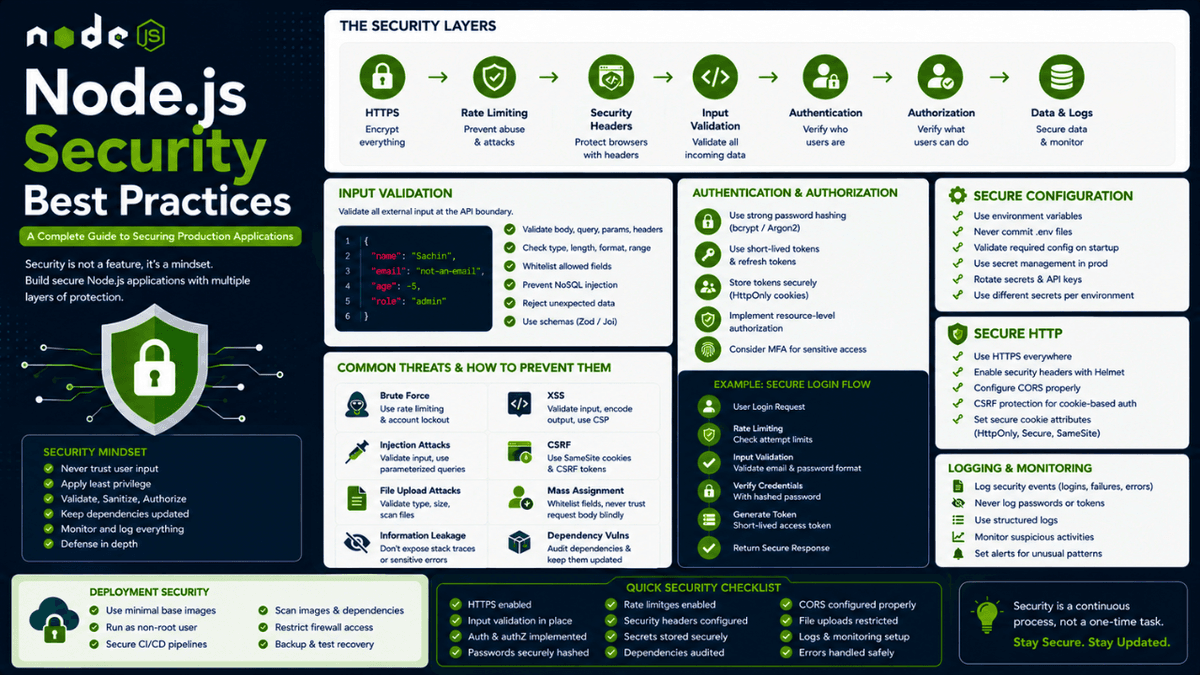
Learn Node.js security best practices for production applications, including authentication, authorization, input validation, secrets, HTTP headers, rate limiting, dependency security, logging, and secure deployment.
Node.js Security Best Practices: A Complete Guide to Securing Production Applications
Building a Node.js application that works is one challenge.
Building a Node.js application that remains secure in production is a much bigger challenge.
A production application is exposed to the internet, third-party services, automated bots, malicious users, vulnerable dependencies, misconfigured infrastructure, and unexpected input.
That means security cannot be something you add at the end of development.
It needs to be part of the architecture.
A secure Node.js application is not created by installing one security package.
It is built through multiple layers:
  Internet
   ↓
HTTPS / TLS
   ↓
Rate Limiting
   ↓
Security Headers
   ↓
Input Validation
   ↓
Authentication
   ↓
Authorization
   ↓
Business Logic
   ↓
Database
   ↓
Logging & Monitoring
Each layer protects against different classes of problems.
For example:
- Input validation protects against malformed data.
- Authentication verifies identity.
- Authorization verifies permissions.
- Rate limiting controls request volume.
- Security headers reduce browser-based attacks.
- Dependency management reduces supply-chain risks.
- Secure configuration protects secrets.
- Logging and monitoring help detect incidents.
In this guide, we'll explore the most important Node.js security best practices for building production-ready applications.
We'll cover:
- Security mindset
- HTTPS
- Environment variables
- Secret management
- Authentication
- Authorization
- Password hashing
- JWT security
- Cookies
- Sessions
- Input validation
- NoSQL injection
- XSS
- CSRF
- CORS
- Rate limiting
- Helmet
- Dependency security
- Prototype pollution
- File uploads
- Error handling
- Logging
- Security monitoring
- Database security
- API security
- Production deployment
- Security checklist
Security Starts With Threat Modeling
Before writing security code, ask:
What can go wrong?
Imagine you're building a notes application.
Users can:
  Register
Login
Create Notes
Read Notes
Update Notes
Delete Notes
Upload Files
Now think like an attacker.
Can someone:
  Access another user's notes?
Guess user IDs?
Brute-force login?
Upload malicious files?
Send huge requests?
Inject unexpected database operators?
Steal authentication tokens?
Abuse an API endpoint?
These questions are more useful than simply asking:
"Did I install a security library?"
Security is about understanding what you're protecting and what you're protecting it from.
A basic threat model looks like:
  Asset
  ↓
Threat
  ↓
Attack Vector
  ↓
Security Control
For example:
  User Account
     ↓
Credential Theft
     ↓
Weak Password Storage
     ↓
Strong Password Hashing
Another:
  API
 ↓
Brute Force
 ↓
Repeated Login Attempts
 ↓
Rate Limiting + Monitoring
Another:
  User Data
 ↓
Unauthorized Access
 ↓
Missing Authorization
 ↓
Resource-Level Access Checks
This way of thinking helps you build security intentionally.
Use HTTPS Everywhere
Never send sensitive data over unencrypted HTTP in production.
Use HTTPS for:
  Login
Registration
Passwords
Authentication Cookies
API Requests
Payment Data
Personal Information
HTTPS protects data while it travels between the client and server.
Without HTTPS:
  Client
   ↓
Plain HTTP
   ↓
Network
   ↓
Server
With HTTPS:
  Client
   ↓
Encrypted TLS Connection
   ↓
Network
   ↓
Server
Even if your Node.js application itself doesn't terminate TLS directly, your reverse proxy or hosting platform should provide HTTPS.
In production, make sure your application correctly handles HTTPS and redirects insecure traffic where appropriate.
Never Store Secrets in Source Code
Avoid:
const JWT_SECRET = "my-super-secret";
And never commit secrets to Git.
Secrets include:
  Database Credentials
JWT Secrets
API Keys
OAuth Client Secrets
Encryption Keys
Cloud Credentials
Webhook Secrets
Payment Provider Keys
Use environment variables or a dedicated secret management system.
For example:
  DATABASE_URL=...
JWT_SECRET=...
STRIPE_SECRET_KEY=...
Then:
const jwtSecret = process.env.JWT_SECRET;
However, environment variables themselves are not automatically secure.
Your deployment environment must also protect them.
Validate Environment Variables
A common mistake is assuming environment variables always exist.
For example:
  const port = process.env.PORT;
const databaseUrl = process.env.DATABASE_URL;
const jwtSecret = process.env.JWT_SECRET;
What happens if:
JWT_SECRET
is missing?
Your application may start and fail later.
A better approach is to validate configuration during startup.
Conceptually:
  Application Startup
       ↓
Load Configuration
       ↓
Validate Required Variables
       ↓
Valid?
    ↙      ↘
  Yes       No
   ↓         ↓
Start      Fail Fast
Your application should fail early when critical configuration is missing.
For production systems, configuration should be treated as part of the application's contract.
Use Secret Management for Production
For small applications, environment variables may be sufficient.
For larger systems, consider dedicated secret management solutions.
Examples include:
  Cloud Secret Managers
Vault Systems
Container Secret Stores
Platform Secret Management
The principle is:
  Application
     ↓
Secret Manager
     ↓
Retrieve Secret
rather than:
  Git Repository
     ↓
Hardcoded Secret
     ↓
Production
If a secret is accidentally committed to Git, rotating or revoking it is usually necessary.
Deleting the secret from the latest commit isn't enough because Git history may still contain it.
Keep Dependencies Updated
Node.js applications depend heavily on third-party packages.
Your dependency tree may look like:
  Your Application
      ↓
Package A
      ↓
Package B
      ↓
Package C
A vulnerability in a transitive dependency can potentially affect your application.
Regularly review dependencies.
Useful commands include:
npm audit
and:
npm outdated
But don't blindly run updates in production.
A better process is:
  Dependency Update
      ↓
Review Changes
      ↓
Run Tests
      ↓
Security Check
      ↓
Deploy
Security updates should be treated as part of normal maintenance.
Use Lockfiles
Your project should normally commit its package lockfile.
For npm:
package-lock.json
Lockfiles help ensure that installations use known dependency versions.
Without a lockfile, different environments may install different versions.
A predictable dependency tree is important for:
  Reproducible Builds
Security Auditing
Production Stability
CI/CD
You can learn more about package management in our guide to package-lock.json and npm.
Don't Ignore Transitive Dependencies
You may not directly install:
package-x
but your application may depend on:
  package-a
   ↓
package-b
   ↓
package-x
This is a transitive dependency.
Security vulnerabilities can exist anywhere in the dependency tree.
That's why dependency auditing should examine the complete dependency graph.
Use Minimal Dependencies
Every dependency increases your attack surface.
Before installing a package, ask:
  Do I actually need it?
Is it maintained?
Is it widely used?
Does it have a good security history?
Does it introduce unnecessary dependencies?
Avoid installing large libraries for tiny problems.
For example, don't install a large package if a few lines of reliable code can solve a simple task safely.
Less dependency complexity generally means fewer things to maintain.
Validate All External Input
Never trust:
  req.body
req.query
req.params
req.headers
req.cookies
Uploaded Files
Webhook Payloads
Treat external input as untrusted.
A good flow is:
  Request
   ↓
Validation
   ↓
Sanitization / Normalization
   ↓
Business Logic
Use schemas for complex requests.
For example:
POST /api/users
might require:
  name:
String
2–50 characters

email:
Valid email

age:
Integer
18–100
This prevents unexpected data from reaching your business logic.
For a deeper explanation, see our article on Input Validation in Node.js .
Validate Request Size
Even valid data can become dangerous when it is excessively large.
For example:
  name:
".... millions of characters ...."
or:
  tags:
[10,000,000 items]
Set limits on:
  Request Body
File Uploads
String Length
Array Length
Pagination Limits
For example:
  app.use(
  express.json({
    limit: "1mb",
  })
);
The correct limit depends on your application.
The goal is to prevent clients from consuming excessive server resources.
Protect Against NoSQL Injection
Node.js applications commonly use MongoDB.
MongoDB queries should never blindly accept arbitrary client-provided objects.
Suppose your application expects:
  email:
String
but accepts an arbitrary object.
An attacker may attempt to manipulate query behavior using MongoDB operators.
Instead of:
User.findOne(req.body);
prefer explicitly constructing the query from validated fields:
  User.findOne({
  email: req.body.email,
});
Even better:
  Validate Input
      ↓
Extract Allowed Fields
      ↓
Build Query
      ↓
Database
Don't allow clients to control the structure of your database query.
Avoid Mass Assignment
Consider:
  {
  "name": "Sachin",
  "bio": "Developer",
  "role": "admin"
}
If your API allows users to update their profile, should they be able to modify:
  role
permissions
isAdmin
Probably not.
Never blindly save the entire request body.
Instead:
  const { name, bio } = req.body;

await User.findByIdAndUpdate(userId, {
  name,
  bio,
});
Explicitly define which fields a user is allowed to modify.
This creates a clear boundary between:
Client-Controlled Data
and:
Server-Controlled Data
Authentication Is Not Authorization
This distinction is critical.
Authentication asks:
Who are you?
Authorization asks:
What are you allowed to do?
Consider:
  User A
   ↓
Authenticated
   ↓
Requests User B's Notes
The user may be logged in.
But that doesn't mean they can access another user's notes.
A secure API should check both:
  Authentication
      ↓
Authorization
      ↓
Resource Access
Many serious application vulnerabilities happen because authentication exists but authorization is incomplete.
Implement Resource-Level Authorization
Consider:
GET /api/notes/:id
A dangerous implementation might be:
  Find Note By ID
Return Note
A safer implementation checks ownership:
  Find Note
    ↓
Does it belong to current user?
    ↓
Yes → Return
No  → Reject
Conceptually:
  const note = await Note.findOne({
  _id: noteId,
  userId: req.user.id,
});
This ensures the query itself is scoped to the authenticated user.
Authorization should happen at the resource level whenever necessary.
Secure Password Storage
Never store passwords like:
password123
in your database.
Never store plain-text passwords.
Instead:
  Password
   ↓
Password Hashing
   ↓
Database
Modern password hashing algorithms are designed to make password cracking more expensive.
Common choices include:
  Argon2
bcrypt
scrypt
The important point is:
Password hashing is not the same as encryption.
Passwords should generally be hashed using a password-specific hashing algorithm.
For more details, see our dedicated guide on Password Hashing with Crypto .
Use Strong Authentication Flows
A secure authentication system should consider:
  Password Hashing
Session / Token Security
Rate Limiting
Account Lockout Strategy
Email Verification
Password Reset
MFA
Session Revocation
Authentication is not just:
Login → JWT
The complete lifecycle matters.
For example:
  Register
   ↓
Verify Email
   ↓
Login
   ↓
Access Token
   ↓
Refresh Token
   ↓
Logout
   ↓
Revoke Session
Each stage requires careful design.
Secure JWT Handling
JWTs can be useful for stateless authentication, but they are often misunderstood.
A JWT is not automatically secure simply because it is signed.
Consider:
  Client
   ↓
JWT
   ↓
API
You still need to protect:
  Signing Secret / Private Key
Token Expiration
Token Storage
Token Revocation Strategy
Algorithm Configuration
Never put sensitive information inside a JWT assuming it is encrypted.
A standard signed JWT payload can usually be decoded.
Do not store:
  Passwords
Secrets
Private Information
inside it.
Use Short-Lived Access Tokens
If you're using token-based authentication, short-lived access tokens can reduce the impact of token theft.
For example:
  Access Token
   ↓
Short Lifetime
Then use a refresh mechanism when appropriate.
The exact architecture depends on your application.
For high-security applications, think carefully about:
  Token Rotation
Refresh Token Storage
Refresh Token Revocation
Session Management
Device Management
Authentication design should be treated as a system, not just a token-generation function.
Secure Cookie Configuration
If you store authentication information in cookies, configure them carefully.
Important cookie attributes include:
  HttpOnly
Secure
SameSite
Conceptually:
  HttpOnly
→ Helps prevent JavaScript access

Secure
→ Send only over HTTPS

SameSite
→ Helps reduce cross-site request risks
The correct SameSite policy depends on your application's architecture.
Cookie configuration should be intentional.
Protect Against XSS
Cross-Site Scripting occurs when an attacker can inject executable content into a page viewed by another user.
For example, storing:
  <script>
  maliciousCode()
</script>
as user-generated content can be dangerous if the application later renders it as trusted HTML.
Protection depends on your architecture.
Common strategies include:
  Output Encoding
Content Security Policy
Safe Rendering
Input Constraints
HTML Sanitization
Remember:
Validation is not a complete XSS defense.
You need to handle data safely when it is rendered.
Protect Against CSRF
Cross-Site Request Forgery can occur when a user's browser is tricked into making an unwanted authenticated request.
This is especially relevant to cookie-based authentication.
Depending on your architecture, protections may include:
  SameSite Cookies
CSRF Tokens
Origin Checks
Referer Checks
The correct strategy depends on whether your authentication uses cookies, tokens, or a combination.
Don't blindly copy a CSRF solution without understanding your authentication model.
Configure CORS Correctly
CORS controls which browser origins can interact with your API.
Avoid:
app.use(cors());
without understanding what your application actually needs.
Instead, define allowed origins intentionally.
Conceptually:
  Allowed Origins
      ↓
Known Frontend Applications
Be especially careful with:
  Credentials
Cookies
Wildcard Origins
Never use permissive CORS configurations simply because they make development easier.
For a deeper explanation, see our guide on CORS in Node.js .
Use Helmet for Security Headers
Security headers help browsers enforce safer behavior.
For Express applications, Helmet can configure several commonly used security headers.
A typical setup might be:
  import helmet from "helmet";

app.use(helmet());
However, don't treat Helmet as a complete security solution.
Security headers are one layer:
  Helmet
   +
Input Validation
   +
Authentication
   +
Authorization
   +
Rate Limiting
Each solves a different problem.
You can read our dedicated guide on Helmet.js and HTTP Security Headers for a deeper explanation.
Implement Rate Limiting
Public APIs can be abused.
Consider:
POST /api/auth/login
An attacker might repeatedly attempt passwords.
Without rate limiting:
  Request
Request
Request
Request
...
With rate limiting:
  Request
   ↓
Rate Limiter
   ↓
Limit Exceeded?
 ↙         ↘
Yes         No
 ↓           ↓
429       Continue
Rate limiting is especially important for:
  Login
Password Reset
OTP Requests
Registration
Search
Expensive Operations
Public APIs
Use different limits for different endpoint types.
A login endpoint may require stricter limits than a public read-only endpoint.
Don't Rely Only on IP-Based Rate Limiting
IP-based rate limiting is useful but imperfect.
Users can share:
  NAT
Corporate Networks
Mobile Networks
VPNs
Attackers can also distribute requests across multiple IP addresses.
Depending on your system, consider rate limiting by:
  IP
User ID
API Key
Session
Endpoint
Device
A layered approach can be more effective.
Protect File Uploads
File upload endpoints are high-risk.
Validate:
  File Size
MIME Type
Extension
File Signature
Number of Files
Don't store uploaded files with predictable executable paths.
Consider:
  Private Object Storage
Randomized File Names
Separate Storage Domain
Malware Scanning
Access Controls
Never assume:
.jpg
means:
Safe Image
The file content itself should be considered untrusted.
Don't Trust File Names
A client might upload:
../../malicious-file
or:
script.php
Never directly use user-provided filenames as filesystem paths.
Generate safe names on the server.
For example:
  User Filename
     ↓
Server Generates ID
     ↓
Safe Storage Name
This reduces path traversal and filename-related risks.
Prevent Path Traversal
Never allow arbitrary user input to control filesystem paths.
Dangerous logic might look conceptually like:
fs.readFileSync(req.query.file);
An attacker may attempt to access files outside the intended directory.
Instead:
  User Input
   ↓
Validate Identifier
   ↓
Map to Known Resource
   ↓
Safe Path
Prefer identifiers over raw filesystem paths.
Secure Error Handling
Never expose detailed internal errors in production.
Avoid returning:
  {
  "error": "MongoServerError: E11000 duplicate key error at /app/src/database/user.js"
}
Instead:
  {
  "message": "Unable to create account"
}
Your server logs can contain the detailed technical error.
A good error flow is:
  Internal Error
      ↓
Log Detailed Information
      ↓
Return Safe Public Message
This reduces information leakage.
For more details, see our guide on Node.js Error Handling Best Practices .
Avoid Leaking Stack Traces
Development:
Detailed Stack Trace
Production:
Generic Error Message
Use environment-aware error handling.
For example:
NODE_ENV=development
may allow detailed debugging.
While:
NODE_ENV=production
should return controlled responses.
Never expose:
  Database Credentials
Internal Paths
Stack Traces
Secret Values
to clients.
Log Security Events
Logging is an important security control.
Record events such as:
  Failed Login
Successful Login
Password Reset
Account Lockout
Permission Denied
Suspicious Requests
Rate Limit Violations
Admin Actions
But don't log sensitive information.
Never log:
  Passwords
JWT Secrets
API Keys
Full Credit Card Numbers
Authentication Tokens
Logs should help you investigate incidents without becoming another source of sensitive data.
Our guide on Logging in Node.js covers structured logs, log levels, and production logging practices in more detail.
Use Structured Logging
Instead of:
User login failed
prefer structured data:
  {
  "event": "login_failed",
  "userId": "123",
  "ip": "192.0.2.10",
  "timestamp": "2026-07-28T10:00:00Z"
}
Structured logs make it easier to:
  Search
Filter
Aggregate
Alert
Investigate
Security events become much more useful when they can be analyzed systematically.
Monitor Authentication Failures
Repeated login failures may indicate:
  Brute Force
Credential Stuffing
Password Spraying
Account Takeover Attempts
Monitoring can detect unusual patterns.
For example:
  100 failed logins
       ↓
Same IP
       ↓
Multiple Accounts
       ↓
Security Alert
Rate limiting can slow attacks.
Monitoring helps you detect them.
You need both.
Secure Database Connections
Database security starts with authentication.
Never use:
  admin
password123
in production.
Use:
  Strong Credentials
Least Privilege
Encrypted Connections
Network Restrictions
Your application should have only the database permissions it needs.
For example, if the application doesn't need to create databases, don't grant it permission to do so.
This follows the principle of least privilege.
Principle of Least Privilege
Every component should have only the permissions it needs.
For example:
  Application
   ↓
Read / Write Application Data
It should not automatically have:
  Database Administration
Server Root Access
Cloud Account Owner Permissions
The same principle applies to:
  Users
API Keys
Services
Containers
Cloud Roles
Database Accounts
If a credential is compromised, least privilege limits the potential damage.
Secure Your API Keys
Never expose private API keys in frontend code.
Anything sent to a browser can potentially be inspected.
For example:
  Frontend
   ↓
Private API Key
is not actually private.
Instead:
  Frontend
   ↓
Your Backend
   ↓
Private API Key
   ↓
Third-Party API
Keep sensitive keys on the server.
Public client-side keys may exist for certain services, but understand the difference between public identifiers and private secrets.
Use Different Credentials Per Environment
Don't use the same secrets for:
  Development
Staging
Production
A production secret accidentally exposed in development can be extremely dangerous.
Prefer:
  Development Secrets
Staging Secrets
Production Secrets
with independent credentials.
This also makes credential rotation easier.
Rotate Secrets
Assume that secrets can eventually leak.
Have a strategy for:
  API Key Rotation
JWT Secret Rotation
Database Password Rotation
Cloud Credential Rotation
Webhook Secret Rotation
For long-lived applications, secret rotation should be part of operational planning.
Don't Commit .env Files
Your .env file often contains secrets.
Add it to:
.gitignore
For example:
  .env
.env.local
.env.production
Instead, commit an example file:
.env.example
containing placeholders:
  DATABASE_URL=
JWT_SECRET=
PORT=
This documents required configuration without exposing secrets.
Secure Your Git Repository
Security isn't only about the Node.js code.
Protect your source control system.
Use:
  Two-Factor Authentication
Protected Branches
Code Reviews
Secret Scanning
Dependency Scanning
Least Privilege
If a developer account is compromised, attackers may gain access to:
  Source Code
CI/CD
Secrets
Production Infrastructure
Your repository is part of your security perimeter.
Secure CI/CD Pipelines
Your deployment pipeline often has powerful permissions.
A compromised pipeline can deploy malicious code.
Protect:
  CI Credentials
Deployment Tokens
Cloud Credentials
Environment Secrets
Build Artifacts
Use separate credentials and grant the pipeline only what it needs.
For example:
  CI Pipeline
   ↓
Deploy Application
should not automatically have unrestricted access to your entire cloud account.
Avoid Running Node.js as Root
On Linux systems, applications should generally run with the least privileges required.
Avoid:
  Root
 ↓
Node.js Application
Prefer:
  Restricted User
 ↓
Node.js Application
If the application is compromised, limited privileges can reduce potential damage.
Keep Production Dependencies Separate
Don't deploy development-only tools unnecessarily.
For example:
  Development
├── Nodemon
├── Testing Tools
└── Debugging Tools
Production may only need:
Runtime Dependencies
This reduces the production attack surface.
Don't Expose Debug Endpoints
Never accidentally deploy endpoints such as:
  /debug
/test
/admin-debug
/internal
without proper authentication and authorization.
Development-only routes should not be available publicly in production.
Secure Health Checks
Health endpoints are useful:
GET /health
But don't expose sensitive information.
Avoid returning:
  {
  "databasePassword": "...",
  "internalServices": [...],
  "environmentVariables": {...}
}
A public health check might simply return:
  {
  "status": "ok"
}
Internal monitoring systems can have more detailed checks when appropriate.
Protect Admin Routes
Administrative functionality should have stronger security controls.
Consider:
  Authentication
Authorization
MFA
IP Restrictions
Audit Logging
Rate Limiting
Never assume:
/admin
is secure simply because the URL isn't advertised.
Security must come from access controls, not hidden URLs.
Don't Use Security Through Obscurity
Changing:
/admin
to:
/super-secret-admin-panel
doesn't provide real security.
Attackers can discover routes through:
  Source Maps
API Documentation
Error Messages
Automated Scanning
Browser Requests
Leaked Code
Use:
  Authentication
Authorization
MFA
Network Controls
instead.
Secure API Documentation
API documentation is useful, but production documentation should be carefully controlled.
Avoid publicly exposing:
  Internal Endpoints
Admin APIs
Debug Routes
Infrastructure Details
If documentation contains sensitive operational information, restrict access.
Disable Unnecessary HTTP Methods
If an endpoint only needs:
GET
don't automatically support:
  POST
PUT
PATCH
DELETE
Only expose the operations your API actually needs.
A smaller attack surface is generally easier to secure.
Use Secure HTTP Headers
Security headers can help protect browser-based applications.
Common headers include:
  Content-Security-Policy
Strict-Transport-Security
X-Content-Type-Options
Referrer-Policy
Permissions-Policy
Helmet can help configure many of these.
However, headers should be tested against your application's requirements.
Security policies that are too strict can break legitimate functionality.
Use Content Security Policy Carefully
Content Security Policy can reduce the impact of certain XSS attacks.
A CSP defines which sources the browser can trust.
Conceptually:
  Browser
   ↓
Only Allow Scripts From Trusted Sources
CSP configuration depends heavily on your frontend architecture.
Test it carefully before enforcing strict production policies.
Protect Against Prototype Pollution
JavaScript applications can be affected by unsafe object merging or property handling.
Be cautious when processing untrusted objects.
Avoid blindly merging arbitrary request data into application objects.
Instead of:
Object.assign(target, req.body);
prefer explicit field selection.
For example:
  const { name, bio } = req.body;

Object.assign(target, {
  name,
  bio,
});
Explicit data flow is generally safer.
Use Safe Serialization
Be careful when serializing objects containing sensitive information.
For example, don't accidentally return:
  {
  "id": "123",
  "email": "user@example.com",
  "passwordHash": "...",
  "resetToken": "..."
}
Create explicit response objects.
For example:
  return {
  id: user.id,
  name: user.name,
  email: user.email,
};
The API should return only what the client needs.
Protect Sensitive Data in Logs
Logging can accidentally expose secrets.
Avoid:
console.log(req.body);
in production if the body contains:
  Password
Token
Payment Information
Personal Data
Use structured logging with sensitive-field redaction.
For example:
  password → [REDACTED]
token → [REDACTED]
Logs should be treated as sensitive infrastructure.
Use Secure Error Messages
An error message should provide enough information for the user to understand what happened without exposing internal details.
Instead of:
MongoDB connection failed at /app/src/db/index.js
return:
Internal server error
and log the technical details internally.
For validation errors, however, provide useful field-level feedback.
Security isn't about hiding everything.
It's about exposing the right information to the right audience.
Implement Security Monitoring
Security controls are not enough if nobody knows when something goes wrong.
Monitor:
  Failed Logins
Rate Limit Violations
Authorization Failures
Unexpected Traffic
Error Rates
Dependency Vulnerabilities
Suspicious IP Activity
For larger systems, integrate logs with monitoring and alerting systems.
The goal is:
  Attack
  ↓
Detection
  ↓
Alert
  ↓
Investigation
  ↓
Response
Keep Security Dependencies Updated
Security libraries themselves can contain vulnerabilities.
Regularly update:
  Express
Helmet
Authentication Libraries
Database Drivers
Validation Libraries
File Upload Libraries
Don't assume a package is secure forever.
Security is a continuous process.
Use Automated Security Checks
Your CI pipeline can automatically check:
  Dependency Vulnerabilities
Secret Leaks
Linting
Tests
Static Analysis
Container Vulnerabilities
A practical pipeline might look like:
  Git Push
   ↓
Tests
   ↓
Lint
   ↓
Dependency Audit
   ↓
Secret Scan
   ↓
Build
   ↓
Deploy
Automating security checks reduces the chance of human error.
Security Is a Layered System
No single technique protects everything.
Consider:
  HTTPS
   +
Security Headers
   +
Input Validation
   +
Authentication
   +
Authorization
   +
Rate Limiting
   +
Secure Dependencies
   +
Secure Configuration
   +
Logging
   +
Monitoring
If one layer fails, another may reduce the damage.
This is known as defense in depth.
For example:
  Attacker
   ↓
Stolen Password
   ↓
MFA
   ↓
Blocked
Or:
  Attacker
   ↓
Valid User
   ↓
Attempts Access to Another User's Resource
   ↓
Authorization Check
   ↓
Blocked
Or:
  Attacker
   ↓
Brute Force Login
   ↓
Rate Limiting
   ↓
Blocked
Multiple layers create resilience.
A Production Security Architecture
A simplified production Node.js application might look like:
                      Internet
                       ↓
                  HTTPS / TLS
                       ↓
                Reverse Proxy / CDN
                       ↓
                  Rate Limiting
                       ↓
                Security Headers
                       ↓
                Node.js Application
                       ↓
             ┌─────────┴─────────┐
             ↓                   ↓
         Validation         Authentication
             ↓                   ↓
             └─────────┬─────────┘
                       ↓
                  Authorization
                       ↓
                  Business Logic
                       ↓
                   Database
                       ↓
               Logs + Monitoring
This isn't a universal architecture.
Your application may look different.
But the idea remains:
Security should exist at multiple layers.
Security Checklist for Node.js
Before deploying a Node.js application, ask:
Application
  ✓ Is all external input validated?
✓ Are request sizes limited?
✓ Are unknown fields handled safely?
✓ Are database queries built explicitly?
✓ Are authorization checks implemented?
✓ Are sensitive fields excluded from API responses?
Authentication
  ✓ Are passwords securely hashed?
✓ Are authentication tokens protected?
✓ Are tokens short-lived where appropriate?
✓ Are sessions revocable?
✓ Is MFA considered for sensitive accounts?
✓ Are login endpoints rate-limited?
Configuration
  ✓ Are secrets outside source code?
✓ Are environment variables validated?
✓ Are production secrets managed securely?
✓ Are secrets rotated?
✓ Are development and production credentials separate?
Dependencies
  ✓ Is package-lock.json committed?
✓ Are dependencies regularly audited?
✓ Are vulnerable packages updated?
✓ Are unnecessary dependencies removed?
HTTP Security
  ✓ Is HTTPS enabled?
✓ Are secure headers configured?
✓ Is CORS restricted?
✓ Are cookies configured securely?
✓ Is CSRF protection considered?
API Security
  ✓ Are public endpoints rate-limited?
✓ Are admin routes protected?
✓ Are resource-level authorization checks implemented?
✓ Are webhook signatures verified?
✓ Are error responses safe?
File Security
  ✓ Are file sizes limited?
✓ Are file types validated?
✓ Are filenames generated safely?
✓ Are uploaded files isolated?
✓ Is malware scanning considered?
Operations
  ✓ Are security events logged?
✓ Are sensitive values redacted?
✓ Is monitoring configured?
✓ Are alerts configured?
✓ Are backups protected?
✓ Is the deployment pipeline secured?
A Practical Security Mindset
The most valuable security skill isn't memorizing every vulnerability.
It's learning to ask the right questions.
Whenever you build a feature, ask:
  Who can access it?
What input does it accept?
What happens if the input is malicious?
What data can the user modify?
What happens if authentication fails?
What happens if authorization fails?
What information can leak?
What happens if this endpoint is abused?
How would I detect an attack?
For example, when building:
POST /api/posts
don't stop at:
Does it create a post?
Also ask:
  Is the user authenticated?
Can the user create posts?
Is the title validated?
Is the content length limited?
Can the user set "isPublished"?
Can the user assign themselves as author?
Can the endpoint be spammed?
Are errors safe?
Are suspicious requests logged?
This mindset produces significantly more secure applications.
Conclusion
Node.js security is not one feature, package, or middleware.
It is a system of multiple defensive layers.
A secure production application should combine:
  HTTPS
Input Validation
Authentication
Authorization
Secure Password Hashing
Safe Token Handling
CORS Configuration
Rate Limiting
Security Headers
Dependency Management
Secure Configuration
Database Security
Safe File Handling
Error Handling
Structured Logging
Monitoring
The most important principle is simple:
Never trust external input, never assume authentication means authorization, and never treat security as an afterthought.
Start by protecting the most important assets.
Identify your threats.
Define your trust boundaries.
Validate external data.
Use least privilege.
Keep dependencies updated.
Protect secrets.
Monitor suspicious behavior.
And build security into every layer of your architecture.
A secure Node.js application isn't one that claims to be impossible to attack.
It's one that is designed to reduce the likelihood of attacks, limit their impact when they happen, and provide enough visibility to detect and respond to them.
That is the foundation of production-grade Node.js engineering.