Node.js API Security: How to Secure REST APIs in Production
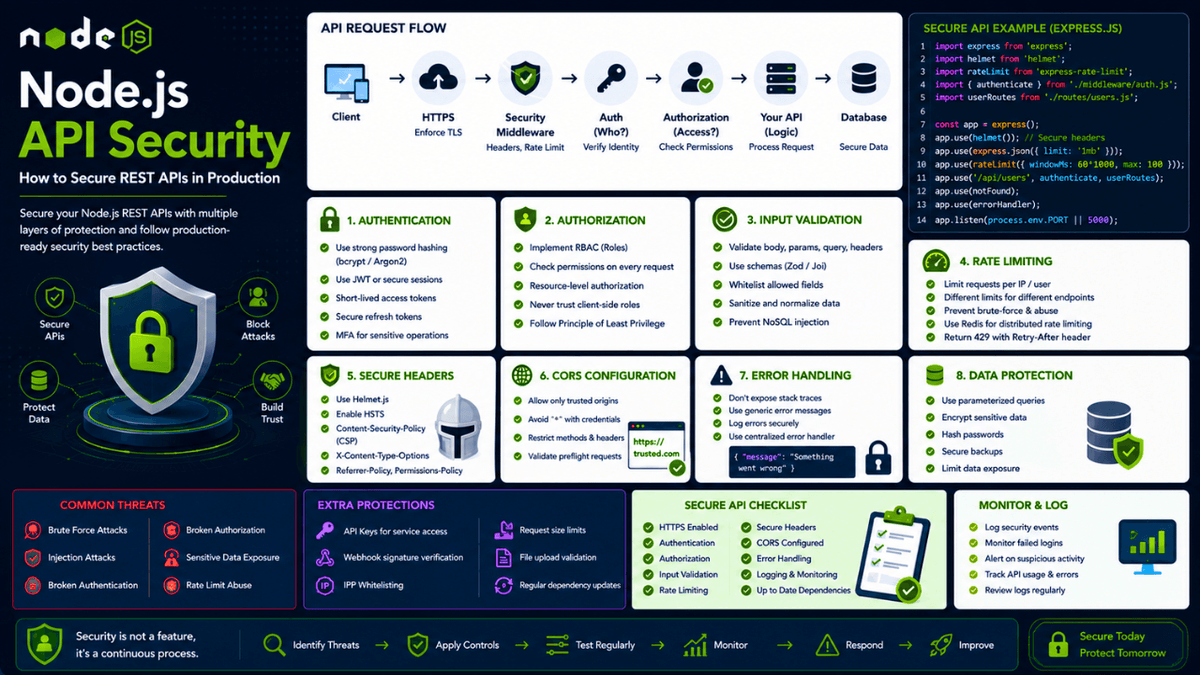
Learn how to secure Node.js REST APIs in production with authentication, authorization, input validation, rate limiting, CORS, security headers, JWT protection, secure error handling, and API monitoring.
Node.js API Security: How to Secure REST APIs in Production
Building a REST API with Node.js is relatively straightforward.
Making that API secure enough for production is a different challenge.
A production API can be targeted by automated bots, brute-force attacks, malicious users, credential stuffing, injection attempts, abusive clients, and accidental misuse.
That's why API security should not be treated as a single middleware or library.
A secure API uses multiple layers of protection:
  Client
   ↓
HTTPS
   ↓
Security Middleware
   ↓
Rate Limiting
   ↓
Authentication
   ↓
Authorization
   ↓
Input Validation
   ↓
Business Logic
   ↓
Database
   ↓
Logging & Monitoring
Each layer solves a different problem.
For example:
- Authentication determines who the user is.
- Authorization determines what the user can access.
- Input validation ensures incoming data has the expected shape.
- Rate limiting reduces abuse and brute-force attacks.
- CORS controls browser-based cross-origin requests.
- Security headers help browsers enforce safer behavior.
- Error handling prevents sensitive internal information from leaking.
- Logging and monitoring help detect suspicious activity.
In this guide, we'll build a practical understanding of how to secure Node.js REST APIs for production.
We'll cover authentication, authorization, input validation, JWT security, rate limiting, CORS, HTTP security headers, error handling, database security, file uploads, API keys, logging, monitoring, and a complete security checklist.
What Is API Security?
API security is the practice of protecting an API from unauthorized access, abuse, data exposure, and malicious requests.
Consider a typical API:
  GET    /api/users
GET    /api/users/:id
POST   /api/users
PATCH  /api/users/:id
DELETE /api/users/:id
Without proper security controls, an attacker might:
  Access another user's data
Modify resources they don't own
Brute-force login credentials
Send malicious input
Abuse expensive endpoints
Upload dangerous files
Steal authentication tokens
Extract sensitive information
A secure API needs to answer several questions:
  Who is making this request?
Are they authenticated?
Are they authorized?
Is the input valid?
Is the request allowed?
Is the resource accessible?
Is the request suspicious?
What information should be returned?
These questions form the foundation of API security.
API Security Is a Layered System
There is no single security package that can secure your entire API.
Instead, think in layers.
                  API Security
                     │
      ┌──────────────┼──────────────┐
      │              │              │
 Authentication  Authorization  Validation
      │              │              │
      └──────────────┼──────────────┘
                     │
              Rate Limiting
                     │
              Security Headers
                     │
                   CORS
                     │
              Secure Database
                     │
             Logging & Monitoring
If one layer fails, another layer can reduce the impact.
This approach is known as defense in depth .
For a broader overview of securing Node.js applications, you can also read our guide on Node.js Security Best Practices , which covers application-level security beyond APIs.
Start With HTTPS
The first requirement for a production API is secure communication.
Use HTTPS instead of plain HTTP.
Without HTTPS:
  Client
   ↓
HTTP
   ↓
Network
   ↓
Server
Data can potentially be intercepted or modified while traveling across the network.
With HTTPS:
  Client
   ↓
Encrypted TLS Connection
   ↓
Network
   ↓
Server
This is especially important when transmitting:
  Passwords
Authentication Tokens
Session Cookies
Personal Information
Payment Data
API Keys
Your Node.js application may not directly manage TLS. In many production architectures, TLS termination happens at a reverse proxy, load balancer, CDN, or hosting platform.
The important point is that your public API should be accessible through HTTPS.
Understand Authentication vs Authorization
One of the most important concepts in API security is the difference between authentication and authorization.
Authentication
Authentication answers:
Who are you?
For example:
  User
  ↓
Login
  ↓
Credentials Verified
  ↓
Authenticated
Authorization
Authorization answers:
What are you allowed to do?
For example:
  Authenticated User
       ↓
Request Admin Dashboard
       ↓
Has Admin Permission?
    ↙        ↘
  Yes         No
   ↓           ↓
Allow        Reject
Authentication alone is not enough.
A user can be successfully authenticated and still not have permission to access a particular resource.
Protect Every Sensitive Endpoint
Consider:
GET /api/profile
This probably requires authentication.
Your API should verify:
  Request
   ↓
Authentication Middleware
   ↓
Valid Identity?
   ↓
Continue
A common architecture is:
  router.get(
  "/profile",
  authenticateUser,
  getProfile
);
The controller should not need to implement authentication logic itself.
This separation keeps security logic reusable.
Use Middleware for Authentication
A typical authentication middleware might follow this pattern:
  const authenticateUser = async (req, res, next) => {
  try {
    const token = extractToken(req);

    if (!token) {
      return res.status(401).json({
        message: "Authentication required",
      });
    }

    const user = await verifyToken(token);

    if (!user) {
      return res.status(401).json({
        message: "Invalid authentication",
      });
    }

    req.user = user;

    next();
  } catch (error) {
    next(error);
  }
};
The important idea is:
  Request
   ↓
Extract Credentials
   ↓
Verify Credentials
   ↓
Attach User Context
   ↓
Continue
The exact implementation depends on whether you're using:
- JWT
- Sessions
- OAuth
- OpenID Connect
- An external identity provider
Secure JWT Authentication
JWTs are commonly used in Node.js APIs.
A simplified flow looks like:
  User
   ↓
Login
   ↓
Verify Credentials
   ↓
Create JWT
   ↓
Client
   ↓
API Request
   ↓
Verify JWT
   ↓
Authenticated User
A JWT normally contains claims describing the authenticated identity.
However, remember:
A signed JWT is not automatically encrypted.
The payload can generally be decoded by anyone who possesses the token.
Never place sensitive information such as:
  Passwords
Private Keys
Database Credentials
API Secrets
inside a JWT payload.
Use Strong JWT Secrets
If your application uses HMAC-based JWT signing, the signing secret must be strong and securely stored.
Never do this:
const secret = "secret123";
Instead:
const secret = process.env.JWT_SECRET;
Your secret should:
- Be sufficiently random
- Not be committed to Git
- Be stored securely
- Be different between environments
- Have a rotation strategy
For high-security applications, asymmetric signing algorithms may also be appropriate.
Use Short-Lived Access Tokens
Long-lived access tokens increase the potential impact of token theft.
A better strategy can be:
  Short-Lived Access Token
          +
Refresh Token
Conceptually:
  Login
   ↓
Access Token
   ↓
Expires Quickly
   ↓
Refresh Token
   ↓
New Access Token
The exact implementation depends on your authentication architecture.
For sensitive applications, consider:
  Refresh Token Rotation
Token Revocation
Session Management
Device Tracking
Logout Handling
Authentication is a complete lifecycle, not just token generation.
Protect Authentication Tokens
Where you store authentication tokens matters.
Common options include:
  HttpOnly Secure Cookies
In-Memory Storage
Browser Storage
For browser applications, carefully consider the trade-offs between XSS and CSRF risks.
If using cookies, configure:
  HttpOnly
Secure
SameSite
For example:
  HttpOnly
→ Prevents JavaScript from directly reading the cookie

Secure
→ Sends the cookie only over HTTPS

SameSite
→ Controls cross-site cookie behavior
The correct configuration depends on your application's architecture.
Implement Authorization
After authentication, your API should determine whether the authenticated user has permission to perform the requested action.
For example:
  User
   ↓
Authenticated
   ↓
DELETE /api/users/123
   ↓
Is User Allowed To Delete User 123?
   ↓
Allow / Reject
Authorization can be implemented using:
  Roles
Permissions
Resource Ownership
Policies
Scopes
Role-Based Access Control
Role-Based Access Control, or RBAC, assigns permissions based on roles.
For example:
  User
Admin
Editor
Moderator
A route might require:
Admin
before allowing access.
Conceptually:
  if (req.user.role !== "admin") {
  return res.status(403).json({
    message: "Forbidden",
  });
}
However, role checks alone are not always enough.
Resource-Level Authorization
Consider:
GET /api/notes/123
Suppose User A owns note 123 .
User B is authenticated.
Should User B be able to request:
GET /api/notes/123
No.
The API should verify resource ownership.
A database query can sometimes enforce this directly:
  const note = await Note.findOne({
  _id: noteId,
  userId: req.user.id,
});
Now the query asks:
  Does this note exist?
AND
Does it belong to the current user?
This is much safer than:
const note = await Note.findById(noteId);
followed by incomplete authorization logic.
Always think about authorization at the resource level.
Never Trust Client-Side Roles
Never assume a role sent by the client is trustworthy.
For example, don't trust:
  {
  "role": "admin"
}
from a client request.
The server must determine the user's permissions using trusted server-side data.
The client can display UI based on permissions.
But the server must enforce permissions.
  Client UI
   ↓
Helpful User Experience

Server Authorization
   ↓
Actual Security Boundary
Validate Every Request
All external input should be considered untrusted.
This includes:
  req.body
req.params
req.query
req.headers
req.cookies
Uploaded Files
Webhook Payloads
Never assume the client will send the correct data.
For example:
  {
  "email": "not-an-email",
  "age": "hello"
}
Your API should reject invalid input before it reaches business logic.
A good request flow is:
  Request
   ↓
Parse
   ↓
Validate
   ↓
Normalize
   ↓
Business Logic
   ↓
Database
For detailed validation strategies, see our guide on Input Validation in Node.js .
Use Schema Validation
Schema validation libraries can make request validation consistent.
Popular options include:
  Zod
Joi
Valibot
For example, conceptually:
  const userSchema = z.object({
  name: z.string().min(2).max(50),
  email: z.string().email(),
});
Then:
  Incoming Request
       ↓
Schema Validation
    ↙       ↘
Invalid      Valid
   ↓           ↓
400         Continue
Validation should happen before business logic.
Whitelist Allowed Fields
Suppose your endpoint allows users to update:
  name
bio
avatar
Don't allow clients to update:
  role
permissions
isAdmin
by simply passing arbitrary fields.
Instead:
const { name, bio, avatar } = req.body;
Then update only those fields.
This is known as an allowlist approach.
It helps prevent mass assignment vulnerabilities.
Prevent NoSQL Injection
If you're using MongoDB, don't blindly pass client-controlled objects into database queries.
Avoid:
User.findOne(req.body);
Instead:
  User.findOne({
  email: req.body.email,
});
The difference is important.
In the first example, the client controls the query structure.
In the second, the server explicitly defines the query.
A safer architecture is:
  Client Input
   ↓
Validate
   ↓
Extract Allowed Fields
   ↓
Build Query
   ↓
Database
Never let arbitrary client input define your database query structure.
Limit Request Body Size
Attackers can abuse APIs by sending unnecessarily large requests.
Configure reasonable body size limits.
For example:
  app.use(
  express.json({
    limit: "1mb",
  })
);
The correct limit depends on your API.
A JSON API may need only a few hundred kilobytes.
A file upload endpoint may require a different limit.
Don't use one large global limit for everything.
Implement Rate Limiting
Rate limiting controls how frequently clients can make requests.
Without rate limiting:
  Attacker
   ↓
Request
Request
Request
Request
Request
...
This can lead to:
  Brute Force
Credential Stuffing
API Abuse
Resource Exhaustion
With rate limiting:
  Request
   ↓
Rate Limiter
   ↓
Within Limit?
 ↙        ↘
Yes        No
 ↓          ↓
Allow      429
Rate limiting is particularly important for:
  Login
Registration
Password Reset
OTP Requests
Search
Public APIs
Expensive Operations
Use Different Rate Limits
Not every endpoint needs the same limit.
For example:
GET /api/posts
might allow many requests.
But:
POST /api/auth/login
should probably have a much stricter limit.
Think about:
  Public Read Endpoint
       ↓
High Limit

Authentication Endpoint
       ↓
Strict Limit

Password Reset
       ↓
Very Strict Limit
Different endpoints have different abuse profiles.
Rate Limit by More Than IP
IP-based rate limiting is useful but not perfect.
Multiple users may share an IP through:
  NAT
Corporate Networks
Mobile Networks
Attackers may also distribute requests across many IP addresses.
Depending on your application, consider limiting by:
  IP Address
User ID
API Key
Session
Endpoint
A layered approach can provide stronger protection.
Return HTTP 429 for Rate Limits
When a client exceeds a rate limit, use:
429 Too Many Requests
You may also provide:
Retry-After
This tells clients when they can try again.
For distributed applications, rate limiting often requires shared storage such as Redis rather than process-local memory.
Configure CORS Carefully
Cross-Origin Resource Sharing controls browser-based cross-origin requests.
A common mistake is allowing every origin without understanding the consequences.
Avoid blindly using:
app.use(cors());
for production applications.
Instead, define trusted origins.
Conceptually:
  const allowedOrigins = [
  "https://example.com",
  "https://app.example.com",
];
Then allow requests only from known origins.
Be especially careful when using:
  Credentials
Cookies
Authorization Headers
Wildcard Origins
CORS is a browser security mechanism.
It does not replace authentication or authorization.
CORS Is Not Authentication
This is a common misunderstanding.
CORS does not stop:
  curl
Postman
Server-to-Server Requests
Custom HTTP Clients
from calling your API.
CORS mainly controls what browsers allow frontend JavaScript to do across origins.
Your API still needs authentication and authorization.
Think of it as:
  CORS
→ Browser Access Control

Authentication
→ Identity Verification

Authorization
→ Permission Enforcement
Each has a different purpose.
Use Security Headers
Security headers provide additional browser-level protections.
For Express applications, Helmet is a popular choice.
For example:
  import helmet from "helmet";

app.use(helmet());
Security headers can help with:
  Content Security Policy
HSTS
Content-Type Sniffing
Referrer Policies
Browser Permissions
Helmet is useful, but it is not a replacement for:
  Authentication
Authorization
Input Validation
Rate Limiting
Secure Configuration
It is one layer of your security architecture.
Configure Content Security Policy
Content Security Policy, or CSP, controls which content sources a browser is allowed to load.
A strict CSP can help reduce the impact of certain XSS attacks.
However, CSP configuration depends on your application.
If your frontend uses:
  CDNs
Analytics
Third-Party Scripts
Inline Scripts
your CSP must account for them carefully.
Start with a policy appropriate for your application and test it before enforcing it strictly.
Protect Against XSS
Cross-Site Scripting occurs when an attacker can inject executable content into content rendered by users.
For APIs, the risk often appears when user-generated content is later rendered by a frontend.
Never assume:
User Input
is safe just because it passed basic validation.
Consider:
  Output Encoding
Safe Rendering
HTML Sanitization
Content Security Policy
Validation and sanitization serve different purposes.
Validation asks:
Is this data acceptable?
Sanitization asks:
Can this data be safely transformed or rendered?
Protect Cookie-Based APIs Against CSRF
If your API uses cookie-based authentication, consider Cross-Site Request Forgery protections.
Potential controls include:
  SameSite Cookies
CSRF Tokens
Origin Validation
Referer Validation
The correct strategy depends on your authentication architecture.
For example, an API using:
HttpOnly Cookie
may need different CSRF considerations than an API using an access token in an Authorization header.
Always evaluate the complete authentication flow.
Verify Webhook Signatures
If your API receives webhooks from external services, don't blindly trust the incoming request.
For example:
  Payment Provider
      ↓
Webhook
      ↓
Your API
An attacker could attempt to send a fake webhook.
Use the provider's signature verification mechanism when available.
The flow becomes:
  Webhook
   ↓
Verify Signature
   ↓
Valid?
 ↙      ↘
Yes      No
 ↓        ↓
Process  Reject
This is especially important for:
  Payments
Orders
Subscriptions
Account Events
Financial Operations
Secure API Keys
API keys are useful for machine-to-machine authentication.
However, they should be treated as secrets when they provide privileged access.
Good practices include:
  Generate Strong Keys
Store Securely
Hash Keys When Appropriate
Rotate Keys
Revoke Compromised Keys
Assign Permissions
Log Usage
Avoid putting private API keys inside frontend JavaScript.
Anything delivered to a browser should be considered potentially visible to users.
Use Least Privilege for API Keys
Not every API key should have full access.
Consider:
  Key A
→ Read-only access

Key B
→ Write access

Key C
→ Administrative operations
This reduces the impact if a key is compromised.
The same principle applies to:
  Database Users
Cloud Roles
Service Accounts
Internal Services
Give every credential only the permissions it needs.
Secure File Upload Endpoints
File uploads require additional security controls.
Validate:
  File Size
MIME Type
Extension
File Signature
Number of Files
Never trust a filename supplied by the client.
Avoid storing files using:
../../some/path
or any directly user-controlled filesystem path.
Instead:
  Uploaded File
   ↓
Validate
   ↓
Generate Server-Side Filename
   ↓
Store Safely
For production applications, consider object storage and separate file-serving infrastructure.
Avoid Path Traversal
Never let users directly control filesystem paths.
Dangerous logic can look conceptually like:
fs.readFileSync(req.query.file);
An attacker may attempt to access files outside the intended directory.
Instead, use a safe identifier:
GET /api/files/123
Then the server maps:
  123
 ↓
Known Database Record
 ↓
Known Storage Location
The client should not control raw filesystem paths.
Secure Error Handling
Your API should return useful errors without exposing internal implementation details.
Avoid:
  {
  "error": "MongoServerError at /app/src/database/users.js:45"
}
Instead:
  {
  "message": "Unable to process the request"
}
Internally, log the detailed error.
This creates a separation:
  Client
   ↓
Safe Error Message

Server Logs
   ↓
Detailed Technical Information
For more information, see our article on Node.js Error Handling Best Practices .
Use Consistent HTTP Status Codes
Use HTTP status codes consistently.
Common examples:
  200 OK
201 Created
204 No Content

400 Bad Request
401 Unauthorized
403 Forbidden
404 Not Found
409 Conflict
422 Unprocessable Content
429 Too Many Requests

500 Internal Server Error
For example:
  Missing Authentication
→ 401

Authenticated But Not Allowed
→ 403

Invalid Request Data
→ 400 or 422

Rate Limit Exceeded
→ 429
Clear status codes make APIs easier to consume and monitor.
Don't Leak Sensitive Information
Be careful about what your API returns.
Avoid returning:
  Password Hashes
Reset Tokens
Internal Database IDs
Private API Keys
Authentication Secrets
Internal Stack Traces
Instead, create explicit response objects.
For example:
  const responseUser = {
  id: user._id,
  name: user.name,
  email: user.email,
};
The API should return only the information the client actually needs.
Protect Against User Enumeration
Authentication endpoints can accidentally reveal whether an account exists.
For example:
"Email does not exist"
versus:
"Incorrect password"
can allow attackers to determine which email addresses are registered.
For sensitive authentication flows, consider using consistent responses.
For example:
"Invalid email or password"
The exact strategy depends on the application's requirements and usability considerations.
Secure Password Reset APIs
Password reset endpoints are high-value targets.
A secure reset flow should consider:
  Random Reset Tokens
Short Expiration
Single Use
Secure Storage
Rate Limiting
Token Invalidation
The general flow is:
  User Requests Reset
        ↓
Generate Secure Token
        ↓
Send Reset Link
        ↓
User Submits Token
        ↓
Verify Token
        ↓
Change Password
        ↓
Invalidate Token
Never use predictable reset tokens.
Protect Login Endpoints
Login endpoints should be treated as high-risk.
Consider:
  Rate Limiting
Secure Password Hashing
Generic Error Messages
Monitoring
MFA
Suspicious Login Detection
For example:
  Repeated Failed Login Attempts
        ↓
Rate Limit
        ↓
Log Event
        ↓
Alert if Suspicious
Security controls should work together.
Protect Password Reset and OTP Endpoints
Attackers may abuse:
  Forgot Password
Send OTP
Verify OTP
Resend OTP
Implement:
  Rate Limits
Expiration
Attempt Limits
Single-Use Tokens
Monitoring
Never allow unlimited OTP verification attempts.
Secure Database Access
Your API is often only as secure as its database connection.
Use:
  Strong Credentials
Least Privilege
Encrypted Connections
Network Restrictions
Secure Backups
Your API's database user should have only the permissions it needs.
For example, an application that only needs CRUD access to application data generally should not have unrestricted administrative privileges.
Don't Expose Database Errors
Database errors can reveal sensitive information.
Avoid sending raw errors directly to clients.
Instead:
  Database Error
   ↓
Log Internally
   ↓
Return Safe API Error
Your internal logs can contain detailed information for debugging.
Your public API should expose only what clients need to know.
Use Structured Logging
API security depends heavily on visibility.
Log important security events such as:
  Failed Login
Successful Login
Authorization Failure
Rate Limit Violation
Password Reset
Admin Action
Suspicious Request
Webhook Failure
Structured logging makes this information easier to analyze.
For example:
  {
  "event": "authorization_failed",
  "userId": "123",
  "resource": "note",
  "resourceId": "456",
  "timestamp": "2026-07-29T10:00:00Z"
}
You can learn more about this approach in our article on Logging in Node.js: Structured Logs, Log Levels, and Production Best Practices .
Never Log Secrets
Avoid logging:
  Passwords
JWTs
Refresh Tokens
API Keys
Session Cookies
Payment Information
Be especially careful with:
console.log(req.headers);
because headers may contain:
  Authorization
Cookie
API Keys
Use structured logging with sensitive-field redaction.
Monitor API Security Events
Logging records events.
Monitoring helps you understand patterns.
Monitor:
  Failed Authentication
Authorization Failures
Rate Limit Violations
Unexpected Error Rates
Traffic Spikes
Suspicious IP Activity
For example:
  1000 Failed Logins
       ↓
Same IP Range
       ↓
Multiple User Accounts
       ↓
Possible Credential Attack
       ↓
Alert
A secure API should not only prevent attacks.
It should help you detect them.
Monitor API Performance
Security and performance are often connected.
An endpoint that performs expensive database queries can become an attack target.
For example:
  Expensive Search Endpoint
        ↓
No Rate Limit
        ↓
1000 Requests
        ↓
Database Overload
Monitor:
  Request Latency
Error Rate
Database Query Time
CPU
Memory
Request Volume
Performance monitoring can reveal abuse patterns.
Protect Expensive Endpoints
Some operations cost more than others.
Examples:
  Large Searches
Report Generation
Image Processing
Data Exports
AI Requests
Complex Database Aggregations
These endpoints may need:
  Strict Rate Limits
Authentication
Pagination
Caching
Background Jobs
Request Size Limits
Don't expose expensive operations without considering abuse.
Use Pagination
Returning thousands or millions of records from one request can overload your API.
Avoid:
GET /api/users
returning every user.
Instead:
GET /api/users?page=1&limit=20
Also enforce maximum limits.
For example:
  Requested limit: 1,000,000
Allowed maximum: 100
The server should enforce:
limit = Math.min(requestedLimit, 100)
Never trust the client to choose a reasonable value.
Validate Pagination Parameters
Pagination parameters are user input.
Validate:
  page
limit
sort
order
For example:
  page
→ Positive Integer

limit
→ 1–100

sort
→ Allowed Fields Only

order
→ asc | desc
Don't allow arbitrary fields to be passed into database sorting logic without validation.
Protect Search Endpoints
Search endpoints can be expensive.
An attacker may send:
  Very Large Search String
Complex Regex
Repeated Queries
Be careful with user-controlled regular expressions.
Some regex patterns can cause excessive CPU consumption.
For expensive search operations, consider:
  Input Limits
Timeouts
Search Indexes
Rate Limiting
Safe Query Construction
Secure API Versioning
API versioning helps you evolve security controls.
For example:
  /api/v1/users
/api/v2/users
When deprecating an insecure API version, have a clear migration plan.
Don't leave vulnerable legacy endpoints running forever.
Remove Unused Endpoints
Every public endpoint increases your attack surface.
Regularly review:
  Routes
Admin APIs
Debug Endpoints
Test Endpoints
Legacy APIs
Unused Webhooks
Remove what you no longer need.
A smaller API surface is easier to secure.
Don't Expose Debug Routes
Never accidentally deploy:
  /debug
/test
/internal
/admin-debug
without proper access controls.
Development tools should not automatically become production endpoints.
Secure Health Endpoints
A simple health endpoint is usually enough:
GET /health
Response:
  {
  "status": "ok"
}
Avoid exposing:
  Environment Variables
Database Credentials
Internal Service URLs
Infrastructure Details
If detailed health information is required, restrict it to internal monitoring systems.
Verify Third-Party Webhooks
Webhook endpoints should be treated as public API endpoints.
Use:
  Signature Verification
Replay Protection
Idempotency
Rate Limiting
Logging
For example:
  Payment Webhook
      ↓
Verify Signature
      ↓
Check Event ID
      ↓
Check Replay
      ↓
Process Once
This prevents attackers from replaying or forging sensitive events.
Use Idempotency for Critical Operations
Some operations should not happen twice.
For example:
  Create Payment
Create Order
Process Refund
A client may retry a request because of a network failure.
Without idempotency:
  Request
   ↓
Server Processes
   ↓
Response Lost
   ↓
Client Retries
   ↓
Server Processes Again
This could create duplicate operations.
An idempotency key can help:
  Request
   ↓
Idempotency-Key
   ↓
Check Existing Result
   ↓
Process Once
This is particularly important for payment and order APIs.
Secure Production Configuration
Separate:
  Development
Staging
Production
configuration.
Don't use the same:
  Database
JWT Secret
API Keys
Cloud Credentials
across environments.
Production secrets should be stored using secure deployment or secret management systems.
Use Environment Variables Carefully
Environment variables are useful for configuration:
  PORT
DATABASE_URL
JWT_SECRET
API_KEY
But remember:
Environment variables are configuration, not a complete secret-management strategy.
In larger systems, use dedicated secret management tools.
Also validate required environment variables when the application starts.
Secure Your Dependencies
Node.js applications depend on many packages.
Regularly run:
npm audit
Review outdated dependencies:
npm outdated
Keep your lockfile committed:
package-lock.json
And update dependencies through a controlled process:
  Update
  ↓
Test
  ↓
Audit
  ↓
Review
  ↓
Deploy
Don't blindly update every package directly in production.
Protect Your CI/CD Pipeline
Your deployment pipeline often has access to:
  Production Servers
Cloud Credentials
Environment Secrets
Databases
Protect your pipeline with:
  Strong Authentication
Least Privilege
Protected Branches
Secret Management
Approval Rules
Audit Logs
A compromised CI/CD system can become a production security incident.
Use API Security Testing
Before production, test:
  Authentication
Authorization
Input Validation
Rate Limiting
CORS
Error Handling
File Uploads
Webhooks
Try requests such as:
  Missing Token
Expired Token
Invalid Token
Another User's Resource
Invalid Input
Huge Request
Unexpected Fields
Too Many Requests
The goal is to think like both:
  Developer
+
Attacker
Test Broken Authorization
One of the most important tests is checking whether a user can access another user's resources.
For example:
  User A
  ↓
Owns Note 123

User B
  ↓
Requests Note 123
Expected result:
403 Forbidden
or:
404 Not Found
depending on your API's information disclosure strategy.
Never assume that because a user is authenticated, they can access every resource.
API Security Checklist
Before deploying a Node.js REST API, review the following.
Transport Security
  ✓ HTTPS enabled
✓ TLS configured correctly
✓ HTTP redirected or disabled where appropriate
Authentication
  ✓ Authentication required for sensitive endpoints
✓ Passwords securely hashed
✓ Tokens securely signed
✓ Tokens have appropriate expiration
✓ Refresh tokens protected
✓ Authentication endpoints rate-limited
Authorization
  ✓ Roles and permissions enforced server-side
✓ Resource ownership checked
✓ Admin routes protected
✓ Client-provided roles never trusted
✓ Least privilege applied
Input Security
  ✓ Body validated
✓ Query parameters validated
✓ Route parameters validated
✓ Headers handled safely
✓ Request sizes limited
✓ Allowed fields explicitly defined
✓ Database queries constructed safely
API Protection
  ✓ Rate limiting configured
✓ CORS restricted
✓ Security headers enabled
✓ Expensive endpoints protected
✓ Pagination enforced
✓ Search endpoints protected
Data Protection
  ✓ Sensitive fields excluded from responses
✓ Database credentials protected
✓ Database access restricted
✓ Secrets not committed to Git
✓ API keys protected
✓ Backups secured
File Uploads
  ✓ File size limits
✓ File type validation
✓ Safe filenames
✓ Storage isolation
✓ Malware scanning considered
Error Handling
  ✓ Generic production error responses
✓ Stack traces hidden
✓ Database errors not exposed
✓ Consistent HTTP status codes
✓ Detailed errors logged internally
Monitoring
  ✓ Security events logged
✓ Sensitive values redacted
✓ Failed logins monitored
✓ Authorization failures monitored
✓ Rate limit violations monitored
✓ Error rates monitored
✓ Suspicious activity alerts configured
A Practical Secure API Request Flow
A production request can be processed through multiple security layers.
  Client
   ↓
HTTPS
   ↓
Reverse Proxy
   ↓
Rate Limiting
   ↓
CORS
   ↓
Security Headers
   ↓
Request Parsing
   ↓
Input Validation
   ↓
Authentication
   ↓
Authorization
   ↓
Business Logic
   ↓
Database
   ↓
Safe Response
   ↓
Logging & Monitoring
Not every API needs every layer at exactly this point.
But thinking in terms of security boundaries helps you design a more resilient system.
Example Express.js Security Setup
A simplified Express application might look like:
  import express from "express";
import helmet from "helmet";
import cors from "cors";

const app = express();

app.use(helmet());

app.use(
  cors({
    origin: ["https://example.com"],
    credentials: true,
  })
);

app.use(
  express.json({
    limit: "1mb",
  })
);

app.use("/api/auth", authRateLimiter, authRoutes);

app.use("/api/users", authenticateUser, userRoutes);

app.use("/api/admin", authenticateUser, requireAdmin, adminRoutes);

app.use(notFoundHandler);

app.use(errorHandler);

app.listen(process.env.PORT || 5000);
This is only a starting point.
A real production application should also consider:
  Input Validation
Database Security
Secure Authentication
Authorization
Rate Limiting Strategy
Structured Logging
Monitoring
Secret Management
Security is not achieved by adding a few middleware packages.
A Better API Security Architecture
A scalable architecture might look like:
                     Client
                      ↓
                 HTTPS / TLS
                      ↓
              Reverse Proxy / CDN
                      ↓
                Rate Limiting
                      ↓
             Node.js Application
                      ↓
        ┌─────────────┴─────────────┐
        ↓                           ↓
 Authentication                Validation
        ↓                           ↓
        └─────────────┬─────────────┘
                      ↓
                Authorization
                      ↓
                Business Logic
                      ↓
                 Data Access
                      ↓
                   Database
                      ↓
            Logs + Monitoring
This architecture separates concerns.
Each layer has a specific responsibility.
That makes the system easier to understand, test, and maintain.
Security Is a Continuous Process
One of the biggest mistakes is thinking:
"My API is secure because I implemented authentication."
Security changes over time.
Your application changes.
Your dependencies change.
Your infrastructure changes.
New vulnerabilities are discovered.
New attack techniques appear.
That's why API security should be continuous:
  Identify Threats
      ↓
Apply Controls
      ↓
Test
      ↓
Monitor
      ↓
Respond
      ↓
Improve
      ↓
Repeat
Security should be part of your development lifecycle.
Conclusion
Securing a Node.js REST API is not about adding one package or writing one authentication middleware.
It requires multiple layers working together.
A production-ready API should consider:
  HTTPS
Authentication
Authorization
Input Validation
Rate Limiting
CORS
Security Headers
JWT Security
Secure Cookies
Database Protection
File Upload Security
Error Handling
API Key Management
Dependency Security
Logging
Monitoring
The most important lesson is simple:
Never trust the client.
Every request should be treated as untrusted until your server has verified what it needs to verify.
Authentication should establish identity.
Authorization should enforce permissions.
Validation should control input.
Rate limiting should reduce abuse.
Security headers should strengthen browser protections.
Logging and monitoring should provide visibility.
And your infrastructure should follow the principle of least privilege.
The goal isn't to build an API that can never be attacked.
The goal is to build an API that is difficult to abuse, limits the damage when something goes wrong, and gives your team enough visibility to detect and respond to security incidents.
Once these principles become part of your normal Node.js development workflow, security stops being a feature you add at the end and becomes part of how you build APIs from the beginning.