Input Validation in Node.js: A Complete Guide to Secure API Validation
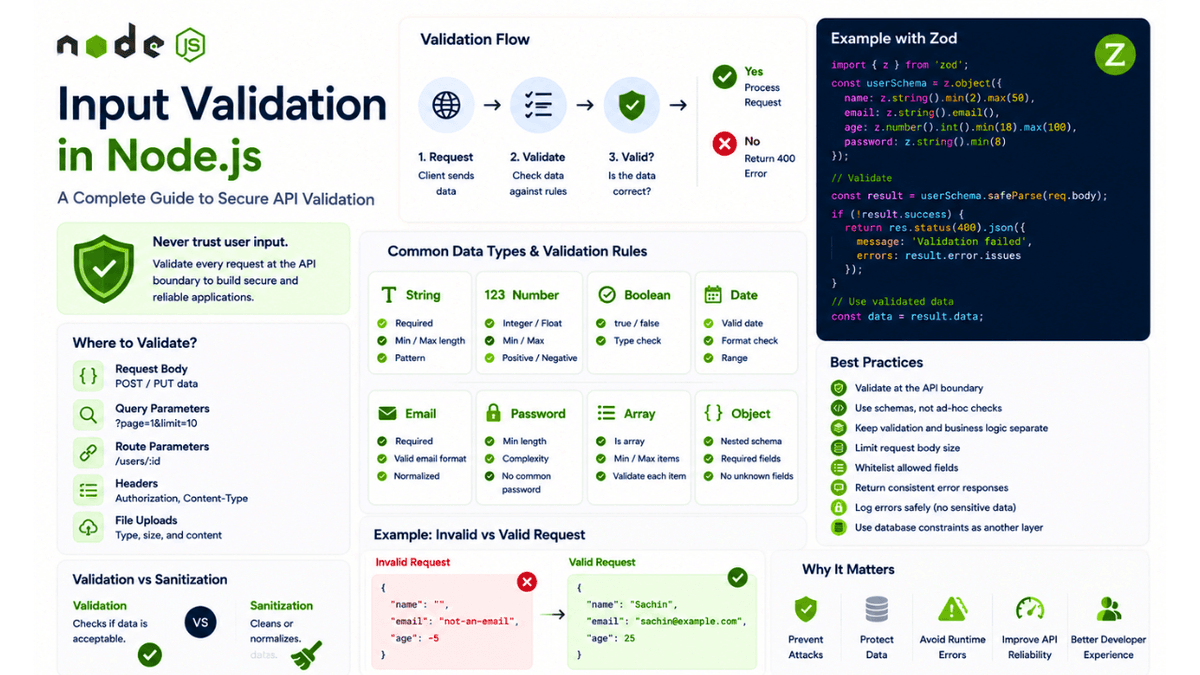
Learn input validation in Node.js with practical examples for request bodies, query parameters, route params, nested data, arrays, and secure API validation best practices.
Input Validation in Node.js: A Complete Guide to Secure API Validation
Every API accepts input.
A user submits a registration form.
A client sends JSON to an API.
A mobile application requests data using query parameters.
A frontend sends an ID through a dynamic URL.
All of these are examples of external input entering your application.
For example:
POST /api/users
with:
  {
  "name": "Sachin",
  "email": "sachin@example.com",
  "age": 25
}
Your application cannot assume that this data is always valid.
A malicious client could send:
  {
  "name": "",
  "email": "not-an-email",
  "age": -100
}
Or:
  {
  "name": 123456,
  "email": null,
  "age": "hello"
}
Or even send an extremely large payload designed to consume server resources.
This is why input validation is an essential part of building secure and reliable Node.js APIs.
The basic principle is simple:
  External Input
      ↓
Validation
      ↓
Valid?
   ↙     ↘
 Yes      No
  ↓        ↓
Process   Reject
Request   Request
In this article, we'll explore how to validate input in Node.js applications, where validation should happen, what data should be validated, how validation differs from sanitization, and how to design a production-ready validation strategy.
We'll cover:
- What input validation is
- Why validation matters
- Validation vs sanitization
- Request body validation
- Query parameter validation
- Route parameter validation
- Headers validation
- Nested objects
- Arrays
- Strings
- Numbers
- Booleans
- Dates
- Email validation
- Password validation
- MongoDB ObjectId validation
- File upload validation
- Schema validation
- Zod
- Joi
- Express middleware
- Validation error handling
- API validation architecture
- Common mistakes
- Production best practices
What Is Input Validation?
Input validation is the process of checking whether incoming data matches the rules your application expects.
Imagine a registration endpoint:
POST /api/auth/register
The API might expect:
  {
  "name": "Sachin",
  "email": "sachin@example.com",
  "password": "StrongPassword123"
}
You might define rules like:
  name:
Required
String
Minimum 2 characters

email:
Required
Valid email format

password:
Required
Minimum 8 characters
The validation process becomes:
  Request
   ↓
Extract Data
   ↓
Validate Schema
   ↓
Valid?
 ↙     ↘
Yes      No
 ↓        ↓
Continue  400
The important idea is:
Never trust data just because it came from your frontend.
Your API is a public boundary.
Anyone can call it.
Why Input Validation Matters
Consider this API:
POST /api/users
The developer expects:
  {
  "name": "Sachin",
  "age": 25
}
But the client can send:
  {
  "name": ["unexpected", "array"],
  "age": "not-a-number"
}
If your application assumes the input is correct, unexpected data can reach:
  Controller
   ↓
Service
   ↓
Database
This can cause:
- Runtime errors
- Incorrect database records
- Unexpected application behavior
- Security vulnerabilities
- Business logic failures
Validation creates a boundary between untrusted external data and trusted internal application logic.
  Untrusted Input
      ↓
Validation Boundary
      ↓
Trusted Application Data
This is one of the most important architectural concepts in backend development.
Never Trust the Frontend
A common mistake is:
"The frontend already validates everything."
Frontend validation improves user experience.
It does not provide security.
Imagine your frontend validates:
  Email:
Required
An attacker doesn't need to use your frontend.
They can send a direct HTTP request:
curl -X POST https://api.example.com/users
The attacker can completely bypass frontend validation.
Therefore:
  Frontend Validation
        +
Backend Validation
is the correct approach.
The frontend provides a better user experience.
The backend provides the actual trust boundary.
Validation vs Sanitization
Validation and sanitization are related but different.
Validation
Validation asks:
Is this data acceptable?
Example:
age = 25
Result:
Valid
But:
age = "hello"
Result:
Invalid
Sanitization
Sanitization changes or normalizes data.
For example:
" Sachin "
could become:
"Sachin"
Another example:
  Email:
SACHIN@EXAMPLE.COM
could be normalized to:
sachin@example.com
Conceptually:
  Input
 ↓
Normalize / Sanitize
 ↓
Validate
 ↓
Process
However, sanitization should not be used as an excuse to accept invalid data.
For example:
"abc"
should not be automatically converted into a valid number just because your application expects one.
Validate at the API Boundary
A good architecture validates external input as early as practical.
Instead of:
  Request
   ↓
Controller
   ↓
Business Logic
   ↓
Database
   ↓
Validation
prefer:
  Request
   ↓
Validation
   ↓
Controller
   ↓
Business Logic
   ↓
Database
The earlier invalid data is rejected, the less likely it is to cause unexpected behavior.
A common Express architecture might be:
  Request
   ↓
Middleware
   ↓
Validation
   ↓
Authentication
   ↓
Authorization
   ↓
Controller
   ↓
Service
   ↓
Database
The exact order depends on the endpoint.
For example, some systems authenticate first so they can determine which validation rules apply to the current user.
What Should You Validate?
Almost every piece of external input deserves consideration.
Common sources include:
  Request Body
Query Parameters
Route Parameters
Headers
Cookies
File Uploads
Environment Variables
Webhooks
External API Responses
Let's examine each.
Request Body Validation
Consider:
POST /api/users
with:
  {
  "name": "Sachin",
  "email": "sachin@example.com",
  "age": 25
}
You might validate:
  name:
Required
String
2–50 characters

email:
Required
Valid email

age:
Integer
18–100
If the request is invalid, return a client error.
For example:
  {
  "message": "Validation failed",
  "errors": {
    "email": "Invalid email address"
  }
}
This is much better than allowing invalid data to reach your database.
Query Parameter Validation
Consider:
GET /api/products?page=1&limit=20
The query parameters arrive as external input.
You should validate:
  page:
Integer
Minimum 1

limit:
Integer
Minimum 1
Maximum 100
Without limits, someone might send:
GET /api/products?limit=999999999
This could cause an unnecessarily expensive database query.
Validation can also act as a resource-protection mechanism.
For example:
  limit:
1–100
This prevents clients from requesting unreasonable amounts of data.
Route Parameter Validation
Consider:
GET /api/users/:id
A request might be:
GET /api/users/65f123abc456789012345678
If you're using MongoDB, the ID may need to be a valid ObjectId.
Instead of passing arbitrary input directly into your database layer:
  Request
   ↓
Validate ID
   ↓
Database Query
If invalid:
400 Bad Request
This prevents unnecessary database operations and makes your API behavior predictable.
Validate MongoDB ObjectIds
Suppose your endpoint is:
GET /api/posts/:id
You may expect:
ObjectId
But a client could send:
GET /api/posts/not-a-valid-id
Your validation layer should detect this before your database operation.
Conceptually:
  if (!isValidObjectId(id)) {
  return res.status(400).json({
    message: "Invalid post ID",
  });
}
The exact validation approach depends on your MongoDB driver or ODM.
Validation is especially important when working with database identifiers because invalid values can otherwise result in unnecessary exceptions or confusing errors.
String Validation
Strings often need more validation than:
typeof value === "string"
Consider:
  name
username
email
title
description
You may need rules such as:
  Required
Minimum Length
Maximum Length
Allowed Characters
Pattern
Format
For example:
  username:
3–30 characters
Letters
Numbers
Underscore
A username like:
sachin_dev
might be valid.
But:
<script>
should not be treated as a normal username.
The exact rules depend on the business requirements.
Required vs Optional Fields
Not every field is required.
Consider updating a user:
PATCH /api/users/:id
The user might update only:
  {
  "name": "New Name"
}
Therefore, your update schema may allow optional fields.
But when creating a user:
POST /api/users
you might require:
  {
  "name": "...",
  "email": "...",
  "password": "..."
}
This means you may need different schemas for:
  Create
Update
Login
Password Reset
Don't automatically reuse one schema everywhere.
Create vs Update Validation
Consider:
POST /api/users
Required:
  name
email
password
But:
PATCH /api/users/:id
might allow:
  name
bio
avatar
The validation rules differ.
A good architecture might have:
  schemas/
├── createUser.schema.js
├── updateUser.schema.js
├── login.schema.js
└── resetPassword.schema.js
This makes the application's validation rules explicit.
Number Validation
Numbers can be tricky because HTTP input often arrives as strings.
For example:
?page=10
The value may initially be represented as:
"10"
not:
10
Your validation layer should decide whether conversion is allowed.
For example:
  "10"
   ↓
Convert
   ↓
10
   ↓
Validate
But:
"hello"
should fail.
You should also validate:
- Minimum
- Maximum
- Integer vs decimal
- Positive vs negative
- Finite values
For example:
  price:
Number
Minimum 0
Maximum 1,000,000
Boolean Validation
Boolean values can be surprisingly confusing.
A query parameter:
?active=true
may arrive as:
"true"
rather than:
true
Your validation system should explicitly define how strings are converted.
For example:
  "true" → true
"false" → false
Avoid relying on JavaScript truthiness:
Boolean("false")
This evaluates to:
true
because "false" is a non-empty string.
This can create subtle bugs.
Explicit validation and coercion are much safer.
Date Validation
Dates should be validated carefully.
Consider:
  {
  "startDate": "2026-07-28"
}
You may need to validate:
  Correct Format
Valid Calendar Date
Allowed Range
Timezone Behavior
Avoid assuming that every date string can safely be passed directly into application logic.
For business-critical systems, define exactly which date format your API accepts.
For example:
YYYY-MM-DD
or:
ISO 8601
Consistency is important.
Email Validation
Email validation is often misunderstood.
A simple regular expression can detect obvious invalid values.
For example:
hello@example.com
But email standards are extremely complex.
In most applications, you don't need to implement the entire email specification.
Instead, validate that:
  Value exists
Value is a string
Value has a reasonable email format
Then, if the email must actually belong to the user, use verification:
  User
 ↓
Enter Email
 ↓
Send Verification Link
 ↓
User Clicks Link
 ↓
Email Verified
Remember:
A valid email format does not prove that the user owns the email address.
Password Validation
Passwords require careful handling.
A validation schema may enforce:
  Required
Minimum Length
Maximum Length
You may also enforce complexity rules depending on your security requirements.
However, avoid creating unnecessarily restrictive rules that make passwords difficult to use.
For example, forcing:
  One uppercase
One lowercase
One number
One special character
is not automatically the best security strategy.
Password security should also include:
- Secure password hashing
- Rate limiting
- MFA where appropriate
- Breached-password detection
- Secure password reset flows
Validation is only one part.
The password should never be stored directly.
For more details, see our earlier article on Password Hashing with Crypto .
Password Maximum Length
Many developers only think about minimum password length.
Maximum length also matters.
Consider a password field accepting unlimited input.
An attacker might send:
Millions of characters
This can consume server resources.
A reasonable maximum length can protect your system against oversized input while still allowing strong passwords.
The correct limit depends on your application and hashing strategy.
Nested Object Validation
Modern APIs often accept nested objects.
For example:
  {
  "name": "Sachin",
  "address": {
    "city": "Vadodara",
    "country": "India"
  }
}
You should validate the nested structure.
For example:
  name:
String

address:
Object

address.city:
String

address.country:
String
Don't only validate the top-level object.
A malicious or buggy client might send:
  {
  "address": {
    "city": 123,
    "country": []
  }
}
Schema validation libraries are particularly useful for handling nested structures.
Arrays
Consider:
  {
  "tags": [
    "nodejs",
    "mongodb",
    "nextjs"
  ]
}
You may want to validate:
  tags:
Array
Maximum 10 items

Each item:
String
Maximum 30 characters
Without limits, a client might send thousands of values.
This can create unnecessary processing and database operations.
Always think about:
  Maximum Array Length
Maximum String Length
Maximum Nested Depth
especially when processing complex request bodies.
File Upload Validation
File uploads require additional validation.
Suppose your API accepts:
POST /api/upload
You should consider:
  File Size
File Type
MIME Type
File Extension
File Name
Number of Files
Image Dimensions
Never trust only the file extension.
For example:
malicious.exe
could be renamed:
image.jpg
The extension alone isn't sufficient.
Depending on the application, you may need to inspect the actual file signature or content.
File uploads also need:
- Storage isolation
- Safe file naming
- Size limits
- Malware scanning where appropriate
- Access control
- Secure download behavior
Validation is only one part of secure file handling.
Request Body Size Limits
Your application should limit how much data it accepts.
For example:
  app.use(
  express.json({
    limit: "1mb",
  })
);
Without reasonable limits, clients could send extremely large payloads.
This is different from field validation.
You should think about both:
  Payload Size
      +
Field Validation
For example:
  Maximum Body:
1 MB

name:
2–50 characters

description:
Maximum 5,000 characters

tags:
Maximum 10 items
This provides multiple layers of protection.
Schema Validation
As applications grow, manually validating every field becomes difficult.
You might start with:
  if (!email) {
  return res.status(400).json({
    message: "Email is required",
  });
}
Then:
  if (!name) {
  ...
}

if (typeof age !== "number") {
  ...
}

if (password.length < 8) {
  ...
}
Eventually, controllers become full of validation logic.
This is difficult to maintain.
Schema validation solves this by defining the expected structure in one place.
Conceptually:
  Schema
   ↓
Input
   ↓
Validation
   ↓
Validated Data
Popular Node.js validation libraries include:
- Zod
- Joi
- Yup
- Ajv
The best choice depends on your project.
Zod
Zod is a popular TypeScript-first schema validation library.
A simple schema might look like:
  import { z } from "zod";

const userSchema = z.object({
  name: z.string().min(2).max(50),
  email: z.email(),
  age: z.number().int().min(18),
});
You can then validate incoming data against the schema.
The exact API may vary depending on the Zod version, so always check the current documentation when implementing it.
The important architectural idea is:
  Schema
   ↓
Parse Input
   ↓
Success → Continue
Failure → Validation Error
Why Schema Validation Is Useful
Schema-based validation provides:
  Centralized Rules
Reusable Schemas
Consistent Errors
Nested Validation
Type Safety
For example:
  schemas/
├── auth/
│   ├── login.js
│   └── register.js
├── users/
│   ├── create.js
│   └── update.js
└── posts/
    ├── create.js
    └── update.js
Your controllers become cleaner.
Instead of:
  Controller
├── Check email
├── Check password
├── Check name
├── Check age
├── Check nested data
└── Business Logic
you get:
  Request
   ↓
Validation Middleware
   ↓
Controller
   ↓
Business Logic
This separation improves maintainability.
Validation Middleware
In Express, validation can be implemented as middleware.
Conceptually:
  const validate =
  (schema) =>
  (req, res, next) => {
    const result = schema.safeParse(req.body);

    if (!result.success) {
      return res.status(400).json({
        message: "Validation failed",
        errors: result.error.issues,
      });
    }

    req.body = result.data;

    next();
  };
Then:
  router.post(
  "/users",
  validate(createUserSchema),
  createUserController
);
The flow becomes:
  POST /users
     ↓
Validation Middleware
     ↓
Valid?
  ↙     ↘
No       Yes
 ↓        ↓
400     Controller
          ↓
        Service
          ↓
       Database
This keeps validation separate from business logic.
Don't Put Validation Everywhere
A common mistake is duplicating validation.
For example:
  Route
 ↓
Validation
 ↓
Controller Validation
 ↓
Service Validation
 ↓
Database Validation
Some duplication can be useful for defense in depth.
But unnecessary duplication makes systems difficult to maintain.
A better approach is to define clear responsibilities.
For example:
  API Layer
→ Validate external request shape

Business Layer
→ Enforce business rules

Database Layer
→ Enforce persistence constraints
These are different responsibilities.
Validation vs Business Rules
This distinction is important.
Consider:
  {
  "age": 25
}
Validation asks:
  Is age a number?
Is age an integer?
Is age within the allowed range?
Business logic asks:
Is this user allowed to register for this service?
The first is validation.
The second is business logic.
Another example:
  Product Quantity:
1–100
Validation:
Is quantity an integer?
Business rule:
Does the user have enough inventory available?
Keep these concerns separate.
Validation and Database Constraints
Application-level validation is important.
But the database can also enforce constraints.
For example:
  Application
   ↓
Validate Email
   ↓
Database
   ↓
Unique Constraint
Why both?
Because application validation can have race conditions.
Imagine:
  Request A → Check email → Available
Request B → Check email → Available
Both requests may pass the application-level check.
Then both try to insert.
A database-level unique constraint can provide the final guarantee.
Therefore:
  Application Validation
        +
Database Constraints
is stronger than relying on either alone.
Handling Validation Errors
A good API should return predictable errors.
For example:
  {
  "message": "Validation failed",
  "errors": [
    {
      "field": "email",
      "message": "Invalid email address"
    },
    {
      "field": "password",
      "message": "Password must be at least 8 characters"
    }
  ]
}
The frontend can use this structure to display errors.
Avoid returning internal stack traces:
  {
  "error": "ZodError at /app/src/routes/users.js:42"
}
That information is useful for developers but should not normally be exposed to API consumers in production.
Choosing the Correct HTTP Status
Validation errors generally represent invalid client input.
A common response is:
400 Bad Request
For some API designs, 422 Unprocessable Content may be used for syntactically valid requests that fail semantic validation.
The most important thing is consistency.
Choose a convention and use it across your API.
For example:
  400
Invalid Request Format

422
Valid Format but Invalid Data
or simply:
  400
All Client Validation Errors
Either approach can work when consistently implemented.
Validation Error Response Design
A predictable response format is valuable.
For example:
  {
  "success": false,
  "message": "Validation failed",
  "errors": {
    "email": [
      "Email is required",
      "Email must be valid"
    ]
  }
}
The exact format depends on your API design.
The important properties are:
- Consistent
- Machine-readable
- Easy to understand
- Free from sensitive internal information
Don't Return Too Much Information
Validation errors should help legitimate users fix their requests.
But they shouldn't reveal unnecessary internal details.
For example, avoid:
  MongoDB CastError
Mongoose internal stack
Database query
Internal filesystem path
Instead:
  {
  "message": "Invalid user ID"
}
Detailed errors should be available in your server logs, not necessarily in public responses.
Validation and Security
Input validation can reduce several classes of security problems.
For example:
  Unexpected Input
      ↓
Validation
      ↓
Rejected
This can help prevent:
- Unexpected data types
- Oversized input
- Invalid IDs
- Malformed payloads
- Resource abuse
But validation alone does not prevent every security vulnerability.
For example, proper authorization is still required.
Consider:
GET /api/users/123
A valid ID doesn't mean the current user is allowed to access user 123 .
Therefore:
  Validation
   +
Authentication
   +
Authorization
are separate security controls.
Validation and NoSQL Injection
When using MongoDB, developers sometimes assume:
"MongoDB means I don't need to worry about injection."
That's incorrect.
If untrusted objects are passed directly into database queries, attackers may attempt to manipulate query behavior.
For example, application logic should not blindly trust arbitrary objects where a simple string or identifier is expected.
Validation can enforce:
  Expected:
String

Received:
Object
and reject unexpected structures.
However, secure database query construction and proper authorization are still required.
Whitelisting Fields
One important strategy is to define which fields your API accepts.
Suppose your endpoint allows:
  {
  "name": "Sachin",
  "bio": "Developer"
}
An attacker might send:
  {
  "name": "Sachin",
  "bio": "Developer",
  "role": "admin"
}
If your application blindly passes the entire object to the database, you may accidentally allow fields that users should not control.
This is a form of mass-assignment risk.
A safer approach is to explicitly define allowed fields:
  Allowed:
name
bio

Not allowed:
role
permissions
isAdmin
Schema validation can help enforce this boundary.
Strict vs Permissive Validation
Consider:
  {
  "name": "Sachin",
  "bio": "Developer",
  "unknownField": "value"
}
You have two choices.
Permissive
Ignore unknown fields.
  name → accepted
bio → accepted
unknownField → ignored
Strict
Reject the request.
  unknownField
     ↓
Validation Error
Both strategies have use cases.
For security-sensitive APIs, strict schemas can make accidental field injection harder.
For flexible APIs, stripping unknown fields may be more convenient.
Choose intentionally.
Environment Variables Need Validation Too
Input validation isn't limited to HTTP requests.
Environment variables are also external configuration.
Consider:
  PORT=3000
MONGODB_URI=...
JWT_SECRET=...
NODE_ENV=production
You should validate required configuration when the application starts.
For example:
  PORT:
Number

MONGODB_URI:
Required string

JWT_SECRET:
Required string

NODE_ENV:
Allowed values
Failing fast during startup is better than discovering a missing environment variable after the first production request.
This connects directly with configuration management and environment variable handling in Node.js.
Webhook Validation
Webhooks are another important source of external input.
Imagine:
  Payment Provider
      ↓
POST /api/webhook
      ↓
Your Server
You should validate:
  Request Structure
Event Type
Required Fields
Signature
Timestamp
In many cases, signature verification is more important than normal schema validation.
The flow might be:
  Webhook Request
      ↓
Verify Signature
      ↓
Validate Payload
      ↓
Process Event
Never assume a request is legitimate simply because it came to your webhook endpoint.
External API Responses
Your application may consume external APIs.
For example:
  Your Node.js App
      ↓
Third-Party API
      ↓
JSON Response
Developers often validate user input but blindly trust external API responses.
External services can:
- Change their response format
- Return errors
- Return incomplete data
- Become compromised
- Have temporary failures
Schema validation can also be useful when consuming external data.
The principle remains:
Validate data at system boundaries.
Validation and Rate Limiting
Validation and rate limiting work together.
Imagine an attacker sends:
1,000,000 invalid requests
If validation happens first:
  Request
   ↓
Validation
   ↓
Reject
your application still has to process all million requests.
Rate limiting can reduce the number of requests reaching your validation layer.
A production architecture might be:
  Request
   ↓
Rate Limiting
   ↓
Authentication
   ↓
Validation
   ↓
Business Logic
The exact order depends on your system.
But the broader principle is:
  Rate Limiting
+
Validation
provides stronger protection than either alone.
Validation and Error Handling
Validation errors should integrate cleanly with your application's global error handling.
Instead of every controller manually doing:
  try {
  ...
} catch (error) {
  ...
}
you can centralize error handling.
For example:
  Request
   ↓
Validation
   ↓
Controller
   ↓
Service
   ↓
Error
   ↓
Global Error Handler
   ↓
Response
Your global error handler can distinguish:
  Validation Error
Authentication Error
Authorization Error
Database Error
Unexpected Error
and return appropriate responses.
This keeps your API behavior consistent.
Validation Library Choice
There is no single perfect validation library.
Zod
Good for:
  TypeScript
Schema Validation
Type Inference
Modern Applications
Joi
Good for:
  Schema-Based Validation
Express Applications
Established Node.js Projects
Ajv
Useful when working with:
  JSON Schema
High-Performance Validation
Standards-Based Schemas
Yup
Commonly used in:
  Frontend Forms
JavaScript Applications
Schema Validation
Choose based on:
- Language
- Framework
- Team familiarity
- TypeScript integration
- Performance requirements
- Existing architecture
The goal isn't to use the most popular library.
The goal is to create a consistent validation boundary.
A Practical Validation Architecture
A production Node.js application might use:
  src/
├── controllers/
├── middleware/
│   ├── auth.js
│   ├── rateLimit.js
│   └── validate.js
├── schemas/
│   ├── auth/
│   │   ├── login.schema.js
│   │   └── register.schema.js
│   ├── users/
│   │   ├── create.schema.js
│   │   └── update.schema.js
│   └── posts/
├── services/
├── routes/
├── models/
├── utils/
└── app.js
The request flow:
  HTTP Request
      ↓
Rate Limit
      ↓
Authentication
      ↓
Validation Middleware
      ↓
Controller
      ↓
Service
      ↓
Database
This architecture separates concerns.
Validation Middleware Example
A generic validation middleware might look like:
  export const validate =
  (schema) =>
  async (req, res, next) => {
    try {
      const result = await schema.safeParseAsync({
        body: req.body,
        query: req.query,
        params: req.params,
      });

      if (!result.success) {
        return res.status(400).json({
          message: "Validation failed",
          errors: result.error.issues,
        });
      }

      req.validated = result.data;

      next();
    } catch (error) {
      next(error);
    }
  };
Then:
  router.post(
  "/users",
  validate(createUserSchema),
  createUser
);
The controller can consume:
req.validated
instead of directly trusting:
req.body
This makes the trust boundary explicit.
Why Validated Data Should Be Separate
Consider:
req.body
This is untrusted external data.
After validation:
req.validated
can represent data that passed your schema.
Conceptually:
  req.body
  ↓
Untrusted

Validation
  ↓

req.validated
  ↓
Schema-Checked
This can make your code easier to reason about.
It also prevents accidentally using the original unvalidated object later in the request lifecycle.
Validation Should Be Consistent
Imagine one endpoint returns:
  {
  "error": "Invalid email"
}
Another returns:
  {
  "message": "Validation failed",
  "errors": []
}
Another returns:
  {
  "success": false,
  "validationErrors": {}
}
This creates unnecessary complexity for frontend developers.
Choose one consistent error structure.
For example:
  {
  "success": false,
  "message": "Validation failed",
  "errors": {
    "email": "Invalid email"
  }
}
Consistency improves developer experience.
Common Input Validation Mistakes
Mistake 1: Only Validating the Frontend
Frontend validation can be bypassed.
Always validate at the backend boundary.
Mistake 2: Trusting req.body
Everything from the client should be treated as untrusted.
Don't assume:
req.body.role
is safe to trust.
Mistake 3: Validating Only Required Fields
A field being present doesn't mean it's valid.
Check:
  Type
Format
Length
Range
Allowed Values
Mistake 4: No Maximum Limits
Always consider:
  Maximum Body Size
Maximum String Length
Maximum Array Length
Maximum Pagination Limit
Maximum File Size
Mistake 5: Reusing One Schema Everywhere
Create and update operations often have different rules.
Use purpose-specific schemas.
Mistake 6: Mixing Validation and Business Logic
Avoid turning controllers into giant validation and business-logic functions.
Separate responsibilities.
Mistake 7: Trusting Database Validation Alone
Database constraints are important, but API-level validation improves user experience and protects application logic.
Use both where appropriate.
Mistake 8: Returning Internal Errors
Don't expose:
  Stack Traces
Database Errors
Filesystem Paths
Internal Service Names
to production clients.
Log them securely on the server.
Production Input Validation Checklist
Before deploying an API, review:
  ✓ Request body validated
✓ Query parameters validated
✓ Route parameters validated
✓ Headers validated where necessary
✓ File uploads restricted
✓ Request body size limited
✓ Strings have reasonable length limits
✓ Arrays have reasonable size limits
✓ Numbers have valid ranges
✓ Dates use consistent formats
✓ IDs are validated
✓ Unknown fields are handled intentionally
✓ Create and update schemas are separated
✓ Validation errors are consistent
✓ Sensitive information isn't exposed
✓ Business rules are separate from validation
✓ Database constraints are used where appropriate
✓ Environment variables are validated
✓ Webhook signatures are verified
✓ External API responses are validated when necessary
A Practical Mental Model
Think of validation as the security gate at the entrance of your application.
                   External World
                       ↓
               ┌───────────────┐
               │  Validation   │
               │     Gate      │
               └───────┬───────┘
                       ↓
               Trusted Application
                       ↓
                 Business Logic
                       ↓
                    Database
The goal isn't to make every input impossible.
The goal is to define exactly what your application accepts.
Everything outside that contract should be rejected or handled explicitly.
What's Next?
Input validation protects your application from malformed, unexpected, and potentially dangerous input.
But even a perfectly validated request can still contain an unwanted operation.
For example:
  Request
   ↓
Valid Input
   ↓
"Delete User"
The request may be structurally valid.
But is the current user allowed to perform that operation?
That's an authorization question.
This leads us to another important part of application security: access control .
As you continue building production-ready Node.js applications, validation should work alongside:
- Authentication
- Authorization
- Rate limiting
- Secure headers
- Error handling
- Logging
Together, these layers create a stronger security architecture.
Conclusion
Input validation is one of the most important responsibilities of a backend application.
Every request entering your Node.js application should be treated as untrusted until it has passed the appropriate validation boundary.
A strong validation architecture looks like:
  External Request
       ↓
Rate Limiting
       ↓
Validation
       ↓
Authentication
       ↓
Authorization
       ↓
Business Rules
       ↓
Database
The exact order may vary depending on the endpoint, but the principles remain the same.
The most important practices are:
- Never trust frontend validation.
- Validate all external input.
- Validate request bodies, queries, and route parameters.
- Use schemas for complex validation.
- Keep validation separate from business logic.
- Define maximum sizes and limits.
- Validate file uploads carefully.
- Use database constraints as an additional layer.
- Handle unknown fields intentionally.
- Keep validation errors consistent.
- Never expose sensitive internal errors.
- Validate environment variables and external service responses.
- Verify webhook signatures.
- Combine validation with authentication and authorization.
A production API shouldn't simply ask:
"Did the client send something?"
It should ask:
"Did the client send exactly what this endpoint expects?"
That mindset is the foundation of reliable backend systems.
Once you establish a clear validation boundary, your controllers become simpler, your business logic becomes more predictable, and your application becomes significantly easier to secure and maintain.